
Contents v
Figures xiii
Tables xvii
Preface xix
Acknowledgments xxiii
1.1 WHAT IS A PROGRAMMING ENVIRONMENT? 1
1.2 CLASSIFICATION OF ENVIRONMENTS 3
1.3 OBJECTIVES IN BUILDING FIELD 6
1.4 INTEGRATION STRATEGIES 7
1.4.1 Integration Requirements 8
1.5 OVERVIEW OF THE FIELD ENVIRONMENT 13
2.1 THE MESSAGE SYSTEM 17
2.1.1 Evolution of Message Passing 17
2.2 PATTERN MATCHING 21
2.3 MESSAGE TYPES 24
2.3.1 Asynchronous Messages 25
2.4 MESSAGE GROUPS 27
2.5 OTHER MESSAGE FACILITIES 28
2.5.2 Environment Management 30
2.6 THE MSG PROGRAM INTERFACE 30
2.6.1 Connecting to the Message Server 31
2.6.2 Registering for Messages 31
2.6.4 Replying to a Message 33
2.7 COMPARISON TO OTHER IMPLEMENTATIONS 33
3.1 THE POLICY CONCEPT 39
3.2 POLICY LANGUAGE CONCEPTS 41
3.2.1 Augmented Transition Network 42
3.2.6 Policy Rule Specifications 45
3.3 SAMPLE POLICY PROGRAMS 50
3.3.1 Automatic Compilation 50
4.1 OVERALL DEBUGGER ORGANIZATION 53
4.1.2 Expression Management 56
4.2 THE MESSAGE INTERFACE 62
4.2.2 Message Command Language 62
4.2.3 The Programming Interface 68
4.3 MESSAGES GENERATED BY THE DEBUGGER 70
4.3.1 System-Oriented Messages 70
4.3.2 Location and Trace Messages 72
4.3.3 Messages Describing the Stack 72
4.3.4 Messages Describing Events 73
4.4 THE TEXTUAL COMMAND LANGUAGE 74
5.1 THE OVERALL APPROACH 82
5.2 THE CROSS-REFERENCE DATABASE SYSTEM 84
5.2.6 Maintaining the Database 97
5.3 THE CROSS-REFERENCE SCANNERS 101
5.3.1 Scanner Output Format 101
5.3.5 Compiler-Generated Scans 105
5.4 THE CROSS-REFERENCE SERVER 106
6.1 CONFIGURATION AND VERSION CONTROL 109
6.1.1 The Internal Representation 111
6.1.2 The Configuration Management Interface 112
6.1.3 The Version Control Interface 113
6.1.4 The Formserver Message Interface 114
6.2 PROGRAM PROFILING 116
6.2.1 The Internal Representation 116
6.2.3 The Message Interface 117
6.3 EXECUTION MONITORING 119
7.1 HISTORY OF BWE 125
7.2 BASIC BWE COMPONENTS 129
7.2.1 Basic Input and Output 129
7.3 STRUCTURED GRAPHICS DISPLAY 134
7.4 RESOURCE MANAGEMENT 141
8.1 ANNOTATIONS 146
8.2 INTEGRATING ANNOTATIONS AND MESSAGES 149
8.3 PERMANENT ANNOTATIONS 153
8.4 ANNOTATION EDITOR INTERFACE 155
8.4.1 The Annotation Panel 156
8.4.2 Manipulating Annotations 156
9.1 OVERVIEW 161
9.2 DBG 162
9.2.1 User-Definable Buttons 164
9.2.2 Integration With Messages 166
9.3 VIEWERS OF DEBUGGER INFORMATION 167
9.4 THE USER INPUT-OUTPUT VIEWER 171
10.1 DEFINING STANDARD QUERIES 176
10.2 QUERY PROCESSING 177
10.2.1 Generating the Query 178
10.2.2 Outputting the Query Result 179
10.3 INTERACTING WITH OTHER TOOLS 181
11.1 ORGANIZING THE DATA 183
11.1.1 The Function-File-Directory Hierarchy 184
11.1.2 User-Defined Groupings 187
11.1.3 Deciding What Nodes To Display 189
11.2 BROWSING OPTIONS 191
11.3 INFORMATION WINDOW 192
11.4 ANIMATING THE CALL GRAPH 193
11.5 INTERACTING WITH THE ENVIRONMENT 195
12.1 WHAT TO DISPLAY 197
12.2 DISPLAYING LARGE HIERARCHIES 198
12.3 CLASS AND MEMBER INFORMATION 203
12.3.2 Arcs in the Display 204
12.4 INTERACTING WITH THE CLASS BROWSER 207
13.1 DISPLAYING THE PERFORMANCE DATA 211
13.2 INTERACTING WITH XPROF 214
14.1 OBTAINING THE INFORMATION 217
14.2 DISPLAYING THE DEPENDENCY GRAPH 218
14.3 BROWSING OPTIONS AND COMMANDS 220
14.3.1 Configuration Management Commands 221
14.3.2 Version Control Commands 222
14.3.3 The Transcript Window 223
14.4 INTERACTING WITH OTHER TOOLS 224
15.1 GETTING THE INFORMATION 228
15.2 DEFAULT DISPLAY DEFINITIONS 229
15.3 USER-DEFINED DISPLAY DEFINITIONS 230
15.3.2 The APPLE User Interface 232
15.4 EXAMPLES OF MAPPING DEFINITIONS 236
15.5 EDITING DATA STRUCTURES GRAPHICALLY 238
16.1 HEAP VISUALIZATION 243
16.2 INPUT/OUTPUT VISUALIZATION 247
16.3 PERFORMANCE VISUALIZATION 248
17.1 DEFINING THE CONTROL PANEL 253
17.2 WINDOW MANAGEMENT 255
17.3 COMMON UTILITIES 255
17.4 STANDARD BUTTON COMMANDS 256
18.1 MESSAGING 259
18.1.1 Message Conventions 262
18.2 GENERAL STRUCTURE 264
18.3 GRAPHICAL INTERFACES 266
18.3.1 The Effectiveness of Graphical Displays 267
18.4 EDITING 269
18.5 DEBUGGING 270
18.5.1 The Debugger Monitor 270
18.5.2 Debugger Information Viewers 271
18.5.3 Data Structure Display 272
18.6 PROGRAM DATABASE 273
18.7 EXPERIENCE WITH THE ENVIRONMENT 274
18.8 CONCLUSION 275
Bibliography 277
Index 281
FIGURE 1-1: Overall FIELD architecture 15
FIGURE 1-2: Sample FIELD screen 16
FIGURE 2-1: FIELD messaging architecture 19
FIGURE 3-1: The policy tool in the FIELD architecture 40
FIGURE 3-2: Processing a message in the policy service 49
FIGURE 3-3: Rule matching algorithms 50
FIGURE 3-4: Policy program for automatic compilation 51
FIGURE 3-5: Policy program to start the cross-reference service 52
FIGURE 3-6: Policy program to invoke the editor upon selection 52
FIGURE 4-1: The debugger interface in the FIELD architecture 55
FIGURE 4-2: Organization of the FIELD debugger wrapper ddt_mon 56
FIGURE 5-1: Cross-Referencing in the FIELD architecture 83
FIGURE 5-2: Query syntax for the cross-reference database 91
FIGURE 6-1: Services in the FIELD architecture 110
FIGURE 6-2: Messages for monitoring file operations 123
FIGURE 7-1: Development timeline for BWE 126
FIGURE 7-2: The architecture of BWE 129
FIGURE 7-3: Example of a GELO tiled-flavored object 136
FIGURE 7-4: AUXD resource file syntax 143
FIGURE 7-5: Sample resource file 144
FIGURE 8-1: The annotation editor in the FIELD architecture 146
FIGURE 8-2: Dialog for creating an annotation 152
FIGURE 8-3: Sample annotation editor 155
FIGURE 8-4: Information display dialog box for an annotation 157
FIGURE 8-5: Annotation query output window 160
FIGURE 9-1: Debugger tools in the FIELD architecture 162
FIGURE 9-2: The dbg debugger interface 163
FIGURE 9-3: Query dialog box for debugger button 165
FIGURE 9-4: Dialog box for editing a debugger button 166
FIGURE 9-5: Event viewer display 168
FIGURE 9-6: Stack display viewer 170
FIGURE 9-7: Variable trace viewer 171
FIGURE 9-8: User input-output viewer 172
FIGURE 10-1: The xref interface in the FIELD architecture 176
FIGURE 10-2: Reference query display output 178
FIGURE 10-3: Cross-reference query output 179
FIGURE 10-4: Cross-reference query dialog box 180
FIGURE 11-1: Flowview in the FIELD architecture 184
FIGURE 11-2: Sample directory-file-function hierarchy 185
FIGURE 11-3: FIELD call graph 186
FIGURE 11-4: Initial display of the FIELD call graph 187
FIGURE 11-5: Class groupings used in a call graph display 188
FIGURE 11-6: Local call graph display 190
FIGURE 11-7: Call graph information window 193
FIGURE 11-8: Call graph animation display 194
FIGURE 12-1: The class browser in the FIELD architecture 198
FIGURE 12-2: Complete class hierarchy for moderate-sized system 199
FIGURE 12-3: Display for a single class 200
FIGURE 12-4: Class display with collapsed hierarchy 201
FIGURE 12-5: Class hierarchy without member information 202
FIGURE 12-6: Class browser display showing visual encodings 204
FIGURE 12-7: Class browser showing member details 205
FIGURE 12-8: Class browser information window 208
FIGURE 13-1: The profiling interface in the FIELD architecture 212
FIGURE 13-2: Sample profile histogram display 213
FIGURE 13-3: Line display for profiling 214
FIGURE 13-4: Full profiling display 215
FIGURE 13-5: Information dialog for profiling 216
FIGURE 14-1: Formview in the FIELD architecture 218
FIGURE 14-2: Formview example 219
FIGURE 14-3: Formview display restricted to a file 221
FIGURE 14-4: Formview dialog box showing file information 222
FIGURE 14-5: Checkin command dialog box 223
FIGURE 14-6: Formview transcript window 224
FIGURE 15-1: Data structure display in the FIELD architecture 228
FIGURE 15-2: Default data structure display for a tree 230
FIGURE 15-3: List data structure display 231
FIGURE 15-4: Default data structure display for an array 231
FIGURE 15-5: Editor for defining type-based display mappings 233
FIGURE 15-6: Editor for defining arc objects 234
FIGURE 15-7: Display mapping for an empty tree 237
FIGURE 15-8: Data structure display using user-define mappings 238
FIGURE 15-9: Structures used for linked list display 238
FIGURE 15-10: List mapping and the resultant display 239
FIGURE 15-11: ListElement mapping and resultant display 240
FIGURE 15-12: Final list structure display 241
FIGURE 15-13: Inset window used in tree data structure display 242
FIGURE 16-1: Monitoring tools in the FIELD architecture 244
FIGURE 16-2: Graphical display of heap memory 245
FIGURE 16-3: Heap display showing various optional windows 246
FIGURE 16-4: Display of file input and output 248
FIGURE 16-5: Input/output viewer showing auxiliary windows 249
FIGURE 16-6: Performance visualization display 251
TABLE 1-1: Summary of environment types 13
TABLE 2-1: Parameter type options 23
TABLE 4-2: Message-based command language 63
TABLE 4-4: SYMINFO command options 67
TABLE 4-5: Programming interface commands 68
TABLE 4-6: Messages sent by the debugger 71
TABLE 4-7: Debugger commands for controlling execution 75
TABLE 4-8: Debugger commands for events 76
TABLE 4-9: Debugger commands for expressions 77
TABLE 4-10: Debugger commands for manipulating files 78
TABLE 4-11: Debugger commands for programming 78
TABLE 4-12: Debugger commands for csh -like interface 79
TABLE 4-13: Debugger commands for the gdb interface 79
TABLE 5-1: The file relation 85
TABLE 5-2: The reference relation 85
TABLE 5-3: The scope relation 86
TABLE 5-4: The declaration relation 86
TABLE 5-5: Declaration classes supported by xrefdb 87
TABLE 5-6: The call relation 88
TABLE 5-7: The function relation 88
TABLE 5-8: The hierarchy relation 89
TABLE 5-9: The member relation 89
TABLE 5-10: The member definition relation 90
TABLE 5-11: The client-server relation 90
TABLE 5-12: Cross-reference database commands 95
TABLE 5-13: Cross-reference database resource file commands 100
TABLE 5-14: Scanner output formats 102
TABLE 6-1: Configuration command options 113
TABLE 8-1: Annotation types 148
TABLE 8-2: Annotation pattern codes 150
TABLE 9-1: Escape sequences for buttons 164
TABLE 11-1: Mouse actions in the call graph browser 192
TABLE 12-1: Mouse commands for class browser 207
TABLE 13-1: Mouse actions in the performance visualizer 215
TABLE 14-1: Mouse actions in formview 220
FIELD, the Friendly Integrated Environment for Learning and Development, is the research project that demonstrated that practical integrated graphical programming environments are possible. It did this by providing user-friendly graphical interfaces to a variety of programming tools and integrating these separate tools into a unified whole.
This book describes the FIELD environment. It discusses the history and evolution of the environment, concentrating on the development of ideas that both worked and didn't work. It discusses the inner workings of the environment, showing how each of the programming tools works and how the various tools interact with each other. It discusses the user interfaces provided by the various tools, how they are used, why they were chosen, and their strengths and weaknesses.
FIELD has been a remarkably successful research project. The ideas first exhibited in the environment now form the basis for most of the current generation of programming environments including Hewitt-Packard's Softbench, DEC's FUSE, Sun's SPARCworks, Lucid's Energize, and SGI's CodeVision. FIELD pioneered the notion of broadcast messaging as a basis for tool integration. Moreover, many of the other tool concepts we introduced in FIELD have found their way into these environments. Thus, in discussing the FIELD environment, this book actually explains the inner workings of today's programming environments.
The concepts presented here -- the message passing framework, the various graphical user interfaces, and the integration of a wide variety of tools to form a single application -- are applicable to domains other than programming environments. Many of the lessons learned from FIELD can be applied to general distributed object systems as well as a variety of new applications that can better be structured as loosely coupled processes rather than a single massive entity. The work on program visualization can be applied to visual database query interfaces and to visually browse the ever-expanding information highway.
The primary audience for this book are those interested in the development of programming tools and environments. The book will also be valuable to serious users of programming environments. The book should also be of interest to anyone undertaking a large software project, both by introducing the software tools needed to work on such a project and by demonstrating the concepts of message-based integration that can be applied to a variety of domains.
This book can be divided into three parts. The first part, Chapters 1 through 3, details the message-based integration mechanism at the core of the environment. The second part, Chapters 4 through 6, describes the underlying services provided by FIELD through wrappers around traditional programming tools. The third part, Chapters 7 through 17, describes the tools and user interfaces FIELD offers to the user.
Chapter 1 provides an overview of integrated programming environments, providing context for the use of message-based integration by briefly reviewing the history of such environments and the alternative technologies that were proposed and considered.
Chapters 2 and 3 detail the message-based integration mechanism, describing the concepts behind it, how it is implemented, and the simple interface it offers the various tools. Chapter 2 provides the basics, while Chapter 3 describes extensions to this mechanism that make it more flexible.
Chapter 4 describes the debugger monitor provided by FIELD. This service consists of a complex wrapper around the system debugger, either dbx or gdb , interacting with the rest of the environment through the message server.
Chapter 5 details the cross-reference database service, a new tool developed to support the environment. It is used extensively for visualization and as a service available to other tools and the user.
Chapter 6 describes the remaining services provided by the environment. Two of these are wrappers around existing programming tools, one for configuration management and version control and one for profiling, while the third is an interface for execution monitoring.
Chapter 7 describes the user interface tools developed to support FIELD and other programming projects, emphasizing the use of these tools in the environment.
Chapter 8 details the internals and the user interface of the annotation editor. Source code must be a central focus of any programming environment, since it is the programmer's concrete input and the program representation. The annotation editor provides FIELD with a clean interface for tying the source to the rest of the environment.
Chapters 9 through 17 then describe the user interfaces provided by the other FIELD tools, showing both how the tools are used and the tradeoffs made to use graphics effectively. Especially important here are the techniques used in the various tools for managing complexity, allowing graphical interfaces to be used on relatively large programs.
The final chapter provides an overview of the lessons we learned from the system, what we felt were its successes and failures, and some sense of future research directions for programming environments.
This book was written using FrameMaker. All the FIELD images in the book are screen dumps taken from the current working version of the system. Because we have been developing almost exclusively on color workstations over the last five years, the user interface has become color-oriented and the various images are taken from a color display. Since they are printed in black and white, the actual colors are shown using gray scale or dithered images. Where it is appropriate throughout the text, we describe the use of color in the images and leave the rest to the reader's imagination.
The FIELD environment is available in source form without charge via ftp on the internet or on various media at a nominal cost, although its use is restricted to non-commercial purposes. Documentation is available in the form of man pages and a new tutorial and reference manual. Persons interested should contact the Brown University Computer Science Department Software Librarian through email at brusd@cs.brown.edu or at:
Software Librarian
Department of Computer Science
Box 1910
Brown University
Providence, RI 02912
In addition, we maintain a mosaic page on the FIELD environment providing a variety of information. This can be accessed at http://www.cs.brown.edu/software/field .
The current version is known to run on Sun workstations with the current operating system. It has been ported to ULTRIX on DECstations, HPUX, IBM's AIX, and other systems, but we do not test these ports on a regular basis. For more information on the availability and current status of the environment, or questions regarding the book or any of the tools, contact the author at spr@cs.brown.edu . Please send any corrections or comments on the system of the book to the same address.
The FIELD environment is a large system that would not have been possible without the help of many people. Although I wrote about 95% of the current code in BWE and FIELD, I relied on others to provide feedback, write documentation, implement preliminary versions of the user-interface toolkit, and provide packages to which I couldn't get around. Because of the time span involved, I'm sure that I am not able to cite everyone who should be mentioned here, but I will try.
The early workstation toolkit was a joint effort between myself and Marc Brown, aided by students such as Mark Vickers and staff such as Joe Pato and John Bazik. Later development efforts were assisted by John Stasko and Kevin Brophy who wrote the original BWE editor and Stefan Tucker who wrote the initial implementation of RIP and MPSI.
The assistance I valued the most on FIELD itself was feedback on the environment in the form of bug reports, requests for new features, or suggestions for improving it. While this feedback came from many sources, several stand out: the teaching assistants for CS11 and more recently CS15 who have put up with the environment for five years have and continue to make numerous suggestions; David Bristor of Sun Microsystems was an early outside FIELD user who provided significant feedback as well as an epoch interface; Scott Meyers was a driving force in the design of the class browser; Moises Lejter, in addition to developing an emacs interface, provided several suggestions on supporting C++; and Yi-Jing Lin provided several suggestions while working on FIELD at IBM.
Others have helped by implementing tools that are now part of the student environment. These include David Fedor who wrote the autocommenting package, and David Simons, Thomas Donovan, and Boris Putanec, all of whom helped in developing the top level student interfaces.
Others helped by writing documentation. Carolyn Duby wrote an early tutorial on FIELD. More recently, Fausto Monacelli has written a user's manual and an accompanying tutorial. Tutorials for the student version of the system have been written and updated by the CS11 and CS15 teaching assistants each year. In addition, Marc Brown, Carolyn Duby, Moises Lejter, Scott Meyers, Joe Pato, and John Stasko have all contributed to the various research publications on FIELD and BWE.
Finally, I need to thank both Trina Avery and Scott Meyers for providing me with valuable feedback on this book itself, Scott from a technical perspective and Trina for acting as my editor.
In addition to thanking all the people who helped with these efforts, I want to acknowledge the many sources of outside funding that made this research possible. This includes support from the Defence Advanced Research Projects Agency, the National Science Foundation, Digital Equipment Corporation, IBM, Sun Microsystems, and NYNEX.
FIELD, the Friendly Integrated Environment for Learning and Development, is an integrated programming environment : a collection of tools that communicate and coordinate with each other in order to let the user create, edit, compile, debug, test, and maintain a programming system.
In order to understand FIELD, its tools, and the decisions made in building it, one must first understand the context in which it was undertaken. We start by giving background information about programming environments. Then we describe our objectives in designing and building a new environment. Next we describe the different integration strategies used in programming environments, illustrating how FIELD differs from previous approaches. We conclude with an overview of the FIELD environment.

Programming is a complex process that involves the coordination of people, ideas and code. Environments are sets of tools that assist in this coordination and automate the process. It is hoped that better and more powerful environments will simplify programming.
Programming tools can be used for a wide variety of different programming applications. These applications differ in their intended project size, the number of programmers involved, and the hardware required to support the environment. Programs today range from a few lines to tens of millions of lines of code. The issues that arise when one person writes a small program are vastly different from those that arise when a large team of people works together to write a large system with a long lifetime. The sets of tools and hence the environments that are appropriate to these problems also differ.
Many current programming tools are useful for programming-in-the-small : problems tackled by a single programmer or a small programming team and programs ranging in size from a few lines up to hundreds of thousands of lines of code. These tools are geared toward simplifying programming itself and improving the productivity of the individual programmer. Such tools -- compilers, loaders, editors and debuggers -- have been around for a long time, and many are mature.
These tools contrast with those developed for programming-in-the-large . These deal with the process part of programming, attempting to automate or simplify the coordination necessary among people and over time in creating a large programming system. Included here are tools for coordinating code such as library and version control systems, tools for coordinating ideas such as interface checkers, CASE (Computer-Aided Software Engineering) tools for specifying design, and tools for coordinating people. Most tools of this nature are fairly recent, and are typically suitable for programs involving up to a hundred programmers and millions of lines of code. Very large systems today go beyond these limits. However, such programming-in-the-huge projects are few as yet, and researchers are only beginning to grapple with what tools might be appropriate for them.
Environments for programming-in-the-small differ substantially from those designed primarily for programming-in-the-large. To reflect this, the two types of environments have been given different names: environments for programming-in-the-large are often called software development environments , while those for programming-in-the-small are called program development environments . While this terminology is not adhered to rigorously, it does provide a useful distinction.
Today both program development environments and software development environments are being designed for workstations. A workstation is a scaled-up personal computer. Today's workstations provide compute power to the individual programmer that far exceeds the overall capability of yesterday's mainframes. For around $5,000 today, programmers can have a 100 MIP machine with 32 megabytes of main memory, 200 megabytes of disk and a high-resolution graphical display. Two-hundred-MIP machines with 64 megabytes of physical memory, a gigabyte of local disk, and hardware-assisted high-resolution 3D graphics displays are available and will be commonplace in three to five years. This continuing revolution in computing allows old tools to be made more powerful and opens vistas for new ones.
Workstations emphasize two dimensions of this hardware revolution through their considerable compute power and their graphical interfaces. The workstation's compute power lets a programming environment contain tools that would otherwise be too compute-intensive. One such tool is an interpreter for a high-level procedural language such as C or C++, as in the Centerline environment [Kauf88a]. Another is the memory checker offered by Purify [Hast92a]. The advantages of graphics are less obvious. A high-resolution display lets programmers look at more than twenty-four lines of code at once. It lets them have multiple windows viewing different contexts of a larger program. It lets them view the code, the output, and the errors and still interact with the debugger all at the same time. Moreover, the presence of graphics opens the door to the use of visualization technology for understanding programs as dynamic entities.
A programming environment is more than just a set of programming or process-oriented tools. It is an attempt to provide a unifying framework for these tools. It gives programmers a consistent interface so that a set of independent tools appears as a single entity. This is achieved by integration ; how tools are packaged to achieve integration is an important part of the environment.
There are three basic methods of packaging tools to provide an integrated environment. The two simpler schemes are to build the environment either as a single system, as has been done with the various Lisp environments, or as a set of independent tools, as has been done with UNIX®1. The third method is to have a set of related tools and a way for those tools to communicate. The integration mechanism thus provided can allow a high degree of sharing and coordination among the tools.
Single-system environments, which date back to the 1960s, have typically been developed to support a single programming language by providing a set of integrated facilities. For example, Lisp environments, from the early versions of Interlisp [Teit74a] through those developed for Common Lisp, provide editors, compilers, a host of debugging facilities, as well as other programming tools. Environments for procedural languages developed with the early time-sharing systems, for example with the various BASIC environments and interactive Fortran environments such as Quiktran.
Such environments were ushered into the modern age in the 1980s with systems like Gandalf from Carnegie Mellon University [Notk85a], POE from the University of Wisconsin at Madison [Fisc84a], PECAN from Brown University [Reis85a], the Cornell Program Synthesizer [Teit81a], Magpie from Tektronics [Deli84a], and Mentor from INRIA [Donz84a]. In each of these new compiler technology was used to offer syntax-directed editing and incremental compilation for immediate programmer feedback. Many of these environments were language-independent in the sense that they could be generated from specifications for a variety of different languages. These systems also introduced workstation-based programming tools such as graphical program views. Today's successors to these environments are the programming systems available on personal computers, such as Symantec's Think C and Think Pascal for the Macintosh, and Borland's Turbo C, C++, and Pascal for IBM PCs.
Single-system programming environments can easily offer a high degree of integration since the tools share the same control and data structures. At the same time they have several disadvantages. The primary disadvantage is that they are closed systems. It is difficult to add new tools or capabilities to a single-system environment, especially tools designed outside of the environment. Even with relatively extensible environments such as the various Lisp systems, incorporating a tool written for one environment into another is quite difficult. A second disadvantage is that the resultant systems become large and hence difficult to maintain and understand. A third disadvantage, especially in those systems that deal with procedural languages, is that the systems have not scaled to handle large programs.
The original alternative to providing a single-system programming environment was to provide an independent set of tools that operate on files. Early time-sharing environments such as Multics or the Dartmouth Time-Sharing System had separate editors, compilers and debuggers. The culmination of a loose-collection-of-tools type of environment was and continues to be the UNIX environment. UNIX has evolved through the efforts of numerous people both inside and outside its birthplace, Bell Laboratories. Intended as a programmer's environment, it has slowly evolved a large set of powerful tools that cover many aspects of the programming process. Moreover, it has become a mainstay in university and industrial research environments, and is a fertile ground for developing and experimenting with new programming tools.
The UNIX programming environment is built around the C language. A number of programming tools exist to support C. The main one is the C compiler, a portable version that lets C programs run on a variety of machines with minor modifications. A linking loader supports libraries, and a profiling facility lets programmers track down and fix performance problems. UNIX also contains a large library of subroutines. It currently offers a choice of symbolic debuggers, from adb at the assembler level to dbx and sdb at the source level. There are also generators based on C, including lex for FSA-based coding and yacc for context-free parsing. Moreover, UNIX offers some of the best text-editors currently available for creating the programs in the first place, including editors that "know" C and provide such facilities as automatic indentation and primitive syntax checking during type-in.
UNIX has also acquired tools for managing the process of programming by automating the programmer's day-to-day activities and controlling the components of large systems. One such tool is the make facility [Feld79a]. This is a configuration manager that provides a command language where the programmer can describe how the system is to be put together. Make then does intelligent recompilation and binding as needed. Two different version-control systems, sccs [Roch75a] and rcs [Tich82a], are also available for controlling files in large systems over their lifetime.
UNIX has demonstrated that it is relatively easy to add new tools into a loosely coupled environment. This openness has led to the variety of tools that are currently available and thus has enriched the environment. This approach of using independent tools has two primary disadvantages. The first is potentially poor performance. Because each of the tools is independent and compartmentalized, there is considerable duplication of effort and excess file input and output. For example, most compilers under UNIX are not particularly fast: they first run a macro preprocessor, then the compiler itself to generate assembler code, then the assembler to generate an object file, and finally a linking loader to generate the executable. The turnaround time for a single-line change in a 100,000-line system can be a matter of several minutes even on today's fastest workstations.
Another disadvantage of loosely coupled environments is that they do not give the programmer a consistent, integrated framework. Each tool typically offers its own interface and its own command language. Moreover, there is little if any communication among the tools, forcing the programmer to be the integration mechanism. For example, it is the programmer who must correlate line numbers in compiler error messages with the corresponding location in the source program.
The third class of programming environment is an integrated programming environment consisting of a set of tools along with an integration mechanism that ties the tools together. This type of environment offers many of the advantages of both the single-system and the loose-collections-of-tools environments. It is an open environment in that new tools can be developed independently and incorporated later through the integration mechanism. Moreover, by providing a powerful integration mechanism, this approach can offer a high degree of coupling among the tools, and thus appear to the programmer as a single environment.
FIELD is an integrated programming environment. In order to understand it and its design, we first consider the objectives and motivations that led to its development.
We developed FIELD in the mid 1980s, a time when we and many others were experimenting with workstation programming environments. These environments were typically single-system, closed environments geared toward showing tools that used incremental techniques and visualization rather than handling large-scale programs. At the time we felt it should be possible to develop such an environment for our own programming, i.e. one that dealt with real, moderately-sized, procedural programs and fit into the UNIX framework. In addition, while working on the PECAN environment, we were frustrated by UNIX's lack of visual tools and integrated facilities. FIELD was developed, then, both to give real programmers good programming tools and to show that the work we and others had done in programming environments could have a practical application.
Our primary objective in developing FIELD was to produce a usable, scalable environment for UNIX programming. It had to be able to deal with existing UNIX programming languages, notably C and Pascal. It had to be able to handle programs of the size that could reasonably be developed with the current UNIX tools, about a hundred thousand lines. Moreover, the environment had to be easy to use and to offer additional capabilities beyond the existing toolkit so that we and others would want to use it.
A second objective in developing this environment was to preserve the openness of the UNIX framework. We wanted to be able to use our existing work and that of others rather than having to build a whole new environment from scratch. This required that the environment both use all existing UNIX tools and be adaptable so that future tools could be incorporated easily.
In addition to producing a friendly, open environment that would actually be used, we wanted to provide a showcase for programming environment research. We were especially interested in research related to the use of workstation graphics. Previous work had demonstrated that multiple views and program visualization could be valuable tools for understanding both the static structure and the dynamic behavior of programs. We wanted to develop an environment that would make such tools easy to produce, and one in which such tools could be used for existing programs.
Another objective of this new environment was to provide good programming facilities for students at Brown University. Brown has been using workstations in undergraduate and graduate computer science education since the early 1980s, but the programming environment, even for introductory students, was limited to the tools available under UNIX. At the time, student environments such as Think Pascal were offering more convenient, more interactive, and generally more appealing environments than were available for workstations. We wanted to remedy this situation and to demonstrate the potential of workstations for programming.
The final criterion in developing the environment was simplicity. We were currently engaged in other research projects and had neither the manpower nor the time for substantial effort on a new environment. We felt that it was both possible and practical to build a new environment that used existing UNIX tools with minimal effort. Moreover, we felt that an environment based on simplicity and on existing tools would provide a strong foundation for future extensions.
The key to designing the FIELD environment to meet these objectives was to find an integration mechanism that was simple and inexpensive, scalable, allowed easy incorporation of new tools, and would let us use the existing UNIX tools with little effort.
We established four criteria for integration based on an analysis of the desired interactions among the various tools of an integrated programming environment:
The first requirement is that tools be able to interact with one another directly. If the user wants to set a breakpoint in the editor, the editor must be able to issue the corresponding debugger command. If the user wants to force a recompilation from the editor, the editor must inform the make interface. If the compiler detects errors, then the current editor focus should be changed to the erroneous context. If the user wants to find all occurrences of a variable in the program, a request must be made of a cross-referencing utility. If a variable display needs information about the type or contents of the value it is to display, it must be able to query the debugger.
The second requirement for an integrated environment is that it allow dynamic information to be shared among the tools. Different components of the environment need to know the current execution context. For example, the editor might want to highlight the current line of execution or the line last selected in cross-referencing. Different components also need to know something about the state of the other components. For example, the editor needs to know when the debugger sets breakpoints so it can inform the user; the make interface needs to know when the editor saves a file so it can initiate an automatic recompilation; the values of variables being traced need to be broadcast to appropriate displays whenever they change; error messages generated by the compiler need to be associated with the corresponding source code.
The third requirement for an integrated environment is that it provide consistent access to the program's source. Programmers access the source for many reasons. They edit it either to create it initially or to make changes. They view it to correlate error messages generated by the compiler, to see where they are during execution, and to see what portions of the program have been identified as hot spots by the profiler. They set breakpoints at source statements, trace variables and expressions defined in the source, and designate source components to cross-reference. A fully integrated environment should provide a single tool for accessing the source that can accommodate all these needs and any others that arise.
The fourth requirement for an integrated environment is that static, specialized information be available to the tools. This information includes the rules needed to build the system, cross-reference information, profiling data, and information about the program and the execution environment. Program information includes data about the types of variables and descriptions of these types. Execution information includes the current set of breakpoints and other run-time events. All this information must be available to various components of the system on demand and must be actively managed so that requests are satisfied with up-to-date data.
Beyond these general requirements, the objectives described in the previous section for developing the FIELD environment imposed additional constraints regarding openness, easy extensibility and cost. Because we wanted to use existing programming tools, it was important that the integration mechanism be easily incorporated into these tools. Because we wanted the environment to support ongoing research in the area of programming environments, we needed to be able to incorporate new tools, both ours and those developed by others. Finally, because we wanted to develop the environment with limited resources, the integration mechanism had to be relatively inexpensive to build and maintain.
The integration mechanisms for environments discussed in See CLASSIFICATION OF ENVIRONMENTS are based on data sharing. All tools in single-system environments have access to data structures representing the program, program analysis, and execution information, and each of the tools can explicitly invoke other tools as needed. In PECAN, for example, the editor, after receiving text input, invoked the parser to make a change in the underlying syntax tree and then invoked the incremental compiler to have this change be reflected in the symbol table and other semantic structures. Any compiler errors were placed as annotations on the syntax trees, which could then be presented to the user through the editor.
In environments based on independent tools, data sharing is done through the file system at much coarser granularity. Here the editor writes out the corrected source file. The compiler reads this file and generates an object file. The loader combines one or more object files to produce an executable file with symbol-table information appended. The debugger reads the symbol-table information associated with the executable to offer symbolic debugging and to correlate the run-time code with the original source. In these environments, programmers invoke tools explicitly. Recently, however, this invocation capability has been integrated into some of the tools. Thus, the emacs editor can explicitly invoke the compiler, make , or the debugger, and various debuggers can invoke an editor or make .
A natural extension of data sharing for an integrated environment is to use a program database. Here a database system is used to store the relevant system information for all tools. A program database extends the low-level data-structure sharing used by single-system environments by letting independent tools access a specific set of common data structures in a controlled way. In effect, the shared data structures of the single-system environments are placed under the control of a database system that provides consistency and integrity.
There are two approaches to implementing a programming environment based on a program database. In the first, all the tools use the database directly. That is, the tools are designed with the database in mind and use representations that either are stored in the database or can easily be derived from the database. This has the advantage of efficiency and consistency, and is the approach being used to develop Ada programming support environments [Munc89a] where an attributed abstract syntax representation is stored in a common database. The compiler, debugger, loader, and other tools all access the program as an abstract syntax tree by going through the common database system. The principal disadvantage of this approach is that existing tools must be rewritten to use the database. A secondary disadvantage is that the database representation must be determined before the tools are implemented, so that adding tools not initially anticipated can cause problems.
The second approach to using a program database is to treat it as a "software backplane". Here the tools can use whatever representation is most appropriate: preexisting tools can use their current representations and new tools can be written to use whatever representation is most efficient for their application. The database system stores a single extensible representation of the data that it maps to the forms needed for each particular application when that application is run. This approach has the advantage of allowing the use of existing tools and of making it easier to write or incorporate new tools in the future. It has the disadvantage that the mappings from the database representation to the application representation can be complex and are not necessarily one-to-one.
The use of a program database has disadvantages. The additional system needed to maintain the database complicates the programming environment. Database systems are large, complex programs, and a program database that deals with multiple clients and maintains consistent information is no exception. Moreover, this strategy requires that the representation of the program be well understood before most of the tools are written. Adding new tools that do not fit well with the original definition can be difficult. Finally, program database schemas are generally designed with a particular language in mind. It is difficult to adapt them to a different language or to accommodate multiple languages simultaneously.
While shared data structures have successfully been used to achieve an integrated environment, we felt that the disadvantages of using a single system or a program database were too great for their use in FIELD. We decided that data sharing at the file level could be used effectively if augmented by a communication mechanism between the various tools.
Most programming tools are compartmentalized. The compiler needs access to the source but not to dependency information or to cross-references. The configuration manager needs information about dependencies but doesn't care about the actual contents of the source files. The debugger generally needs only to have the symbol table and the executable and to be able to display, not understand, the source. This compartmentalization is closely reflected in the files used in UNIX and similar environments and is one of the reasons for their success.
The integration required among the tools is mainly that one tool needs information known to another tool, or that one tool needs the services provided by another tool. Thus the editor might need to know what line is currently executing, where errors occurred during compilation, or where the definition of a given function is. Similarly, the editor might need to request that the debugger set a breakpoint at a given line, or the debugger might need to tell the editor to display the current function.
For this sort of integration, using shared data structures, either directly or through a database system, is overkill. A much simpler mechanism is possible. This involves limited communication among the tools so that one tool can request action or information directly from another. This is the basis for an integration strategy based on control rather than data.
Control integration can be achieved by providing message passing among the various tools. Each tool must be adapted to both send and receive messages. This can be done by modifying the tool or by providing a wrapper around the tool. Each tool must offer whatever functionality is required of it by the other tools through messages.
Control integration provides many of the benefits we were looking for. The resultant environment is still a set of basically independent tools, yielding a degree of openness that is not found in environments using data integration. Control integration is also a relatively inexpensive mechanism: both the amount of code needed to support messaging and the number of modifications needed to existing tools are relatively small.
There are, however, several potential disadvantages to control integration. One of the primary advantages of data integration is that work can be shared among the tools. For example, one tool can parse the source and store the result in shared data structures. This result of the parse is then be used by both the compiler and tools for cross-referencing and other syntactic and semantic analysis.
It turns out that the lack of this feature is not a serious problem. Modern tools are so compartmentalized that large amounts of information rarely need to be shared and the amount of work being duplicated is not significant. In the few cases where such sharing is helpful, existing tools can easily be modified to provide the additional information. For example, we modified the GNU g++ compiler to produce cross-reference information, a change that required only about 1000 lines of code. Similarly, Sun modified its compilers to generate output files for their source browser.
A related drawback of both environments based on loose collections of tools and control integration is the time spent waiting for compilation and loading to finish. Data integration mechanisms have the potential to facilitate incremental compilation and incremental loading and hence to provide immediate feedback to the programmer. Performance can be addressed in part in a control-based environment using new tools that speed development. Incremental loaders are available and will become standard. Intelligent editors are being developed to offer immediate feedback on both syntactic and semantic errors. New configuration management tools offer more selective recompilation.
A third disadvantage of control-based integration is that it does not guarantee consistency among the tools. Since each tool has its own data structures, modifications made in one tool may not be reflected correctly in another. This difficulty is minimized, however, because of the compartmentalization of current tools. Moreover, message-passing mechanisms provide a good framework for maintaining consistency among multiple views. The various types of environments are summarized in See Summary of environment types.
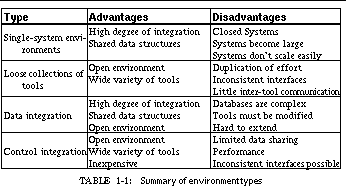
Because of the disadvantages of data integration and our belief that control integration with existing programming tools would be a practical alternative, we developed a message-based integration mechanism.
Further analysis of the communications requirements in a control-based environment showed that two types of messages need to be sent. The first are command messages: explicit command requests sent from one tool to another to achieve some particular action or to retrieve a particular piece of information. The second message class is informational. These contain data known to one tool that might be of potential interest to other tools. For example, the file and line where execution stopped in the debugger is of potential interest to a variety of tools. Both of these message classes can be supported using a broadcasting mechanism with a central message server. Tools register with the server when they start. Then, as they execute, the tools send messages to the message server, which then broadcasts these messages to the other tools.
To make this practical, the broadcasting is selective. Each tool, when it starts, notifies the message server of the messages it is interested in receiving, specifying any command requests other tools can make of this tool and any information messages this tool will want to act on. Then the message server, when it receives a message from a tool, needs to broadcast it only to those tools that have previously expressed interest.
The center of the FIELD environment is a message server that supports this type of selective broadcasting . Messages handled by the server are simple strings, and string-based pattern matching is used to determine which clients receive the rebroadcast. Both asynchronous messages and synchronous messages with replies are supported.
This can be seen in the overall architectural diagram of FIELD shown in See Overall FIELD architecture. Here the message server, MSG, sits in the middle, serving as the communications and integration mechanism for a large variety of tools. The tools that are part of FIELD are shown as rectangular boxes. Other components of the environment that are not message based such as the cross-reference database xrefdb , are shown as rounded rectangles. Tools from the underlying UNIX environment are shown as ellipses. Solid arcs represent message-based communication. Dotted arcs represent subprocesses that are run using a pipe or a pseudo-tty.
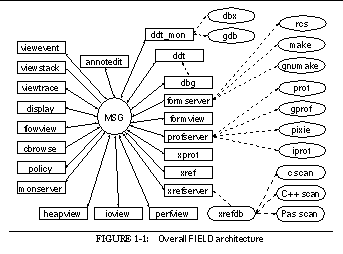
Communicating with the message server are the various tools provided by the FIELD environment. These tools are of two basic types, services and viewers. Services exist to offer facilities to other tools in the environment. These include the back end of the debugger, ddt_mon , to control the execution environment, the formserver interface to make and rcs for configuration management and version control, a cross-referencer, xrefserver , that maintains databases on programs, and monserver , a monitoring service for sampling program execution.
Viewing tools provide the user interface to the programming environment. A sample screen from FIELD is shown in See Sample FIELD screen. The window at the upper right is the control panel showing the available tools. The principal viewing tool for the source is an annotation editor, annotedit , shown in the lower right. This is a wrapper around a full-function editor that provides annotations on the source. The annotations are tied to the message system. They let the user initiate commands for other tools from the editor and give other tools a consistent means for displaying information relevant to the source.
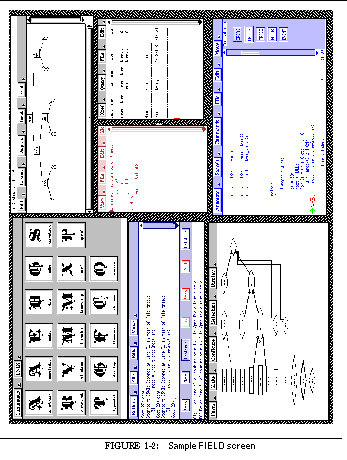
Other viewers are implemented as graphical front ends for standard UNIX tools or for the various service tools provided. The dbg debugging tool, shown in the middle left of See Sample FIELD screen, has both a textual and a visual front end, as well as a data structure displayer, display , shown in the upper right and displays of the current debugger state such as viewstack shown in the center. The configuration management service has a visual front end, formview , shown in the lower left. Textual and two graphical front ends display information stored in the cross-reference databases. The textual view, xref , is shown in the middle right. There are also a variety of visualizers for program monitoring as well as a graphical front end for the various UNIX profiling tools.
FIELD integrates tools by providing a simple message-passing framework that supports selective broadcast messaging. The center of the framework is the message server that the various tools communicate with. When a tool starts, it finds the message server and sends it a description of the messages it is interested in. As it runs, the tool sends messages to the server. The message server matches each message against the descriptions that were registered by all the tools, and forwards the message to those tools that have expressed interest in it.

This basic concepts of a central message server and broadcast messages have been used in a number of different systems, ranging from windowing systems to artificial intelligence systems to previous programming environments.
The X windowing system offers a window-based event mechanism in which the X server acts as the message coordinator [Sche86a]. Each client specifies, for each of its windows, what events it is interested in on the basis of the event type. Events not handled by the immediately affected window are passed up the window hierarchy until a suitable window is found. Events are usually generated by the server, but can also be generated explicitly by clients.
Sun's NeWS windowing system generalized this mechanism by allowing the selection of events based on patterns [Micr87a]. Events are record structures and the clients define an event pattern using a sample message structure. An incoming message matches the pattern if each specified field in the pattern structure matches the corresponding field in the incoming message. While the X mechanism works across multiple processes, in NeWS each client downloads Postscript code to the server where the event handling is done using lightweight processes. This type of event handling is also characteristic of the model-view-controller input mechanism offered by Smalltalk [Gold83a].
The concept of a blackboard system is well known in artificial intelligence applications. Such systems are composed of multiple daemons, each responsible for one aspect of the application. The system itself and each of the daemons can post messages by effectively writing them on a common "blackboard", i.e. the central message server. Each daemon then reads and processes the messages that it is interested in. In these systems, the daemons are typically controlled by messages, i.e. they run only when appropriate messages are posted.
The use of generalized message passing has been less prevalent in programming environments. The ALOE system, developed as part of Gandalf, used action routines on abstract syntax trees [Kais85a]. When the syntax tree was changed or when the user requested an action, the nodes of the syntax tree were informed by predefined callback routines. This can be thought of as a simple message-passing scheme in which the syntax tree manager sends messages to the nodes by invoking the appropriate callbacks.
The PECAN program development environment [Reis85a] generalized such message-passing systems. PECAN provided a central event manager. Tools could define events by specifying the event name and the argument types, and could send events by specifying the event name and a list of arguments matching the predefined types. Tools could also register for events by specifying the event name and a callback routine to be called whenever an event of the given type occurred. This mechanism was essential to maintaining the consistency of multiple views and became the central means of organizing the system. The mechanism was much simpler than that used in FIELD: it did not work across processes, messages had to be defined explicitly and all parties had to be aware of all parts of the definition, and selectivity of message reception was based solely on the message type. Nevertheless, this mechanism was a primary motivation for using message-based integration in FIELD.
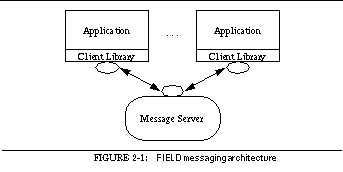
The message facility uses both a client library that is linked into each FIELD component and a separate message server process as shown in See FIELD messaging architecture. Each tool and service starts by first initializing the client library. This cause the library to try to open a connection to the current message server. If no message server is found, a new one is started. After initializing the library, the tool registers patterns describing the messages it is interested in using the local client library. The local library then registers them in turn with the message server. As the tool runs, it sends messages through its client library directly to the message server. This is true even if the message is destined for itself. The message server determines which clients are interested in the message and forwards it to the corresponding client libraries. The client library finds each registered pattern that matches the incoming message, decodes the message according to the pattern, and calls the application with the decoded arguments.
TCP/IP domain stream sockets [Leff86a] are used for message communication, letting the message server and the tools run on different machines. The connection with the message server is based on a "known" file that defaults to
/usr/tmp/msg.<HOST>.<USER>.addr
where < HOST> contains the hostname of the server and < USER> contains the user's login id. An alternative file can be specified by using the -msgfile <file> option on the command line when starting the tool. The message server uses this file to record its host name and the message port it monitors when it starts. It also uses the UNIX file-locking mechanism to lock the file. When a client needs to connect to the message server, it checks that this file exists and is locked and then attempts to connect to the message server using the host and port number in the file.
The connection file makes it easy to insure that only one message server is active for a given session. It also gives the message facility a degree of protection or security based on the UNIX file system. The message server lets the initial client specify the group and owner as well as the file permissions for this file. Since new clients can attach to the message server only if they can both lock and read this file, access to the message server can be restricted to a given user or a given user group.
Messages are passed between the clients and the message server as ASCII strings. This simplifies the FIELD architecture in several ways: we need not worry about byte ordering or floating-point representation when passing messages between machines of different types; debugging the messaging system is simpler, since it is easy to monitor the message traffic; and obvious mechanisms are available for defining patterns to indicate the messages of interest for the various clients.
In order to insure consistency between tools and to make it easier to add new tools, we adopted a set of conventions that define the form of messages. These conventions were based on our previous work with PECAN and our early experiences with FIELD.
Each message starts with a tool identification field. Command messages use the name of the tool group that handles the command. For example, all debugger command messages start with DDT and all cross-reference database command messages start with XREF . The identification string for information messages that are not directed toward a specific tool names the sender. All information messages send by the debugger, for example, are prefixed with DEBUG . Complex packages like the debugger, with lots of command and information messages use, different identification strings to avoid conflicts. Simpler tools, with a limited set of messages, use the same identification string.
Following the identification string is the name of the message. For a command message, this is the command; for an information message, this identifies what information is being sent. For example, the command message
is a command message to evaluate the expression (*root) , while the message
DEBUG VALUE tree /pro/field/test/tree.c 33 j 654
is an information message noting that the variable j has the value 654 at line 33 of file tree.c. Following the message name are additional arguments separated by spaces. The first argument is generally the name of the binary system (tree in the above examples) that the message refers to.
Other conventions are used in messages. All strings that might include an embedded blank are sent in quoted form. The message pattern matcher automatically recognizes the character `\37' as the start of a literal string that ends at the next such character. All file names are sent using full pathnames to avoid any problems with differences over the current working directory. Locations are identified by providing a file name and a line number and, when possible, a function name. Any text field representing an unknown value is replaced with an asterisk. Any unknown numeric field is sent as a zero.
Finally, messages and message patterns are typically defined as open ended, allowing additional parameters or identifying information to be added to the end of the message without affecting clients. Message patterns are defined so that any unexpected arguments at the end of the message are ignored. This has allowed us to augment messages to provided additional functionality without having to change existing tools.
Patterns are used by the FIELD message server to determine which tools should receive the rebroadcast of a message. They are used by the client library within each tool to determine what routines should be called with the incoming message and to decode the message by extracting the arguments to be passed to these routines. Our goal in designing FIELD's pattern-matching strategy was to make message specification as simple as possible while at the same time making it easy to decode arbitrary messages.
One method for defining message patterns is to use the powerful pattern matching facilities of regular expressions. However, regular expressions do not meet our needs. They are more complex than necessary for our purposes; most of our messages are highly structured, and simpler schemes that can be both faster and easier to specify are sufficient. Regular expressions are not designed to return embedded arguments and, in addition, would be overly complex for specifying common items like integers or floating point numbers.
The alternative method, which we chose, is based on the standard UNIX input facility scanf . Here an input string or file is scanned using a simple pattern containing normal characters that must match exactly and embedded sequences starting with a percent character (%) that indicate an argument of a given type. Scanf patterns are extended in FIELD to let arguments be passed in arbitrary orders, to allow additional argument types, to check for an end of message, and to allow strings that are not space terminated.
A FIELD message pattern is a string with embedded escape sequences. Characters of the basic string must exactly match characters in the incoming message. Embedded escape sequences can match zero or more characters of the incoming message and can be used to decode arguments for later use. Escape sequences begin with a percent sign (%) followed by an optional argument number, an optional length, and an encoding of the sequence type:
%[argument number][. length] [type specification]
The type specification is generally a single character indicating the type of the argument or value being scanned as shown in See Parameter type options. The argument number is specified if the corresponding item should be decoded and passed to the routine associated with the message. The argument numbers start at 1, so, for example, %1d indicates that the integer located in the incoming message at this position should be passed to the corresponding routine as the first parameter. An argument without an argument number is matched but not passed to the callback routine. In addition to these sequences, a percent sign at the end of the string indicates that the matching string must not contain additional information.
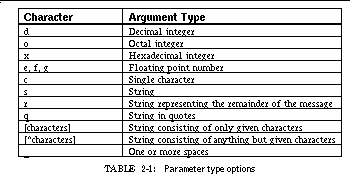
The semantics of the string patterns differ slightly from that used in scanf . Strings are defined as starting at the given character position in the message and continuing until a match is found for the subsequent character. Thus " %1s* " matches characters up to but not including an asterisk. If the subsequent character is a right parenthesis, then a parenthesis-balanced string is required and any left parenthesis found in the body of the incoming message is matched with its right parenthesis before the right parenthesis following the argument is matched.
When registering for a message, the application provides four items: the string containing the message pattern, the routine to be called when the message is received, the number of arguments that this routine expects, and an optional array of default values for these arguments. The default values are used if the corresponding argument is not defined in the message pattern. This lets one routine be employed for several message formats, and it allows the addition of extra parameters. The annotation editor uses these extra arguments to tell the routine handling the message which annotation editor is being invoked and what annotation type is affected.
As an example of the use of message patterns, consider the case of the message sent by the debugger when a breakpoint is added. This message has the form:
DEBUG EVENT ADD <system> <id> BREAK <file> <line> <message>
where the system field contains the system name, the id field has the numeric identifier for this breakpoint in the debugger, the file and line fields have the location of the breakpoint, and the message field contains a string describing the breakpoint.
The annotation editor needs to know the file and line number of the breakpoint to place the corresponding annotation as well as the id and the associated message as information to associate with the annotation. Because a common routine is used to handle all incoming messages that yield annotations, the five arguments to this routine should be first the file, then the line number, then any associated numeric information, and finally two information strings. The corresponding message pattern is:
DEBUG EVENT ADD %s %3d BREAK %1s %2d %4r
The %s indicates that the system string should be scanned and ignored. The %3d indicates that the subsequent id field should be scanned as an integer and then passed to the corresponding routine as the third parameter. The message must start with EVENT ADD and the field following the id field must contain the text BREAK. The next field is scanned as a string and passed as the first parameter, and the following field as an integer and passed as the second. Finally, the rest of the message is gathered as a string and passed as the fourth parameter. The fifth parameter used by the routine is not specified by the pattern and hence resorts to the default value.
The routine registered for this message is declared as:
handle_add_msg(char * file, int line, int v, char * t1, char * t2,int rid)
DEBUG EVENT ADD tree 4 BREAK tree.c 24 [4] BREAK at line 24
handle_add_msg("tree.c", 24, 4, "[4] BREAK at line 24", NULL, -1)
The additional argument passed to the message-handling routine ( -1 in this case) is the message reply handle, which contains the value used to reply to a synchronous message.
About half the messages sent in FIELD are asynchronous messages broadcast to provide potential clients with information. The other half are synchronous messages, either representing commands that may return values or situations in which one tool wants to keep in step with the clients that use its information. For example, the debugger uses synchronous messages for its command interface and to insure that all views update synchronously at an update point.
The message client interface processes asynchronous messages by sending the message server the text of the message and returning control to the application. The message server forwards the message to all clients that have registered at least one matching pattern. The client libraries compare each incoming asynchronous message with all registered patterns and call the specified routine with the decoded arguments for each match. In this case the message reply handle passed as the extra argument is -1 .
Synchronous messages can be handled in one of two ways. Either the call to the client library to send a synchronous message blocks until the message has been processed, or the application can provide a callback routine to be invoked when a reply is received. Synchronous messages associated with commands typically return a string value to the caller. In the first case, this is the value returned by the routine called to send the message. In the second, the reply string is passed to the callback routine. The first alternative is simpler and cleaner from the programmer's point of view, since it makes the synchronous message look like a remote procedure call. However, this implies a nested event loop, which is not recommended in most X11 applications.
When it receives a synchronous message request, the message server first determines what receivers exist for the message, and sends the message to all clients that have one or more matching patterns. Each client then calls the registered routine for each matching pattern.
Each of these routines must reply to the given message with either a string value or NULL. These replies are immediately forwarded to the message server. If the message server gets a non-NULL reply from any client, it immediately passes it back to the original caller as the reply to the synchronous message. Otherwise, after all clients have responded, it passes an empty string back to the original caller.
This bimodal way of handling synchronous messages is simple and sufficient. Messages that reflect commands are generally designed only to be handled by a specific tool (or one of a specific class of tools) and thus any non-NULL reply is acceptable and the sooner it is received the better. Information messages that desire synchronization typically have no reply values associated with them; thus all recipients produce a NULL reply and the caller waits until they all have processed the message. This scheme also means that additional tools can monitor otherwise synchronous messages and can replying with NULL without affecting the sender.
Synchronous message handling is robust as long as the various tools do not ignore a reply request for a message. The message server generates an immediate NULL reply if there are no clients for a given message. The server also keeps track of what replies have not been received from what tools. If a tool goes away, normally or abnormally, the message server detects this and simulates a NULL response to all its pending messages. We did not impose a time-out feature on message replies since the action associated with a synchronous message may require user interaction inside a tool, and thus take an arbitrary amount of time.
In addition to synchronous and asynchronous messages, the message server provides two special classes of messages. These are currently used by the policy tool, a higher-level message interface described in the next chapter. However, their implementation is general and they can be used for other purposes.
The policy tool is a client that acts as an buffer between tools by effectively interposing itself between the tool sending a message and the tool receiving it. The policy tool offers the capability of changing, deleting, and inserting messages into the message stream. In order to be sure that it can control other tools, it must be guaranteed to be the initial processor of a message. This is why priority messages were introduced.
Priority message handlers are called before any standard handlers. Upon receiving a message, the message server first checks whether there is a priority handler for this message. If so, then the message is sent to this handler as a synchronous message. The reply from that message is used by the message server to determine how to proceed. The reply can be RESEND , in which case the message server sends the message out normally. It can be RESEND with an additional value, in which case the message is sent normally and the value is returned to the original caller. It can be IGNORE , in which case the message is not sent to any normal clients. It can be REPLY with an additional value, in which case the value is sent back to the original sender and the message is not sent to the other clients. Finally, it can be REPLACE followed by a value, in which case the given value is used as the message which is then processed normally.
The message server lets clients register for priority messages in the same way they register for standard messages, by providing a callback routine, a message pattern, and a default set of parameter values. The only difference the client will see is that all priority messages are sent as synchronous messages and hence expect a reply.
The other special class of messages is default messages. These provide fallback handlers. Any tool can register a default handler and a corresponding pattern with the message server. This handler is invoked only if it matches a synchronous message that either had no responders or to which all replies were NULL. Both these cases are handled so that monitoring tools, for example a listener that accepts all messages and prints them out for debugging purposes, do not interfere with correct processing. The handler is invoked synchronously so that it must reply. It can either reply normally, in which case its reply is sent to the original caller, or it can reply with the string RESEND , in which case the original message is rebroadcast to all matching clients.
Default messages are used to invoke tools in the FIELD environment automatically. For example, if a message is sent asking the cross-reference database to evaluate a query but no database server is present, the default handler for the message is invoked. The handler starts the database server and then asks the message server to resend the message. The resent message is then accepted by the new database server.
Users sometimes want to debug more than one program at a time, and thus, in an environment like FIELD, they need to have two instances of the environment active simultaneously. This can be done by giving each instance of the environment its own message server by specifying the proper message connection file on the command line for each tool.
Because this is not always convenient, we augmented the FIELD message server to let a single message server handle multiple sets of tools. This is accomplished using message groups. The message server maintains one or more active message groups each consisting of a set of connected clients. Messages sent from clients are rebroadcast only to other clients in the same group. In effect, this lets a single message server act as an independent message server for each of its message groups.
The message server maintains the group name and current working directory of each message group. Tools can change the group they are talking to by sending an appropriate message to the message server. Tools can also ask for information about all groups currently being handled by the message server.
FIELD lets the user set the message group in two ways. First, the default group can be specified using the -msggroup <group> option on the command line. Secondly, the new tool can query the message server to determine the current active groups and either use appropriate heuristics to choose one or request the user do so. This is done in most of the FIELD tools that provide a user interface using the heuristics described in See The Control Panel.
The message server is at the center of the FIELD environment. It is the only tool that every other tool in the environment is assured will exist. As such, it is the logical place to put additional functionality common to all tools in the environment. The current message server provides two common facilities: controlling common services and maintaining the current working directory and environment.
Several of the tools in the FIELD environment act as services ; they do not offer a user interface or provide facilities directly to the user, but instead offer a service to the other tools in the environment. The cross-reference database and the internal interface to make and rcs are two such services.
These services are not invoked explicitly but must be available for other tools to run. Moreover, only a single instance of each is required. Having more than one cross-reference server would not be harmful but would waste computing resources since each query sent via message would be processed twice; having more than one make interface, however, could be harmful since multiple invocations of make or rcs could interfere with each other.
Facilities are available within the FIELD message server to manage such services. The facilities allow a service to be created when needed by some client tool, destroyed when no remaining client requires it, and insure that only one instance of the service is running at any time.
The message-client interface provides two entry points for managing services. The first is used to request a service for the current tool. This routine sends a message to the message server asking if the service is available. If the service is currently running, the message server adds the requesting tool to the set of tools that have requested the service and replies that the service is ready. If the service is not running and this tool is the first to request it, then the message server replies to the client that the service should be created and internally indicates that the service is in the process of being created. The client library then invokes the service. If the service is in the process of being created, the server tells the client to wait and try again.
When the service itself is invoked, it first initializes, registering patterns for the messages it will handle. Then it calls the second entry point to indicate that it is a service and gives the service name. This client routine sends a message to the message server to that effect. If a service with the same name is already running, the message server lets the client know so it can exit. Otherwise, the message server notes that the service is now available and handles all future requests for it accordingly. The client library insures that no message requests are handled until the service definition request is processed.
The message server keeps track of which clients are services and which clients have requested services. If a service process terminates, the message server notes that the it is no longer available. When a tool terminates, it is removed from the list of requesting clients for all of the services it required. When all requesting clients for a given service have exited, the message server sends the service a SERVICE DONE message to indicate that it is safe (and desirable) for the given service to terminate.
In a standard UNIX environment, each window on the screen maintains its own environment, including the current working directory as well as all the environment variables. These in turn affect how file names are interpreted and the various tools operate.
Early experience with the FIELD environment demonstrated, however, that the user views the multiple FIELD windows, each representing a different tool, as a single entity because of the extent of their integration. If each tool maintained its own environment, users became confused when using relative file names and tools that use environment variables. It became necessary to insure that all the tools are in agreement on the working environment.
Because of the global nature of environment management, this was built into the message server. The message server maintains the current working directory and the current environment variables for each message group. When a new tool is attached to an existing group, its working directory and environment are set to that of the group.
When a tool wants to change its working directory or an environment variable, it invokes a corresponding routine in the message client library; this routine translates the request into a message that is then sent to the message server. The message server updates its internal state and then forwards this message to all clients in the corresponding message group. The client library for each of these clients then updates the working directory or the environment.
The interface between the application and the message server is provided by the message client library. This package provides the entries needed to send and receive messages and to control the message server. The interface used here was designed for simplicity. There are three routines for registering the three different types of messages (normal, default, and priority). There are two routines to send asynchronous and four to send synchronous messages. There is also a routine to reply to a given message.
The client library is designed so that a connection to the default message server is established automatically the first time a message pattern is registered or a message is sent. In addition, the user can explicitly request a connection by calling the routine
MSGconnect(char * lock, char * group)
The first argument to MSGconnect is the path name of the connection file to be used. If it is NULL, then the default file will be used. The second argument is the name of the message group for this connection. It can also be NULL, indicating that the default group should be used. The message handle returned by MSGconnect is used to identify the message server to communicate with. The first connection made, either through MSGconnect or by default, is considered the default message handle, and a message handle of NULL then implies this handle.
The message facility allows command line arguments to control the message connections, including -msgfile <file> to specify the default connection file and -msggroup <group> to specify the default message group. These are scanned by the routine
MSGset_application(int argc, char ** argv)
which scans the initial argument list for parameters relevant to the message server and sets the appropriate internal values. The routine removes these arguments from the argument list and returns an updated argument count.
The client application defines the message patterns it is interested in by calling the routine
MSGregister(MSG_HANDLE,char *,void (*)(...),int,void **)
The first argument identifies the message group. The second argument is the pattern string describing the message. The third argument is the routine to be invoked when a message that matches the pattern string is sent. The fourth argument contains the number of pattern arguments this routine expects. (The actual number of arguments sent to the routine will be this number plus one, since the message client library adds a message reply handle to the end of the argument list.) The final argument is an array of default values for the arguments to be passed to the routine. These are used where the message pattern does not specify a matching field for the given argument. This argument may be passed a value of NULL to indicate normal defaults (0 for integer and real values, NULL for strings).
MSGregister informs the message server about a normal message. To register a pattern describing a default or priority message, the routines MSGregister_default or MSGregister_priority respectively are used. These have the same calling sequence as MSGregister .
Sending a message to the message server is done using any of the routines
MSGsend(MSG_HANDLE,char * msg)
MSGsenda(MSG_HANDLE,char * format,...)
MSGcall(MSG_HANDLE,char * msg)
MSGcalla(MSG_HANDLE,char * format,...)
MSGcallback(MSG_HANDLE,void (*rtn)(void*,char*),void * data, char * msg)
MSGcallbacka(MSG_HANDLE,void (*rtn)(void*,char*),void * data, char * fmt, ...)
The two MSGsend routines are used to send an asynchronous message and return immediately. The two MSGcall routines are used to send a synchronous message. They both return the string value returned as the first non-NULL reply, or an empty string if all replies were NULL. The MSGcallback routines provide an alternative mechanism for handling synchronous messages. They return immediately, but when a reply to the synchronous message they specify is received, the routine passed as the second argument is called. This routine takes two arguments, the void * value passed in the data parameter indicating the call and the reply string.
The routines MSGsenda , MSGcalla , and MSGcallbacka are convenience functions that provide printf -style formatting capabilities for message calls. Their first argument is a format string that contains embedded %-escape sequences specifying how to format the additional arguments. In addition to the standard printf escapes, %S can be used to indicate a string that will be quoted and sent as a single argument.
A synchronous message is answered using the routine
MSGreply(int id, char * reply)
The first argument passed to MSGreply is the message reply handle that is the extra argument tacked onto the message handler's argument list by the client library. The second argument is the reply string.
Other message-based programming environments have evolved based on the concepts pioneered in the FIELD message server. These include HP/Softbench from Hewlett-Packard [Caga90a], DEC/FUSE from Digital Equipment [Corp91a], and SPARCworks based on Tooltalk from Sun Microsystems [SunS93a]. While these systems all use the same basic underlying idea of pattern-based selective broadcasting, they provide different interfaces to their clients and different ways of defining and specifying messages.
Softbench was the first commercial programming environment to utilize the message passing concept pioneered in FIELD. The Softbench message service, BMS or Broadcast Message Server, is similar in operation and concept to FIELD's. Softbench and BMS provide a more formal and structured interface to messages than does FIELD, and also offer some additional facilities available in FIELD through the policy tool described in chapter 3.
One of FIELD's weaknesses is that it does not enforce conventions for messages. The flexibility inherent in using simple strings for messages let us experiment with different tools and formats and evolve the conventions we have chosen. However, in a commercial or production environment, fixed form messages are more desirable.
Softbench standardizes messages two ways. First, it defines the notion of tool protocols. For each grouping of tools, such as debuggers or editors, a standard set of operations and information messages is defined. Then new or different tools can be substituted directly for existing tools provided they maintain the protocol for their tool group. In particular, Softbench uses this facility to let different editors coexist within the environment.
The notion of tool protocols recognizes that, to the rest of the environment, the message interface defines the tool so that two tools with the same message interface are interchangeable. While we did not formally define this notion in FIELD, we have used it to introduce substitute tools, notably the current make and profiling facilities.
The second addition used in Softbench is a standard message format. Messages are structured to contain seven fields:
This structured form is similar to the conventions adopted in FIELD. FIELD does not provide information about the originator of a command message but does provide the tool id for information messages. The request-id used in Softbench is replaced in FIELD by an internal numeric identifier constructed by the message server for synchronous messages. The tool names used in FIELD messages correspond to tool groupings rather than to individual tools; thus DEBUG messages would be sent by all debugger types. The use of a command name and argument string is similar in FIELD and Softbench.
Rather than defining the context as part of the message, FIELD uses the message server to maintain the same context (consistent working directory and environment) among all tools. This has the advantage that it provides the connecting tools with a consistent environment and simplifies tool communication through the file system. (In theory, relative path names could be used; in practice, all file names passed in FIELD messages have complete path names wherever possible.) Softbench has the advantage that a single service could be written to offer facilities to multiple users, for example a background process server. To do the equivalent in FIELD would require the addition of an additional local tool and a second message server.
Another facility provided by the Softbench environment is the Encapsulator tool [From90a]. This is a separate facility that can take any program with a textual interface and generate a wrapper program that provides a simple graphical interface and connections to the message server. This makes incorporating existing tools into the environment quite easy.
We have not found the need for an equivalent tool for the FIELD environment. The user interfaces generated by the encapsulator are, by necessity, direct extensions of the textual interface provided. In adding tools to the FIELD environment, we have stressed developing powerful visual interfaces to existing tools. Such interfaces go beyond what can be generated automatically, and thus have had to be individually hand-coded. Note that, while they provide much more functionality, they do not require much programming. Most of FIELD's initial tool interfaces were working in one or two days and fully functional within a week.
In 1990, Digital Equipment Corporation licensed the then-existing FIELD source code and converted it into a product, DEC/FUSE. Since that time, FIELD and DEC/FUSE have diverged. Additional functionality has been added to FIELD through monitoring tools, the policy server, and additional support for C++, while FUSE was modified to provide a Motif-based interface. In addition, several changes were made in FUSE's underlying message facilities.
The DEC/FUSE message server differs from FIELD's in two ways. First, FUSE introduced the notion of a tool group, equivalent to the message groups since added to the FIELD message server. This was supplemented by a clean user interface for selecting tools and tool groups for debugging sessions. Second, FUSE introduced the notion of using callbacks for handling message replies. This was necessitated by the use of Motif, which strongly discourages nested event loops. (The BWE toolkit used by FIELD provides window-based input locking to facilitate nested event loops.) This modification has also been incorporated into the FIELD message server.
Sun Microsystems introduced their message-based environment, Tooltalk, in 1991. Tooltalk is similar to FIELD and Softbench in many ways, but there are significant differences.
Messages in Tooltalk are structured objects that contains fourteen attributes:
Tooltalk allows the sender much finer control over the recipient of a message than does either FIELD or Softbench. This is in part because Tooltalk was designed to support a wider range of applications on which security or efficiency are more important considerations. It also serves to limit the number of processes that must be active and run for each message. A message can be directed to a specific process, to a group of processes based on a file descriptor or on process type (similar to the Softbench notion of a tool protocol grouping), or to all processes.
In contrast, FIELD controls who gets the message completely through pattern matching. The message strings we use typically contain information that identifies the recipient group and/or the sender, the binary for which the message is relevant (identifying a session), the file for the message, and any other relevant fields. By appropriately defining patterns that selectively use the available fields, we are able to eliminate spurious messages.
Tooltalk has been designed to fit the modern notion of object-oriented programming. Tooltalk lets the application view the messaging in an object-oriented fashion where processes are responsible for a given object or object type and the messages are operations or methods for that object. This is achieved by giving each message an object and object type field, and letting these be used both for pattern matching and for controlling who the message is sent to by the sender. Note that the tool-protocol notion of Softbench and appropriate message fields and patterns in FIELD can be used in a similar manner.
Another notion introduced by Tooltalk is that of maintaining the status of each message as part of the message. When a client registers for a Tooltalk message, it must designate whether it is a handler for the message, an observer of the message before handling, or an observer of the message after handling. The Tooltalk system keeps track of the state of each message, first sending it to any pre-observers, then to a handler if one exists, and then to any post-observers. The system requires that there be at most one handler for a given message, and the status indicates whether a handler was found and successfully handled the message. The handler typically inserts a reply into the message to indicate the result of the operation requested.
Tooltalk provides a way to deal with messages that have no handlers. As with Softbench, this includes the ability automatically to start a process that would be associated with a given message; in Tooltalk this can be based on the process type or on the object or object type. In addition, Tooltalk provides the capability to queue the message for later delivery to a process.
Tooltalk is also designed to be used as a remote procedure call mechanism. Notice messages are sent asynchronously to the caller; request messages are sent synchronously and the caller blocks until the message is handled and the reply value is returned. Moreover, messages are defined as procedure templates that take a set of typed arguments and return typed values. A preprocessor is provided to generate stubs that act as procedures for sending messages and to generate the appropriate message registrations to call the application's routines directly when a message is received.
The message-passing framework outlined in the previous chapter is sufficient for most functions within a programming environment. However, as seen there in the discussion of Hewlett-Packard's Softbench and Sun's Tooltalk, additional functionality is needed as programming environments become more complex and as the framework is extended to other applications. Rather than complicating the messaging implementation with this functionality, FIELD uses a separate tool, the policy service.

The FIELD environment is controlled by its messages. By suitably adding, changing, removing, and acting on messages, an application can control how the environment works, add additional functionality to the environment, and facilitate the integration of new tools. The policy service in FIELD is a programmable tool that permits this manipulation of messages. See The policy tool in the FIELD architecture shows the policy tool as a separate component of the overall environment. What it does not show is the fact that the tool has the ability to intercept and process all the messages sent among the other tools.
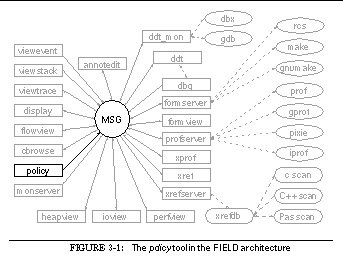
The notion of a message-processing tool as part of a message-based environment was introduced by Garlan and Ilias in the Forest system [Garl90a] and by Sullivan and Notkin in their use of mediators and events [Sull90a]. The Forest system used the tool to provide and enforce a software policy, i.e. to allow a higher-level specification of how software development should be done. Mediators and events used a similar but more powerful mechanism as a bridge between two applications that want to communicate, allowing messages to be mapped from one to the other.
A message processor like the policy service acts as an intelligent interface between applications. It inspects messages sent by tools and takes arbitrary actions based on them. The most common actions are to let the message be broadcast to other tools, to send an alternative messages in its place, and to let the message be broadcast and to send additional messages. The actions are defined using a special-purpose, message-oriented language.
This facility has several potential application areas. The simplest is making new tool might require modification of already existing tools. A simpler approach is to design a tool's message interface independent of the rest of the environment. Rather than registering for messages from other tools directly, it defines a message for each possible action it can take. Then, the message processor is used to map any messages that should trigger these actions into the messages that in fact do trigger them.
A second application area for a message-processing facility is controlling the environment. Because the operation of the environment is determined by the message traffic, the message processor can easily change how the environment works. For example, if the user wants to compile automatically every time a file is saved, then the message generated when a file save occurs is augmented with a message requesting that the given file be compiled. Alternatively, when a message processor detects that no tool exists to handle an incoming message, is can start the appropriate tool before forwarding the message.
The environment is also controlled through tool parameters. Most of the tools in the environment have options for how they should operate: should the editor change focus to the next error message or the current debugger focus, should the call-graph view highlight execution, should the data structure display be updated as often as possible or only when the programmer requests it? These options can be accessed by the message processor by sending messages, letting the programmer customize the environment from the message-programming file.
A final application of a message processor is to control the software process, i.e. how the environment is used. Many organizations have a specific approach to software development, with specific rules on how software should be written and how the various tools available in a programming environment are to be used. For example, the rules may specify that a file must be unit tested before it can be checked in. Several attempts have recently been made to create a formal approach to defining and enforcing these rules. These attempts generally fall under the rubric of process programming, since they involve a programmatic description of the software process that can then be interpreted and used by both the programmers and, potentially, the programming environment as well. Because the tools are controlled by messages in our environment, a programmable message-processing facility can provide a fairly direct implementation of a policy program.
The programming language offered by the message processor in FIELD handles each of the above applications. Our policy language is based primarily on the language defined in Garlan's Forest system, with additions to provide the capabilities of Notkin's mediators and events and our own extensions.
The programming model used by the policy service is that of an augmented transition network. A transition network is an extended finite-state machine. Inputs to the network cause the machine to change from one internal state to another. Associated with this transition can be an action that yields an output of the machine. An augmented transition network allows arbitrary conditions in addition to the value of the next input to control the traversal of the arcs.
The inputs to the transition network are the incoming messages. A transition from one state to another is taken if the next incoming message matches the message pattern associated with that transition and if the associated Boolean condition is satisfied. To facilitate defining the necessary conditions, the policy language allows the definition of variables. The conditions can then be defined as Boolean expressions over these variables using standard operators as well as built-in and user-defined functions. The actions associated with the transitions can involve setting these variables, sending and replying to messages, changing the environment for all tools, or calling a built-in or user-defined routine to take a more complex action.
The augmented transition network presented by the policy service is structured by levels and tools. Rather than forcing the policy program to specify a complete and therefore complex transition network, the policy language lets the program be defined in logical pieces, and lets it be tailored to the needs of different projects and users.
Policy in an organization can be defined at various levels: there can be a default policy, an organizational policy, a policy for the particular group working on a system, and a policy that an individual programmer wants to use. To handle this, the Forest system allowed the policy program to be defined in terms of different priority levels. FIELD's policy language retains this concept.
The policy program is defined by reading in multiple policy files, each of which represents a different policy level. The first file, defined at the system level, lays out the basic default policies of the system. Each input file can define additional, lower-priority levels and their associated files. The ability to define arbitrary levels lets the system adapt to a variety of different environments.
The priority ordering inherent to the levels can be used in two ways. First, a higher priority level can set a required behavior, one that cannot be overridden by a lower level. This allows a policy defined at a higher level to be enforced regardless of any lower-level specifications. Alternatively, a higher priority level can set a default behavior that can be overridden by lower levels. This lets a higher level program define the standard behavior of the environment while letting this behavior be overridden by a project group or an individual user. Levels can also be protected in which case no new tools can be defined at this or lower levels.
Each level is associated with a group of users. The set of users for a given level can be defined in the policy file for that or any higher level. A user is assigned to the highest priority level possible, and only policies of this or higher levels are considered for that user. This lets the policy tool act differently for a privileged user than for a standard user, for example, letting the system administrator bypass some of the consistency checks that would otherwise be made.
Policy levels are declared using the constructs
The optional asterisk preceding a level definition indicates that the level is protected. The level itself is defined by the level name followed by either an identifier or a string in parenthesis: an identifier indicates an environment variable that holds the name of the associated policy program file for this level; a string indicates the name of the policy program file.
The policy program must provide different actions for each of the tools of the programming environment. In order to simplify the specification of the overall policy program, the language follows the notions introduced in Forest and breaks the program down by tools.
A tool in the policy program is associated with its own augmented transition network. The overall transition network of the policy service is obtained by running each tool's transition network in parallel. The policy language allows the definition of transition rules for each tool at each priority level.
The set of tools known to the policy service is defined dynamically within the policy language. The definition is generally done at the system level, but could be done at lower priority levels to let new tools be added for specific projects. The lowest priority levels, particularly user-defined levels, are protected and cannot define new tools, thereby insuring that the level priority structure is enforced.
Tools are declared in the policy language using the syntax
The policy language uses global and local variables to determine the applicability of a transition and parameterizing actions. Global or state variables can be explicitly accessed and set by other applications using messages. The message
sets the given global variable to the given value, while the message
returns the value of the given variable.
Global variables are defined using the construct
The options field permits a variable to be associated with the corresponding environment variable shared by all the tools. The ENVIRONMENT options specifies that the variable's initial values should be obtained from the environment variable of the same name. The SETENV option indicates that whenever the associated variable is set, the corresponding environment variable is changed for all tools.
Local variables can be defined at various scopes -- for all tools, for a specific tool, or for a particular transition-action pair. Local variables are defined at the outer level using the declaration
The policy language defines input messages using message patterns that are specified in one of three forms. Normal message patterns are represented by the pattern string contained in brackets with initial and trailing spaces ignored. For example, the pattern
is used to match the message " ANNOT SAVE <file> " sent by the editor when the file is saved. Priority message patterns are similar but the brackets are paired with exclamation marks. For example, the pattern
[! FLOW USERFOCUS %1s %2d RIGHT !]
can be used to priority register for the message sent when the user clicks with the right mouse button on a node of the flow graph. Finally, default message patterns are enclosed using brackets paired with question marks. The pattern
is used as a default message to match command messages for the cross-reference service: it is matched if the service is not currently available and is used to start it.
Patterns can be either declared or used directly within the policy language. Declarations of patterns have the syntax
Pattern here indicates the bracketed strings defined above. After an identifier has been defined as a pattern, it can be used in place of that pattern.
The main portion of a policy program consists of the rules that describe the conditions under which actions should be taken. These rules are grouped by tool, and the conditions and actions for each tool are considered independently. The grouping syntax is
There are two ways of specifying condition-action pairs, when-rules and for-rules. When-rules define simple condition-action pairs and consist of a pattern and an optional condition followed by an action set. The set of actions is invoked when a message arrives that matches the given pattern and the given Boolean condition evaluates to true. Their syntax is
The pattern of a when-rule can have an associated list of arguments; in this case, the identifiers in the formal list are defined as variables whose scope is local to the when-rule. Because the pattern is matched first, the formal parameters derived from the match can be used in the condition as well as the actions of the rule.
For-rules provide a more sophisticated interface for defining condition-action pairs. They define a set of path expressions that can trigger multiple actions in parallel. A for-rule is defined as a set of regular expressions over a set of patterns. It has the syntax
The set of patterns specified first are the only patterns that can affect the for-rule; any message not matching one of the patterns will not affect the execution of the rule. Any formal parameters of these patterns are defined as local variables for the whole rule. The local variables list allows the definition of additional local variables within the rule body.
The rule body itself consists of one or more path expressions and their associated actions. Each path expression consists of a regular expression over patterns and has the syntax
If a sequence of messages is received that completely matches the path expression, then the corresponding action is taken. Messages allowed by the for-rule but not matching any of the patterns in the given path expression are still used and cause the path expression to abort the match.
The policy language supports four basic types of actions: sending messages, setting variables, changing the environment, and invoking a built-in or user-defined function. The syntax for defining actions is
A conditional action consists of one or more IF clauses followed by an optional ELSE clause. Conditions are allowed in action definitions to let multiple alternatives be triggered by a single action and to allow conditional actions inside for-rules.
Actions are optional unless the keyword REQUIRED is added after the set of actions. Each action specification begins with a keyword. Send actions consist of the keyword SEND followed by a parameterized message. The message is constructed in the opposite way that a pattern is decoded: fields denoted by %<number><type> take the appropriate value from the actual parameter set. Actions to set an internal variable are denoted by the keyword SET , while actions to set an environment variable for all tools are denoted by the keyword SETENV . The keyword NULL indicates an action that does nothing, RETURN is used to reply to the message that triggered the current action, and RESEND is used for default or priority messages to cause the message to be resent.
Most nontrivial actions are implemented via the CALL keyword. These involve finding the routine with the given name, either as a built-in service of the policy tool or as a user-defined routine, and then calling that routine with an argument list consisting of strings constructed from the actual arguments given in the call action.
The current set of built-in actions is small:
print ( format , ... ) Print a string to stderr
run_program ( sys, ... ) Run a system in background
start_service ( name, path, ... ) Start a FIELD service
Actions should be added to implement the file-based data methods used in the Forest system.
In addition to these current actions, the policy tool lets the user specify binary files containing routines that can be invoked as actions. Such binary files are specified in the policy program using load declaration
The policy tool uses the level and tool based organization as well as the action specifications to determine what actions to take when a message occurs.
When a message arrives, the evaluation strategy shown in See Processing a message in the policy service attempts to determine which actions are relevant. Each rule to be considered is tested to see if it is applicable using the tests shown in See Rule matching algorithms. These tests return both a test status and the resultant set of actions. The test status can be REQUIRED , indicating that the rule matched and that the action set returned is required; DEFAULT , indicating that the rule matched and the action set returned is optional; or UNUSED , indicating that the rule did not match.
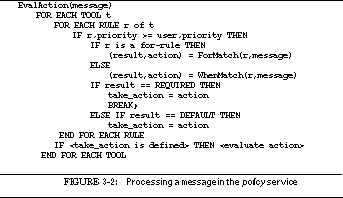
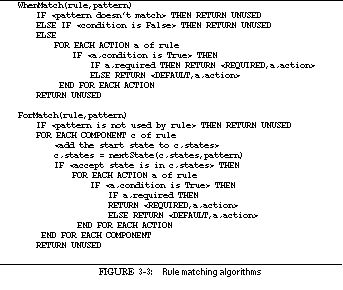
The policy tool and language in FIELD are flexible and can be used in a variety of ways within the environment. In this section we illustrate a few simple policy programs.
A user may want a source file to be compiled automatically whenever it is changed and saved. In FIELD this has the effect of giving the user feedback on any compiler-detected errors as soon as a save is done. It also lets compilation overlap editing without any additional user commands.
Automatic compilation is undesirable if the system is heavily loaded or if the user plans to edit multiple files concurrently (since then the compilation should be deferred until all the edits are complete). The policy program that implements automatic compilation shown in See Policy program for automatic compilation reflects these conditions. We define global variables that let users indicate whether they want the automatic compilation feature enabled and whether they are currently editing multiple files. A top level default action enables automatic compilation, and an action at the administrative level turns off the feature if the load average on the machine is too great. Finally, a user-level action checks if multiple files are being compiled and does nothing in this case.
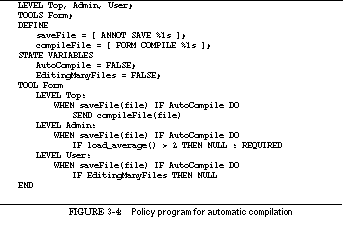
Both Softbench and Tooltalk have extended their message servers to automatically start service tools when they are first needed. We can implement similar functionality using the policy service. A simple example of the automatic start-up is shown in See Policy program to start the cross-reference service. Here we define a default pattern corresponding to a cross-reference query. This pattern is matched only if a client sends such a query and the cross-reference server does not exist. (If it does exist, it is guaranteed to return a non-NULL reply to the query.) In this case, the built-in method that starts a service is called to start the cross-referencer, and then the query message is resent.

Another function implemented by the policy language is starting up a tool upon some user action. For example, the user may define a selection in the call graph browser using the right mouse button to mean that an editor should be invoked on the corresponding file at an appropriate line. Selections in most of the tools send a message that identifies the file and line as well as the mouse button (or key) that triggered the selection. The policy program needs to check for this message and start a new editor when it occurs. The built-in method run_program can be used to run the editor. The resultant policy program is shown in See Policy program to invoke the editor upon selection.
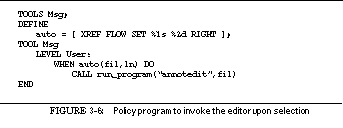
The process of programming centers around the edit-compile-debug cycle. Central to this cycle is debugging, i.e. executing the user's program in a controlled fashion. Debuggers let one set breakpoints, single-step the program, examine and set variables, and view the execution stack. Their user interface lets the programmer work in terms of the source while actually manipulating values and code at the machine level.
The debugger in an integrated programming environment must communicate with the other tools. The debugger must talk to the editor to show the current execution location and to let the user set breakpoints. Other tools need to query the information in the debugger to display variables and data structures, to show the stack or breakpoints, and to display program execution visually.
Such communication requires the debugger to be integrated with the rest of the FIELD environment using the message system. We have implemented the debugger in three pieces: a low-level debugger that takes all its commands from the message server, a textual interface that maps a debugger command language into messages for the back end, and a separate window-based interface for debugging. In this chapter we describe the first two of these components. The third is described in See The Debugger Interface.

We considered several ways to get a debugger for the FIELD environment. The first was to write a new debugger from scratch. Debuggers are difficult to write, however, especially in a machine-independent manner. For example, the source code for the GNU debugger, gdb , is about as large as that for all of FIELD combined with the toolkit supporting it. Because of our limited resources and time frame, we rejected this alternative.
A second option was to augment an existing debugger with the code necessary to talk directly with FIELD. This would mean adding a message interface so the debugger could accept commands and send messages to other tools. At the time we were developing FIELD, however, there was no candidate debugger for use as a starting point. We were working on a Sun4 workstation and gdb at that point did not handle this architecture. Moreover, each manufacturer had its own version of the UNIX debugger dbx and the source for the specialized versions was not available.
This left us with the third alternative, developing a wrapper around the system debugger. Such a wrapper would map commands from its own command language into commands recognized by the underlying debugger. It would then interpret the output of the underlying debugger to respond to the original command and determine what messages should be sent to other tools.
We wanted our wrapper to be somewhat independent of the underlying system debugger. At the time, we planned to use dbx on the Suns, cdb on HP machines, debug on Apollo workstations, and either dbx or gdb on the DEC VAXstations. The debugger wrapper we developed does not have a user-accessible front end. Instead, its command language consists of messages received through the message server. Output from the wrapper can either be passed back as replies to these messages or can be directed to the standard output or to another file. The command language is both terse and relatively complete. It is terse since we were using messages and did not require a complex syntax. It is relatively complete in that it includes most commands from both dbx and gdb .
See The debugger interface in the FIELD architecture shows the place of the debugger wrapper, ddt_mon , in the overall organization of FIELD. In addition to talking to the message server, it runs one of the system debuggers using a pseudo-tty. The figure also shows the textual front end, ddt , described in See THE TEXTUAL COMMAND LANGUAGE. This front end can be used stand-alone or can be run using a pseudo-tty by the graphical debugger front end, dbg (described in See The Debugger Interface).

The overall structure of the debugger wrapper is shown in See Organization of the FIELD debugger wrapper ddt_mon. The largest portion is the interface to the system debugger which implements a set of basic commands for each back-end debugger and interprets the output from that debugger. The other components of the debugger interface include a command decoder for message-based commands and packages for expression and name management, handling the symbol table, maintaining the current debugger state, handling events such as breakpoints, and managing the stack.
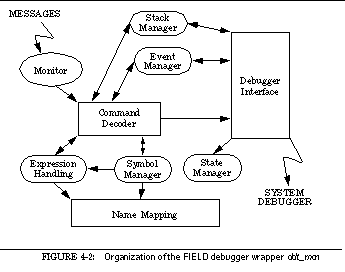
The state management portion of the debugger wrapper keeps track of the wrapper's internal state as well as the state of the system debugger. It determines when to process commands, how to process input from the debugger, what to tell the user, and how to interact with the system debugger.
The state manager differentiates between user commands and commands from other tools. It gives priority to commands from other tools, processing them whenever the application is halted; user commands are processed only when there are no tool commands and after the user has been told that the program has halted. This lets the debugger support internal breakpoints such as a data structure display update request, where other tools need to interact with the debugger but the user should not be aware that execution has halted.
In order to support a variety of different languages not handled by the underlying system debuggers, the debugger wrapper does expression and symbol processing. This has been used for C++ (first C++ 1.2, more recently C++ 2.0, 2.1 and 3.0), Modula 3, standard Pascal (with all names mapped to lower case), and an object-oriented Pascal implemented as a front end to Sun's Pascal. Many of these languages change or mangle the original source names during compilation. The debugger must translate these mangled names into user names and vice versa. It also supports implicit variables such as this in C++.
The debugger reads the symbol table from the binary file. It keeps track of all files, static variables, and functions. For each file, it notes the date last modified so that the user can be told if the file is newer than the binary being run. For each static variable, it saves the file in which the variable is defined, so that the debugger can match a possibly mangled variable name to the set of relevant global variables for the current source file. Finally, for each function the debugger stores the first and last line number for setting breakpoints, the file in which the function was defined, and a list of the local variables needed for name mapping. Scanning the symbol table also lets the debugger determine what source language was used, either by checking for symbols inserted by the various compilers or by checking filename extensions.
Expressions are processed by completely parsing each input expression and replacing it by an equivalent expression that the system debugger can handle. Each identifier that occurs in the original expression is mapped into a name acceptable to the back end. When an identifier is used as a variable it is found in the symbol table and mapped into the appropriate local or global name or, in the case of C++, it can be mapped into a field reference if the current context is a member function. Identifiers can also be used as function names, field names, or method names; each of these uses is mapped separately.
The back-end mapping is implemented by providing hooks for each of these name mappings for each source language. A common interface to mappings is maintained. Moreover, the interface provides a common facility for asking the user to choose among different alternatives when the name to be mapped is ambiguous. Expression processing also involves mapping names output by the system debugger into ones the user can understand. This mapping is again done separately for each source language.
One of the primary responsibilities of the debugger is to let the user monitor and control the execution of the application, typically by setting breakpoints and tracing functions or variables. The debugger wrapper provides a range of such facilities.
Each breakpoint, trace request, etc. is viewed by the debugger wrapper as an event . Each event contains descriptive information such as the file, function, and line number for a breakpoint, and is assigned a number that the user or other application can use as a handle for deleting or modifying it. Each event also maintains flags that indicate whether the event is internal and should generate message through the message server, or is external and should output to the user when the event occurs. Most events are both internal and external. Finally, each event is associated with a textual description and the information needed to identify it for the system debugger.
The debugger currently handles the event types shown in See Event types. TRACE, CALL, and BREAK events indicate trace points, function entry and exit tracing, and breakpoints respectively. TBREAK events are one-shot breakpoints, and STOPEXIT events are breakpoints at the end of a function.
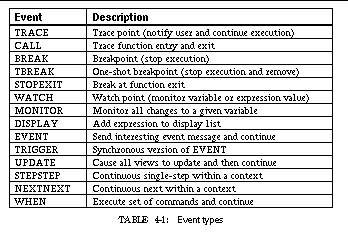
WATCH, MONITOR and DISPLAY events are used to detect when expressions change value. WATCH events, which are restricted to variables rather than whole expressions, report any change in the variable's value. They can be used to monitor the program continually or can be restricted to monitoring at a given line or within a given function. MONITOR events allow arbitrary expressions to be checked, either at a given line or whenever the debugger gets control. DISPLAY events also allow arbitrary expressions. Each expression in a display event is printed, whether or not it has changed value, either at the location specified for the event or whenever program execution is stopped and user commands are accepted.
EVENT, TRIGGER and UPDATE events are used to connect the debugger to other tools. They represent locations in the program where the debugger gets control, sends a message, and then continues execution. EVENT and TRIGGER events send an interesting event message. An UPDATE event is similar except that it sends a standard update message that is interpreted by most tools as a request to update their displays to be in sync with the currently executing program.
STEPSTEP and NEXTNEXT events provide continuous single-stepped program execution through the debugger. When they are active, the debugger single-steps continually either into or over functions, respectively. This means that the debugger gets control after each statement in the user's program and takes appropriate actions. It can be used to view program execution on a line-by-line basis. These events must be restricted by specifying an enclosing function; they are automatically activated when the function is entered and continue until the function returns.
Finally, WHEN events let the user execute a sequence of debugger commands at a given point in the program. They act as internal breakpoints and the program continues execution normally after the commands are executed.
Event processing is triggered by monitoring the output from the system debugger when the user program is executing. This is done with a set of patterns that use the message server pattern matcher and include information on how the particular message relates to event processing. Several alternatives are possible. First, the message may not relate to message processing at all and can either be ignored or echoed to the user. Second, the message may contain information to be gathered for future event processing. This occurs when the output from dbx or gdb contains multiple lines handled by the wrapper as several distinct messages. For example, when dbx encounters a breakpoint, it first prints a line telling where the program stopped and then prints the source text for the current debugger focus.
The third way of handling a message is to invoke an event handler after adding any new information contained in the message. The event handler looks at each defined event, testing it for relevancy using the information gathered by reading messages from the system debugger. If the event is consistent with this information, then it is processed.
Trace events (CALL, TRACE and WATCH) are processed by having the event output an appropriate string to the current output file if it is external and then send any appropriate messages to the message server if the event is internal.
Break events (BREAK, TBREAK and STOPEXIT) are processed by printing a message identifying why the program stopped if the event is external and sending a location message through the message server if the event is internal. Next the event manager tells the state manager that the program should stop execution and return control to the user. Finally, if the event was a TBREAK, it is removed from the list of current events.
Interesting-event events (EVENT and TRIGGER) are processed by telling the state manager that execution should continue after this breakpoint and marking the event for later processing. When the state manager detects that the program has halted and is ready for input, it calls the event manager to handle the deferred event processing. The processing for EVENT and TRIGGER events involves getting the data associated with the event by asking the system debugger to evaluate any associated expressions, and then building and sending the appropriate interesting event message to the message server.
UPDATE and WHEN events are also queued for deferred processing after telling the state manager that execution should continue. The deferred action for UPDATE is to send the appropriate message to the message server; the deferred action for a WHEN event is to begin executing the associated debugger program.
STEPSTEP and NEXTNEXT events are processed by printing the current location if the event is external, sending a message indicating the current location if the event is internal, and queuing the event for later processing. The deferred processing involves first checking if the event should still be active. This is done by making sure that the function being traced using these events is still on the current call stack. If it is, then the state manager is told to either step into or step over instead of stopping; if it is not, then the state manager is told that program execution can continue.
MONITOR events are processed by indicating that the program should continue and queuing the event for deferred processing. The deferred processing involves requesting the new value of the associated expression from the system debugger and then printing a message indicating the current value if the event is external and sending a message to the message server with the new value if the event is internal.
Finally, DISPLAY events are processed by a different mechanism. When the state manager decides actually to stop the program and return control to the user, it calls the event manager. The event manager then checks for any display events and provides output for those that are currently active.
The stack management package in the debugger caches the current run-time stack and provides access to it to other portions of the debugger, the user, and other tools. Computing the stack, especially with mangled names and dumps of local and global variables, can be expensive. This package attempts to compute only what is necessary.
Internal access to the stack is automatic. The first time information is requested, the stack is obtained from the low level debugger and saved. If execution begins, the saved version of the stack is discarded. Otherwise, future queries are handled from the saved version of the stack.
Stack access for other tools is somewhat problematic. Tools active in the environment may want to know the stack at all points -- for example, the stack viewer needs to display the run-time stack at all times. This can be accommodated in one of three ways. First of all, the debugger could always compute and send messages describing the stack. This was tried initially but turned out to be too slow, causing a noticeable delay each time the debugger gained control. The second alternative would be not to send stack messages but instead to provide a debugger query that a tool could use to get the contents of the stack. This has the advantage that the debugger does only the work necessary to support the currently active tools, but the disadvantages that tools that want stack information must be proactive and that stack information cannot be used to trigger editor annotations. The third alternative, which we currently use, is to have tools register their requirements with the debugger when they start.
The message-based command language that the debugger wrapper accepts was designed to include most of the commands offered by current debuggers and to be easily extensible. Messages sent to the debugger have one of the two forms
DDT <command> <system> <arguments>
DDTR <command> <system> <arguments>
The difference between these is that the DDT form is a user command while the DDTR form is a command from another tool. For the first form, the debugger output is directed to standard output; the second, the output is sent as the reply to the incoming message.
The debugger processes messages whenever it is not explicitly doing something else. Except for a request to interrupt execution which is processed immediately, most messages are queued for later processing. Two queues are maintained, one for user ( DDT ) messages and one for tool ( DDTR ) messages. The tool queue is always checked first to give commands from other tools priority over user commands. The user command queue is checked only if the other queue is empty and if the debugger state manager indicates that the user has been told that the program has halted.
The message command language was designed to minimize the number of distinct commands while providing full debugger functionality. Its command messages are summarized in See Message-based command language.
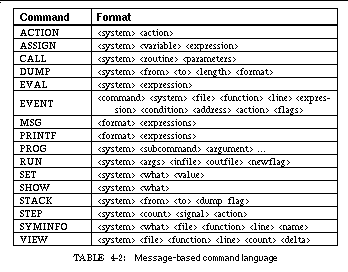
In each of these commands the system field determines whether the command is relevant to this instantiation of the debugger. This allows multiple debuggers on the same message server at the same time. This field normally identifies the binary being debugged, but can be more specific than this. The system field in general consists of text fields separated by `^' characters. The first field is the name of the binary; its value must match the name of the binary being debugged or must be a single asterisk indicating any system. The second field, if present, non-null and nonzero, contains the process id of the debugger, thus providing a more selective means of identifying which instance of the debugger to use.
The ACTION command is used to control the debugger. The action parameter determines what action is taken. INIT reinitializes the debugger for the current binary, discarding all breakpoints and other events and reloading the binary. RESET is similar except that breakpoints and other events are converted when possible from their current positions in the old copy of the binary to the corresponding position in the new binary. QUIT simply causes the debugger to exit. KILL terminates the currently running program. STOP stops the current program wherever it is currently executing and gives the debugger control. This command is useful only within a command sequence issued at a trace point where it prevents the debugger from automatically continuing execution (since the command would not be processed if the program were actually executing). Finally, DETACH detaches the currently running binary from the debugger, letting it continue execution free from debugger control.
The ASSIGN command is used to set program variables during execution. It takes an expression denoting the target variable and an expression denoting the new value.
The CALL command is used to invoke a function in the program being debugged from the current context. The program must be active for this command to work. Both the called function and the argument list can contain expressions to be evaluated in the current debugger context. The value returned from the called routine is ignored.
The DUMP command is used to print the contents of a set of memory locations in a given format. The set of locations can be identified either by the from and to values or by a from value and a length. The format can be one of b, c, d, D, E, f, F, i, o, O, s, x, or X (as in dbx ).
The EVAL command is used to evaluate the given expression in the current debugger context. The resultant value is either printed on the associated terminal (with a DDT command) or returned in reply to the message (with a DDTR command). The expression can involve function calls.
The EVENT command is used to manipulate the set of events in the debugger. The command field specifies the action to be taken: ADD to add events, SHOW to display events, REMOVE to remove events, or CHANGE to update existing events. In each of these cases, the set of fields after the system is used to identify the relevant event or events.
The ADD command can work in two ways. Normally it builds a new event with the specified fields and adds it to the current set of events. If the flags field includes the value DDT_EVENT_PATTERN (16), then a single add command is used to define multiple events. In this case, the function parameter is interpreted as a regular expression pattern. An event is added for each function that matches this pattern, using the matching function as the function parameter and preserving all the other parameters except for the line number.
The SHOW and REMOVE commands both look through all events and find those that match all the fields specified in the command. The SHOW command prints the textual description of each matching event and sends a message through the message server simulating an add of this event. The REMOVE command deletes each matching event, producing appropriate output and messages.
The CHANGE command is used by the annotation editor to change the line number of a given event. The fields other than the line number are used to identify the event. For each matching event, the line number is set to the given line. This command is designed for use by an editor to maintain breakpoints that may have moved due to edits. The line number changes take effect not immediately but when the binary is next reloaded.
The MSG and PRINT commands are used to format output from the debugger. They take two arguments. The first is a format string that is similar to the format string given for printf in UNIX, i.e. normal text is echoed directly and embedded escape sequences denote where to place the arguments. The second parameter contains a comma-separated list of expressions to be used with the format string. Each expression is evaluated and the result of the evaluation is substituted for the corresponding escape sequence in the format string.
These two commands differ in that the PRINT command outputs the resultant string to the debugger's terminal (or, in the case of a tool request, in the message reply), while the MSG command sends the message
The RUN command is used to start executing the binary. The parameters allow new values to be specified for the argument list and the input and output files when the program is run. Alternatively, they permit the current settings of these values to be reused.
The SET command is used to set various parameters and internal flags within the debugger and to implement some miscellaneous commands. These commands include determining the action to be taken if the user program encounters a signal, changing the system being debugged, setting environment variables or the current working directory, searching for a regular expression pattern in the current source file, and executing shell or native debugger commands.
The SHOW command is used to provide a variety of information from the debugger. In particular, it is used to implement most of the commands that simply request information.
The STACK command is used to give the requester a dump of the current execution stack. The parameters to this command indicate the number of levels at the top of the stack, the number of levels at the base of the stack, and whether local variables should be included in the output. The first two parameters are relevant only if the call stack is deeper than the sum of their two values. In this case, only the first top and the last bottom stack frames are displayed. Otherwise the full stack is displayed.
The STEP command is used to continue program execution after a breakpoint has been reached. The action parameter determines how execution is to continue and can have one of the values shown in See STEP actions. The command takes two other parameters, a count and a signal name or number. If a signal name or number is given, then the debugger sends the given signal to the program when execution continues. A nonzero count implies that the given command should be executed that number of times, i.e. that count steps should be taken or that count breakpoints should be skipped. Not all versions of dbx or gdb support all these options; for example, Sun's dbx does not support continue with a count. In these cases the interface does the best it can.
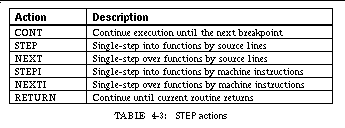
This command is used to support a limited set of queries based on the symbol table. The file , function , and line parameters identify the location in the program relevant to the name. If these are omitted, then the current debugger focus is used. The name parameter is the basis for the query. The what parameter defines what information is being requested and can have one of the values in See SYMINFO command options.
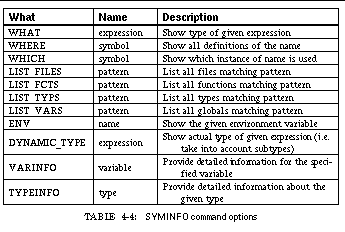
The VIEW command is used to change the debugger focus and list the corresponding source. The focus can be changed either explicitly or using the current stack. If the delta parameter is nonzero, then the view is changed by moving up or down the stack by delta calls. Otherwise, if one of file , function , or line is set, then the current debugger focus is changed to the corresponding location.
After changing the debugger focus, the count parameter is considered. If it is zero, the debugger simply prints the location of the modified focus. If it is positive, the debugger prints that number of source lines starting at the new focus. If it is negative, the debugger displays a window around the new focus.
One of our goals in defining our debugger interface was to provide easy extensibility, both for the user of the debugger and for other tools that need to use the debugger. As a first step in this direction, we made our debugger programmable, i.e. we let the user or other tools define simple "debugger programs" that can later be referred to and executed.
The debugger programming language is similar to UNIX shell programming in that it is based on the command language. The basic statements are message-based debugger commands. We have also added a small set of control constructs to form these into a programming language. The PROG command is used to implement this facility. The subcommand and argument fields for this command are shown in See Programming interface commands.
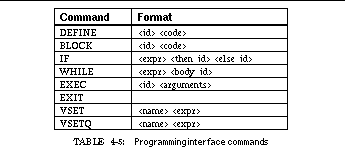
The basic construct in the programming language is a sequence of statements executed sequentially. This sequence can be a function block that takes arguments and defines its own scope or a simple block that shares the scope of its parent.
Blocks are defined by the DEFINE and BLOCK subcommands. Each block has an associated identifier and a sequence of messages. The identifier is an arbitrary string that should be unique for each block. The code sequence consists of one or more message texts (i.e. the message that would normally be sent to the debugger for the corresponding command). If the code argument is an asterisk, then the corresponding block is deleted.
The DEFINE command is used to create new callable blocks that can be invoked using the EXEC command. Within such blocks, expressions can access the parameters using the notation @i where i is the parameter number (starting from 0). Such substitution occurs only in expressions.
The BLOCK command creates local blocks. These blocks have no parameters of their own, so that instances of @i are interpreted as referring to the arguments of the nearest invoking block that was created using the DEFINE command. Local blocks are generally used for the sequences of statements within a control construct, for example the then or else part of an IF statement and the body of a WHILE statement.
The programming interface features four control constructs. The IF command provides conditional execution; the WHILE command provides looping; the EXEC command provides block invocation with parameters; and the EXIT command terminates all active blocks up to the last EXEC'd one.
The IF command takes an expression and two block identifiers, which should have been previously defined using the BLOCK command. An IF command first evaluates its expression. If the expression evaluates to a nonzero value, then the then-block is invoked; otherwise the else-block is invoked. When the block terminates, the IF terminates as well.
The WHILE command takes an expression and a block identifier. It first evaluates its expression; if this is nonzero, then it invokes the specified block. When the block terminates, the expression is evaluated again using new values for any embedded variables. As long as the expression evaluates to a nonzero value, the block is reexecuted.
The EXEC command starts executing the specified block. If the block was created using DEFINE, then the arguments parameter of the command is used to define the values for @0 through @9. This parameter is taken as a comma-separated list of parameters, possibly enclosed in parentheses. The values given for each parameter are not interpreted but are instead substituted textually for the corresponding variables.
Finally, the EXIT command terminates the current block and all enclosing blocks up to the most recent block that was created using DEFINE.
In addition to defining the parameter variables @0 through @9, the programming interface to the debugger also lets users define new variables. These have the form @<name>.
Two command exist to define variables, VSET and VSETQ. Both take the variable name (without the @) and the text to substitute for that variable. They differ in that the VSET command evaluates the given text at the time the VSET is executed and sets the variable to the result of this evaluation, while VSETQ quotes its argument.
The program interface is implemented as if it were a separate client that can send messages. Whenever the debugger looks for messages from other tools, it also queries the programming interface for its next command. If one is present, it is executed as if it came either from the user or from another tool (depending on whether it is a DDT or DDTR type message).
The debugger wrapper is an integral part of the FIELD environment. As such, it not only operates using a message-based back end but also generates a variety of messages of interest to other tools. These messages can be separated into logical groups as summarized in See Messages sent by the debugger.
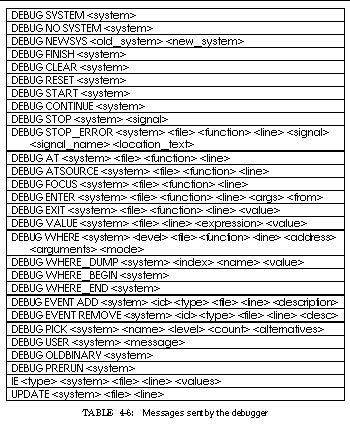
The debugger uses the first group of messages to tell other tools what systems are currently being debugged. This allows new tools to act intelligently. For example, if a tool is invoked and only one system is active, the tool can assume by default that it should listen to or interact with that system. If more than one system is active, i.e. if the user is debugging multiple binaries, then the tool can ask the user which one is relevant.
The SYSTEM message is sent when the debugger successfully loads a given system. The NO_SYSTEM message is issued if the debugger was told to load a system but failed. This is used by the visual interface to the debugger to display a dialog box requesting an alternative system. The NEWSYS message is issued when the user asks the debugger to change systems. The FINISH message is issued when the debugger terminates.
The next set of messages allows tools to monitor the state of the debugger with respect to a given system. The START message is issued when the debugger starts executing the binary. The STOP message is issued whenever the application stops executing and the debugger gets control. In addition, the STOP_ERROR message is issued when the user's program stops due to a signal or fault and contains information describing the fault. This is used by the visual debugger interface to optionally display a dialog box explicitly telling the user that the program faulted.
The AT , ATSOURCE , and FOCUS messages are used to describe the current debugger focus. Whenever the program stops executing, the debugger sends the first two messages to inform other tools of the location at which execution halted. The two messages generally provide the same information, but differ when the program halts inside a routine not compiled for debugging. In this case, the AT message contains the name of that routine but no line number, while the ATSOURCE message contains the location of the first line compiled with debugging when looking up the call stack. The FOCUS message conveys the current debugger focus, i.e. the source line that will be listed if the user entered the list command. This can be changed independently of the current execution line.
The debugger informs other tools of trace events through the ENTER , EXIT , and VALUE messages. ENTER and EXIT are used for function tracing. The debugger fills in as much of these messages as it can. However, lack of support from the underlying system debugger causes the argument list and the from location of the ENTER message and the return value of the EXIT message to be replaced with an asterisk. The VALUE message is used whenever a variable or expression value is displayed due to an event, i.e. with WATCH , MONITOR , and DISPLAY events. It provides the event location as well as the name and value of the expression or variable.
The next group of messages is used by the debugger to give other tools information about the call stack. The debugger can send a set of messages describing the stack whenever the application stops executing. Because this set of messages is potentially large, the debugger lets other tools control how much and what portions of the stack are described in this way.
A stack description starts with the message WHERE_BEGIN . Next comes a sequence of WHERE and WHERE_DUMP messages defining the stack contents. The end of the description is indicated by the WHERE_END message. Each WHERE message describes one level of the stack, listing the routine, its location, and the current argument values. The mode flag is provided to let other tools simplify processing. It can be L to indicate a local call frame where either the function or the line number is provided; A to indicate a non-debugged call frame where an address rather than a source location is provided; or G to indicate a dummy stack frame at the bottom of the stack. The level field of the message indicates the stack level, with 0 being the currently executing routine. The WHERE_DUMP message gives the current value of either global or local variables. The index field of the message is a real number of the form level.count , where the level indicates the stack level and the count indicates which local variable it is at the given level.
The next two messages are sent by the debugger whenever events are created or deleted. They provide the identification number of the event, the event type, the event location, and the textual description of the event being added or deleted. The EVENT ADD message is also sent for all events when an EVENT SHOW command is processed.
The final set of messages is used by the debugger to convey miscellaneous information to other tools. The PICK message is handled by the textual and graphical debugger front ends when the user must help the debugger disambiguate a variable of function name. The level field is either 1 or 2, where 1 indicates that a textual query is desired and 2 that a graphical query is. The USER message contains arbitrary text and can be issued using the programmable debugger interface. The IE (for interesting event) message is sent for EVENT-type events and the UPDATE message is sent for UPDATE-type events.
Finally, the OLDBINARY and PRERUN messages are provided to give the application control over what to do if the source files are newer than the binary file. The PRERUN message is sent synchronously before a debugger run command is executed. If a tool responds NO , then the run is aborted. This is used in the student version of FIELD to check if the user has edited the source file since the last run and to save and compile the binary if so, returning NO if the compilation fails. The OLDBINARY message is sent if one of the source files is newer than the binary file. Again, this message is sent synchronously and a tool can respond NO to abort the run. This message can again be used to force automatic recompilation.
The user front end to the debugger wrapper is provided by the FIELD tool ddt . This consists of a command parser that translates a debugger command into the message-based command language that the wrapper understands. It handles user input and output and can be run either stand-alone or in conjunction with the graphical interface dbg described in See The Debugger Interface.
The textual command language for ddt was based on the language for dbx , so that users familiar with dbx can use the debugger without having to learn a new command language. Most dbx commands are implemented in ddt . In addition, ddt implements some commands that exist only in the GNU debugger, gdb , for example the info command. Finally, ddt implements a csh -like history and alias mechanism.
The basic debugger commands can be broken down into various categories. The commands for executing the process being debugged are shown in See Debugger commands for controlling execution. The commands for managing events are shown in See Debugger commands for events. The major differences in the event commands from those of dbx are the addition of a temporary breakpoint command, break, and the addition of the monitor command. In dbx , the trace command is used both to trace calls and to trace variables. To simplify parsing and to make the command language clearer, we separated these two functions into two commands.
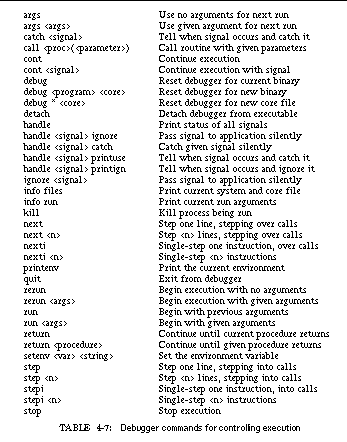
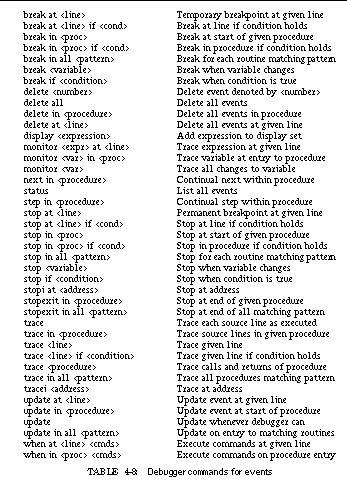
The commands for managing and displaying program data are shown in See Debugger commands for expressions. These commands include some of the functionality of the info and printf commands of gdb . They also include the ability to obtain the dynamic type of an object. This is the actual type rather than the static type, and will differ in an object-oriented language when a subtype of the declared type is present. This feature can also be used inside an expression using the typeof pseudo-function: the expression parser replaces typeof(expression) with the dynamic type of the expression.
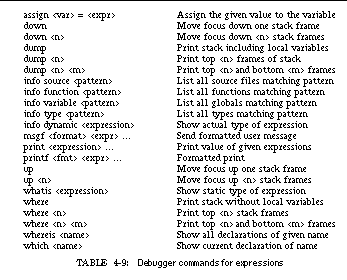
The commands for manipulating source files are shown in See Debugger commands for manipulating files. These commands differ from dbx in that both the file and the function command print the current focus not just a portion of the focus. Moreover, rather than forcing the user to respecify the directory search path in full to add a new directory with the use command, we take the gdb approach and let the path be set incrementally.
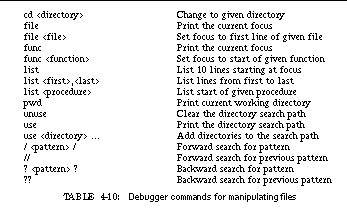
The commands that provide access to the programming features of the debugger wrapper are shown in See Debugger commands for programming. The command sequences here are arbitrary debugger commands that are gathered and placed in an appropriate program block. Note that each command occurs on a separate line.
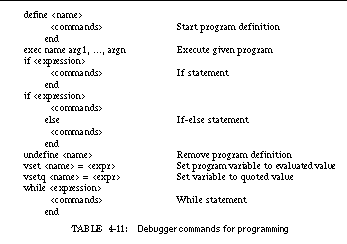
The debugger also provides several miscellaneous commands for interacting with other tools and for managing the csh -like command line editing it provides. These are shown in See Debugger commands for csh-like interface. In addition to commands that implement the dbx interface and extensions for gdb commands not included in dbx and for the features we have added to the debugger, ddt also provides a command mode that emulates most of the gdb commands. This mode is implemented using a set of aliases to define gdb commands in terms of those implemented in ddt . These are shown in See Debugger commands for the gdb interface. In addition, a number of miscellaneous gdb commands are implemented using the quote command. These include add-file , backtrace , disassemble , frame , inspect , jump , printsyms , ptype , sharedlibrary , symbol-file , and until .
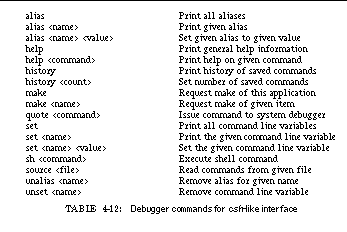
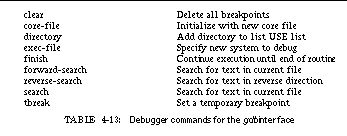
One of the basic tools needed in a comprehensive programming environment is a good cross-referencer to provide detailed information about a program. A cross-referencer can be used as the basis for program visualization, as a service for other tools, or as a database of program information for the user. In FIELD, cross-reference information is the basis for both the call graph display and the class browser, supports editor commands that go to a selected function or to the declaration of a selected name, and answers user queries about the application.
A cross-referencer provides a database of information about the source program. The information is generally viewed as source-based or syntactic information since it is derived directly from the program source. Examples of such information include what procedures exist in an application and where they are defined and called. The information can include semantic information, such as the definition corresponding to each use of a variable, as well as information normally stored as part of the application symbol table, for instance, a description of the user-defined data types.
Various attempts have been made to give the programmer this information. One of the earliest was the Masterscope package for Interlisp [Teit74a], which automatically gathered information about the application currently loaded into Interlisp and provided simple queries to access and use it. Batch systems provide cross-reference information, listing all names used in the program and identifying which uses are definitions and which are references. The tags facility of Berkeley UNIX provides function definition information across all files of a directory and is used by vi and other editors to let users go to a particular function. More recently, workers at Bell Laboratories developed CIA and CIA++ [Gras90a], facilities similar to the FIELD cross-reference database.
Another approach to providing program information within a programming environment has been to build the environment around a program database. In such a data-centric environment, the program database can be defined to hold the detailed information required for cross-referencing. For example, an Ada environment based on Diana would store complete annotated syntax trees in the database so that finding the definition corresponding to a use simply involves finding the link from the tree node of the use to its definition. This capability is one of the advantages of a programming environment based on a database system.
FIELD, however, is a control-based programming environment without a central database system, so that a new tool is needed to store and provide the necessary information through the underlying communications mechanism. The information can be gathered in two primary ways: the tool itself can gather the information from the actual source files, or, since most of the desired information is scanned or computed by compilers, compilers could generate the necessary information for the tool, much as they generate symbol table information for the debugger. Sun's source-browser tool takes the latter approach, having modified the various compilers to generate a data file that can be used by the source browser. In FIELD, because we did not have access to most compiler source, we have used both approaches: we allow information to be generated by a compiler and, at the same time, provide our own scanners to gather the information from the source.

Our approach to cross-referencing in FIELD emphasizes modularity and simplicity. It divides the problem into four separate components: a database system to store the information, scanners to obtain the information, a message interface to communicate with other tools, and a visual front end to support user queries. We have implemented a complete yet simple system for each of these components. For example, the database system is an in-core relational database with little support for query optimization and no support for concurrency or integrity. While this would be insufficient for a general database application, it is sufficient for the needs of the environment. Similarly the scanners are not full compilers or even parsers, but are designed to obtain the necessary information with a minimum of program understanding.
See Cross-Referencing in the FIELD architecture shows the overall structure of the system and its place in the FIELD environment. The message server acts as the interface between the cross-reference and the other tools. The message-based interface to cross-referencing is handled by the package xrefserver . This package actually runs one or more xrefdb database systems, each handling a single binary or directory. The database systems in turn are responsible for running the appropriate scanners.
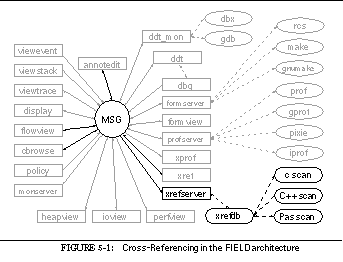
The cross-reference database is used by a variety of tools in and out of the FIELD environment: the annotation editor uses it to provide dynamic links from a reference to the corresponding definition, and the call graph and class browsers use it to provide the raw data for visualization. In addition, the xref interface provides direct user access to the data through simple queries.
Other tools have also been developed that use the database. One such tool, included in the instructional version of FIELD, is an automatic commenting facility that produces and updates comment information in student's Pascal programs. For each routine in the source, it queries the database to find all routines that call or are called by the given routine, as well as all global variables referenced in it. The result of these queries is formatted and inserted in comments in the original source file. Other applications that have used the database facilities include a simple emacs interface and our more recent research on 3-D program visualization.
Xrefdb implements a simple, in-core relational database system that stores and provides access to the cross-reference information. The set of relations is built into the database, and some work is required to add new relations or to modify existing ones. Two types of relations are supported, those obtained directly from the data and database views derived automatically from other relations. The database offers a relational query language but little in the way of query optimization. Finally, the database is specialized to provide intelligent, incremental update on a file basis.
Ten relations are currently stored in the cross-reference database. Eight of these are defined by scanning: files , reference , scope , declaration , call , function , hierarchy , and member . The two remaining relations, member definitions and client-server , are computed automatically from the other relations when the database initializes or reloads.
The file relation consists of the four fields shown in See The file relation. Each relation is identified by a single letter for use in queries. For the file relation, this is the letter `f'. The name and tail fields provide the full pathname of the file and the final part of this name that contains only the file name. The id field provides a unique key for this tuple, the usedby field indicates that the file is used by the specified file, and the field type NAME indicates a string name. All names that textually match have the same NAME value. Similarly, the FILE type represents the unique identifier associated with this file.
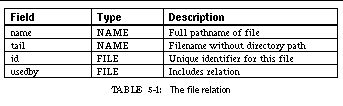
The usedby field would actually be part of a separate relation if the database were kept in a normal form. However, we found it simpler not to define and maintain another relation, but rather to store the information directly in the file relation. Because all updates are done in a controlled manner by the database system rather than as a response to a user query or command, this does not introduce any update inconsistencies.
The reference relation, denoted by `R', represents a reference to a name. Whether the name represents a type, a variable, a procedure, etc., is not maintained, nor is the defining instance this reference refers to. The fields of the relation are shown in See The reference relation. The name field identifies the symbol being referenced, the file , line , and function fields locate the reference, and the assign field indicates whether this reference occurred in an assignment context, i.e. on the left-hand side of an assignment operator.
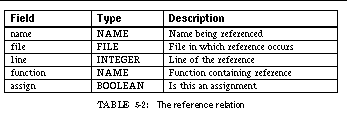
The scope relation represents the static bounds of scopes in the source, information that can be used to associate a given reference with a given declaration. The relation contains the fields shown in See The scope relation. The class field identifies the type of scope: EXTERN indicating an external (file) scope, INTERN denoting a local function or block scope, ARGS denoting an argument list, or SUE indicating that the scope contains the fields of a structure, union or enumeration type. The scanner and the database system assume that a scope is wholly contained in a single file, which is almost always the case. Making this assumption lets the relation specify only the source file and the start and end lines of the scope. This allows testing a reference for inclusion in a scope by checking its file against the file of the scope and insuring that its line number is within the range of the lines specified for the scope. If scopes were allowed to begin and end in different files, a different representation would be needed for testing inclusion. The scope relation is denoted by `S'.
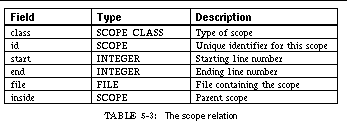
Each declaration in the source files is represented by a tuple in the declaration relation, denoted by `D'. Each tuple contains the fields shown in See The declaration relation. The name field identifies the object being declared, the location of the declaration is specified by the file , line , function , and scope fields, the type field provides the type assigned to this object by the declaration, and the class field denotes the kind of object being declared. The current set of declaration classes are shown in See Declaration classes supported by xrefdb. The USER_KEY declaration lets users insert their own keywords in the database using a comment of the form /* XREF: <name> */ .
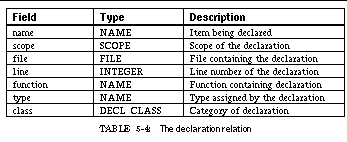
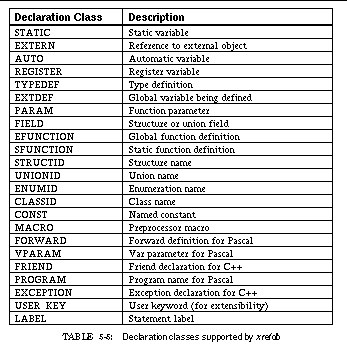
Xrefdb maintains the set of all static function calls in the application using the call relation, which includes the fields shown in See The call relation. The relation includes only static calls. Indirect calls cannot be deciphered by the various scanners. Similarly, virtual function calls in C++ may not be included. The call relation is denoted by `C'.
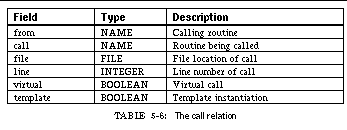
The function relation, denoted by `F', provides a list of routines defined in the application. It includes a limited amount of information about each routine. The fields of this relation are shown in See The function relation. The scope field contains the scope of the function definition, which should include the scope of the argument list as well as that of the function body. The args field contains a comma-separated list of the parameter names.
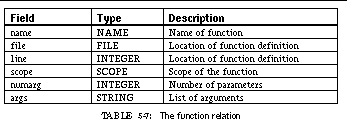
Several relations were added to the cross-reference database to facilitate class browsing and information representation for object-oriented languages. The first such relation, hierarchy , denoted by `H', describes the relationships among classes, primarily the class hierarchy. Each tuple describes one relationship, as shown in See The hierarchy relation. Its fields handle the different type of superclass relationships used in C++, including public, private, and virtual inheritance.
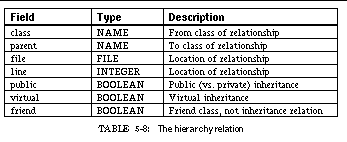
Information about the members and methods of a class are described in two relations. The first, the member relation, denoted by `M', contains information provided by the scanners and has the fields shown in See The member relation. The protect field can be one of PUBLIC, PRIVATE, or PROTECTED. The fields in this relation reflect local information available to the scanner. The virtual field, for example, says whether the method was explicitly declared virtual, not whether it is virtual because the same method was defined in a superclass to be virtual.
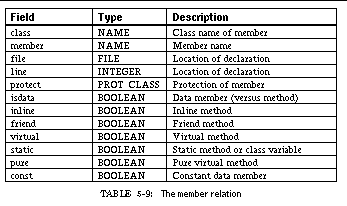
The second relation describing class members and methods is the member definition relation, denoted by `m'. This relation is computed by the cross-reference database by combining information from the member relation, the declaration relation, and the function relation, and is used to relate the declaration of a class member to its definition outside of the class. The relation contains the location of the code for each method. As shown in See The member definition relation, the relation includes information not contained in the member relation: the type field provides the actual type associated with the member obtained from the declaration relation, and the name field contains the full, demangled name of the field (as opposed to the member field, which contains only the simple name used in the actual class definition).

The client-server relation, denoted by `c', is the second one that is computed and is used to describe dependencies among classes. These dependencies follow Meyer's definition: one class is a supplier to a client class if a data member of the client class has the supplier as its data type or if a method of the client class has the supplier as one of its parameter types [Meye88a]. The relation is computed using the member definition relation. The fields of the client-server relation are shown in See The client-server relation.
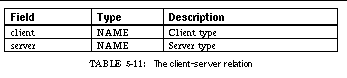
The query language provided by xrefdb is based on a relational calculus similar to the QUEL language developed for Ingres [Held75a], that has been simplified to make parsing and query processing easier.
A relational calculus query language defines queries using a set notation such as {x|f(x)} where x represents a tuple to be output and f(x) represents a Boolean formula that must be satisfied by x . The components of x and f are based on tuples contained in relations in the database. Variables can be used in both x and f to denote an arbitrary tuple of a given database relation. Data from the database is accessed by specifying a variable and the corresponding field.
Variables in xrefdb are arbitrary identifiers that begin with the key letter associated with one of the database relations. Fields are denoted with the syntax variable.field . Thus R.name refers to the name field in a tuple associated with the variable R from the reference relation. Similarly R1.name denotes the name file in a tuple associated with the variable R1 from another instance of the reference relation and m.class refers to the class field of a tuple from the member definition relation.
As shown in See Query syntax for the cross-reference database, a query is specified in the xrefdb query language by providing a list of the fields to be output and the formula to be satisfied by these fields. The initial list of fields defines the output of the query. Each of the requested fields is output in the order specified, separated by either a space if the database is run directly by the user or a delete character (\177) otherwise. The optional asterisk preceding the output list indicates that the output should not be sorted; normally the query result is sorted and any duplicate tuples are removed before it is output.
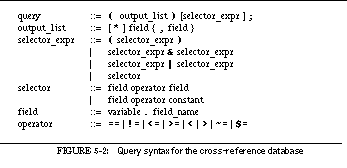
The equation part of the query is used to limit the relevant tuples. Two special relational operators are provided, ~= and $= . The ~= operator takes a field as its first operator and a string (usually constant, but it can be derived from a field) denoting a regular expression as its second. It returns true if the value of the field matches the regular expression. The $= operator does a case-insensitive string comparison between its two arguments.
Constants, either numbers or strings, can be specified in several ways. They can be a normal constant (i.e. integer or real or quoted string) preceded by a backquote ( ` ). String constants specified in this manner include the quotes. They can also be an identifier preceded by a backquote, in which case they represent the corresponding string without quotes. For more complex string constants, such as regular expressions, a constant can be specified as arbitrary text surrounded by at signs ( @ ).
For example, a query for the source location of the function foo would be:
(F.file,F.line) F.name == `foo;
A similar query for the name and location of all functions containing the string bar would be:
(F.name,F.file,F.line) F.name ~= @bar@;
Finding the location of the declaration associated with a reference to a name containing foo at line 100 in file sample.c involves a more complex query:
D.scope == S.id & R.name == D.name &
( D.function == R.function | D.function == @*TOP*@ ) &
R.line == `100 & R.file == `sample.c &
S.file == `sample.c & S.start <= `100 &
S.end >= `100 & R.name ~= @foo@;
This query returns the name, file and line of all declarations that satisfy its expression. The expression indicates that a scope tuple ( S ) should be found such that the scope spans the given line in the specified file. In addition, a reference tuple ( R ) should be found that matches the given name at the given file and line. Then a declaration tuple satisfies the expression if the declaration occurs in the given scope S and either in the same function as the given reference R or at the top level of the program, and if the name being declared matches the name of reference.
Queries are processed in xrefdb by building an expression tree representing the conditional part of the query and then, for each possible set of output tuples, interpreting the tree to see if the condition holds. The set of possible output tuples is determined by letting each variable in either the list of output fields or the equation take on all possible tuple values from its corresponding relation. Thus, in database terminology, the query is evaluated by taking the cross product of all relations denoted by a variable, selecting from this cross product based on the given formula, projecting the resultant tuples onto the set of output fields, and, if desired, sorting the result and eliminating duplicates.
This brute-force approach works for simple queries but can be quite costly for complex ones. Most relational database systems do query optimization. This takes several forms, such as the addition of indices to avoid looking at all tuples of a relation, breaking up the formula so that equations relevant to subsets of the variables can be computed only for those variables, and ordering the evaluation so that the most selective parts of the query are done first. Query optimization comprises a significant part of a database system.
We wanted to keep our database system simple but at the same time make query evaluation practical for most relevant queries. The nature of the database -- that queries come from other tools and hence can be carefully defined, that all data is kept in memory and hence can be accessed rapidly, and that most databases will be relatively small (less than 10 megabytes of total data) -- allowed us to take shortcuts in optimization. Most notably, xrefdb does not create or use indices.
The two complexities in relational query optimization when relations are not indexed involve determining the order to access the different variables and splitting the equation so that its component parts are used as early as possible. The order in which variables is considered is difficult to optimize a priori without knowing something about the data in the database and the query. We assume that the tool generating the query can do this. However, once this order is determined, the expression can be appropriately divided mechanically.
The order in which the variables are considered is the reverse of the order in which they are specified, starting with the output list and then proceeding left to right through the selection expression. The tool generating the query can determine a "good" ordering and add dummy output fields, rearrange the order of the output fields, or rearrange the selection expression to obtain this order.
The database optimizes the expression for each variable being considered by constructing a new expression consisting of all relational terms that involve the current variable and either a constant expression or a variable that has already been considered, along with the Boolean operators needed to combine these. Each relational term is thus considered for only one variable and at the earliest possible time in the query evaluation. Where multiple terms are applicable, the order of evaluation is that implied by the original query.
For each variable considered, each tuple of the corresponding relation is used in turn as a source for the expression constructed for this variable. If the expression evaluates to TRUE, then the next variable is considered, using this tuple and any previous tuples as a basis. If this is the last variable, then the current set of tuples, one per variable, is used to generate the output text using the output list of the query. Since the database is maintained in memory, each variable needs to retain only the index of its current tuple in the corresponding relation and no data movement needs to be performed.
The annotation editor uses the query in the previous section for a declaration corresponding to a reference of foo at line 100 in file sample.c:
D.scope == S.id & R.name == D.name &
( D.function == R.function | D.function == @*TOP*@ ) &
R.line == `100 & R.file == `sample.c &
S.file == `sample.c & S.start <= `100 &
S.end >= `100 & R.name ~= @foo@;
The order in which the variables are specified is D , S , and then R , so that they are considered in the order R , S , D . First, each tuple in the reference relation ( R ) is looked at. The simplified expression for this relation is:
R.line == `100 & R.file == `sample.c & R.name ~= @foo@
This was chosen for evaluation first since, while the reference relation is usually large, the selection criteria for this query are quite restrictive and the number of matching tuples will be small.
For each reference that matches, the next variable, S , is considered: each tuple in the scope relation is matched against the simplified expression:
S.file == `sample.c & S.start <= `100 & S.end >= `100
The scope relation is considered after the reference relation because it is usually considerably smaller, and before the declaration relation because the expected number of matching tuples, i.e. scopes that span the given source location, is small.
Next, the declaration relation ( D ) is considered. For each matching reference tuple and each enclosing scope tuple, the declaration relation is scanned and the simplified expression:
D.scope == S.id & R.name == D.name &
(D.function == R.function | D.function == @*TOP*@)
is evaluated. Each tuple that satisfies this expression is then used for outputting the name, file and line of the matching declaration.
In addition to allowing queries, the cross-reference database allows the limited set of commands shown in See Cross-reference database commands.
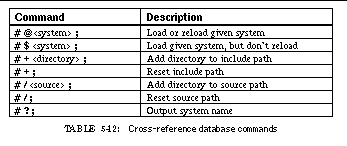
The cross-reference database is generated from source file information. Gathering this information is generally the most time-consuming and costly part of maintaining information about a system since the data changes whenever the user edits a source file and the overall database can be large.
The cross-reference database system manages information gathering through a variety of techniques that simplify update. These include allowing all information for a given file to be replaced without affecting the rest of the database system, determining which files need to be updated, scanning only when recompilation is successful, caching the whole database on disk, and using scanning methods that let the compiler generate the appropriate information.
The first strategy employed to minimize the cost of scanning is to update the database only when necessary and practical. For most purposes, this means updating the database only when a new binary file is successfully built or when the user explicitly requests an update. It is not practical to update the database as the user edits the sources, nor does it always make sense. For example, both compilers and our scanners fail to generate cross-reference information if the source code is not syntactically valid.
When the database is to be updated, the system first attempts to determine which source files need updating by checking which files have changed. The database starts by checking the time the database was last saved against the time each source file contained in the file relation was modified. If the file is newer, then it must be rescanned. In addition, the database system uses the file relation to determine if any other file includes a file that has changed. If so, that file (and any file that includes it, etc.) is also marked for updating. Thus, the database system uses the database to determine what files actually need rescanning.
After checking the file relation to determine which files are out of date, the database system removes from its database all entries relevant to those files. Next the database system proceeds to update itself. If the target of the database is a binary file, then its symbol table is searched for all source file names; if the target is a directory, then all files in that directory (including other directories) are considered. Before scanning a particular file, the database is checked to see if that file exists in the system and skips it if so. Otherwise information for that file is added to the database.
This scheme has the drawback that files once part of a system or contained in a directory that has been removed may not disappear from the database. Our original implementation attempted to get around this problem by noting which files were scanned and then removing, at the end, all files originally in the database but not scanned or at least checked on the later pass. This didn't work because include files were not flagged as being scanned. Our current implementation leaves the files in the database. This turns out not to be a problem in practice, however, since only rarely is a source file removed without a corresponding change to some header file referred to by that source file. In this case, the database removes the data for the file and will not reinsert it.
When the database system determines that a file needs to be rescanned, it is in charge of obtaining the necessary data. We assumed in developing the scanners that scanning should be part of the compilation process. This makes sense since successful compilation typically precedes the need to update the database and because the work required to produce the cross-reference information duplicates work already done in the compiler. Even when we use our own scanners and cannot modify the compiler, however, this is an effective strategy. For example, we have a modified CC command script from AT&T that can invoke our scanner simultaneously using the common intermediate file generated by the C++-to-C translator. This saves about thirty percent of the execution time over doing separate compilation and scanning runs.
The cross-reference database scans a file by first finding any scanning information previously saved as part of compilation. To do this it looks for files of the form
. <source name> . <language>xref
. <source name> . <language>xref . Z
where <language> is a character denoting the source language. Such a file is assumed to be the output of the appropriate scanner and is used directly by the database. The language needs to be known so that the database can demangle names from the scanner correctly. Normally the data file is removed after it is scanned to save disk space; however, the environment variable XREF_NOUNLINK can be set to keep the file available. If no such file is found, then the database determines the language associated with the source file using either user-specified options or the extension of the file, and then runs the appropriate scanner. The output of the scanner is read directly by the database system.
The xrefdb database system is specialized to its particular application. This is reflected in its ability to replace single files selectively as mentioned above, its knowledge of how to obtain data from a source file using an appropriate scanner, its ability to store and reload the database, and the way it maintains the database.
One problem that arises in maintaining the database involves duplication of information. Scanning a source file requires scanning all the include files the source file uses in order to obtain and implement macro definitions and handle conditional code. Most scanners do this by feeding the source file through the appropriate compiler with options to generate only the result of preprocessing. A side effect of this is that any include file used by more than one source file is scanned more than once and duplicate entries are added to the database system.
Normally, a tuple to be added to a relational database is first checked against the existing database; if it represents a duplicate, then the request to add it is ignored. This is effective since add operations are generally infrequent and, with most indexed storage methods, the check for duplication is virtually free. In our database, though, these conditions are not met: add operations typically outnumber database queries by several orders of magnitude and we do not use indices.
Xrefdb adds information to the database in batch mode, i.e. it adds all the tuples for updated files at once. Our strategy for eliminating duplicate tuples takes advantage of this by waiting for all the information to be added and then removing all duplicate tuples. This involves a single sort operation for each relation and can be relatively quick even for a large database.
The process of tuple elimination is made practical by eliminating string comparisons through the addition of a hidden relation that maps names into unique integer identifiers. As a name is received from a scanner, it is looked up in a hash table to obtain the appropriate identifier, which is then stored in the database. To further speed up scanning, file and function names in the scanner output can be replaced with an asterisk indicating that the previous file or function should be used, so that no hash lookup is required.
The original implementation of the database system eliminated tuples only after all files were scanned. This turned out to be inefficient: it used five to ten times more storage than was necessary, since duplicates from all files had to be kept in core before being eliminated. To avoid this problem, the database system now eliminates tuples after scanning ten files. It turns out that the cost of doing the elimination multiple times is not significantly more than that of a single elimination, since the relations being sorted are kept relatively small by eliminating duplicate tuples and since previous elimination passes allow the underlying relations to be partially sorted, thus speeding up the subsequent sorts to eliminate duplicates.
Another specialized feature of the cross-reference database is its ability to cache the in-core database on disk. Because the database is updated only at specific intervals, the database system knows when the database is stable. At this point it writes the database out in a file: .xrefdbdata for a directory, .<binary>.xref for a binary file. This file is written as a text file to allow for portability across machine architectures and to permit debugging. When a system or directory is first loaded, the database system checks for the existence of this file. If it exists, it is used as a starting point and the update algorithm creates the database using the time at which this file was written. If the user has set the environment variable XREF_NOUPDATE, then the existing database is used without updates.
As a final simplification, xrefdb uses computed relations. Both the member definitions relation and the client-server relation are computed dynamically by the database system rather than being generated by the various scanners. This reduces the complexity of the scanners and requires less information to be saved when the database is cached onto disk, since the relations are computed each time the database is loaded.
The user can control the cross-reference database system through environment variables and resource files. Using resource files allows different options to be provided for different systems and even different files within a system.
Resource files are based on the name of the object being cross-referenced. If a directory is being cross-referenced, then the file .xrefrc in that directory is assumed to be the resource file. If a system is being cross-referenced, then the file .<system>.xrefrc , where <system> is the system name, in the same directory as the system, is assumed to be the resource file.
The resource file contains a list of commands to the database system that can apply to all files or specifically to a single file. Each command is on a separate line and consists of a keyword and optional arguments. The commands are shown in See Cross-reference database resource file commands.
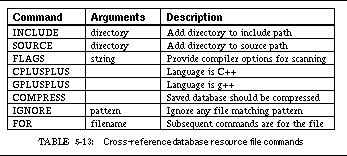
The INCLUDE directive adds the specified directory to the list of include directories to be used while scanning. These specify what directories should be search for included files. The SOURCE directive adds the specified directory to the list of directories to search for a filename. Since many systems do not place full pathnames in the binary file, knowledge of the appropriate source directories is needed in order to find the source file given only the final component of its name. If no resource file is present, these directory lists are obtained from the INCLUDE_PATH and SOURCE_PATH environment variables.
The FLAGS directive allows the specification of compiler options. Most scanners run the standard preprocessor for the given language. Since compiler options such as -D or -U can affect compilation and hence cross-referencing, this command or the environment variable XREF_FLAGS is used to provide the proper preprocessor options.
The GPLUSPLUS and CPLUSPLUS flags let the user specify the language for a particular source file. Normally the database system deduces this from the file extension. However, since users sometimes use the same file extension for GNU's g++, standard C++, and regular C, an alternative means of differentiating is provided.
The COMPRESS flag tells the database system to run the UNIX compress utility on the database file in order to save disk space (at the cost of slightly increased run time). The database system automatically uncompresses this file if saved in compressed form. Moreover, if it was saved compressed and is updated, the database system automatically saves it again in compressed form.
The IGNORE directive, along with the XREF_IGNORE environment variable, is used to specify a set of regular expressions. Any source file name that matches one of these patterns is not scanned and is thus excluded from the database for the given system or directory.
The FOR command specifies that all subsequent commands until the next FOR command are to be applied only to the specified file. Include directives for a given file are used in addition to the default include directives given for all files. All other directives replace any default directives if specified.
The database system determines the source language for each source file and runs the appropriate scanner. So far, we have developed scanners for C, Pascal, and C++. Each of these scanners takes a different approach to providing the necessary information in a common output format.
Each of the scanners is expected to produce an output file containing information to be inserted into the basic cross-reference relations. This file is a text file in which each line contains information for one tuple of the database. Each line consists of a keyword specifying the type of information provided followed by space-separated arguments.
See Scanner output formats shows the different information lines. The fields are either strings or integers. In order to keep the scanner output as short as possible, an asterisk can be used in either the file or the function field to indicate that the file or function is the same as the previous one. For portability and extensibility, enumeration fields such as the type of scope or declaration or the protection of a field are specified using their ASCII name rather than an integer value.
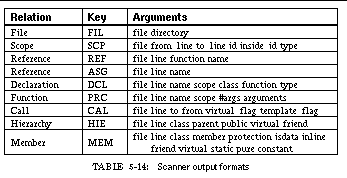
The file relation is specified by FIL lines. Each line specifies a file and the current working directory. The first line in the scanner output is assumed to specify the name of the original source file; any additional lines are used to specify files included into this source file. The scanner does not have to insert file directives for each include file. Instead, if a new file is specified in another directive, xrefdb automatically creates a corresponding tuple in the file relation.
The scope relation is specified by SCP lines. Each scope is identified externally by an integer identifier, which appears in the SCP line as the fourth field. Any other references to a scope, e.g. the inside_id parameter on the SCP line and the scope parameter in the DCL and PRC lines, use this identifier. Inside the database system, this identifier is mapped to the internal identifier for the scope. However, a single scan can involve multiple scope texts; for example, in C++ the file is actually scanned both by a C++ scanner to find classes and by a C scanner to handle most of the other definitions. A SCP line of the form
is used to start a new context for scope identifiers and thus to separate scans. Each scanner outputs a line of this form at the start of the scan.
The REF and ASG lines are used to build the reference relation. The ASG line is assumed to refer to a previous reference of the same name in the same file and sets the assign flag for that reference. In both the REF and the ASG information lines, the name field consists of the remainder of the line and thus can include embedded spaces. This lets the scanners output references to string constants, complex type names, and other such entities.
The remaining information lines, DCL, PRC, CAL, HIE and MEM, all provide a one-to-one correspondence between their fields and the corresponding tuple.
The simplest scanner we implemented is for Sun's Pascal (standard Pascal with extensions developed by Berkeley for separate compilation, extensions developed by Sun, and extensions developed by Apollo for their Pascal). This scanner consists of a full lexical analysis and parser for the language. The grammar is augmented with action rules for declarations, functions, and expressions. The rules for declarations note the beginning and end of the declaration and accumulate declaration information, such as the type and storage class, that is used to generate a DCL information line at the end of each logical declaration. The function rules gather the argument names and list of arguments in order to output a PRC tuple. The expression actions look for both assignments to output a ASG line and for calls in order to output a CAL information line. To correctly identify calls with no parameters, the scanner keeps track of names that are function names and the name of the current function; the REF information line is generated for each name found during lexical analysis.
Sun Pascal utilizes the C preprocessor to handle include files and conditional compilation. Rather than incorporating the preprocessor into the scanner (and doing so for the other scanners as well), we wrote a separate scanner to obtain the preprocessor information. This generates information for definitions and references of macro names. To actually scan a Pascal source file, we first run the preprocessor scanner over the file, then run the C preprocessor over the source file and run the output of the preprocessor through the Pascal scanner. The two scanner output files are then concatenated and passed to the database system.
A similar scheme is used in processing C programs. The program is first scanned with the preprocessor scanner to obtain all macro definitions and uses. Then the C preprocessor is run, using the appropriate options, and the output from the preprocessor is fed to a scanner for C.
While Pascal is a relatively simple language to parse for declarations, C is not. Rather than implement a full parser for C, we use a much simplified scanner that looks only for declarations and scans expressions looking only for assignments and calls. The scanner assumes that the program will compile and that little error checking is needed. Moreover, in order to handle the variety of different implementations of C, the language accepted by the scanner is actually a superset of the union of the K-R C, ANSI C, and C++ 1.2 extensions.
The C scanner is implemented as an extended finite-state machine that scans either declarations or statements and divides declarations into function declarations and data declarations. Information about the current declaration is accumulated until either the declaration ends and the declaration information is output or the scanner detects that the declaration was actually an expression and the information is discarded. Expression scanning looks for calls by checking for a left parenthesis and assignments by checking for the assignment operator.
Because the scanner scans the C language only approximately, its result is not guaranteed to be exact. The inaccuracies are most pronounced in detecting what is being assigned to in an assignment statement, the data type associated with a declaration, and the function being called when an expression is used. However, the scanner has matured to the point that it correctly detects almost all C constructions and such inaccuracies have not been a problem.
Our first attempt at a scanner for C++ was for the older (1.2) definition of the C++ language, at which point C++ was more an extension of ANSI C. A scanner for this language was built by extending our C scanner to parse and document the additional constructs.
The next version of C++ was much more extensive, providing class inheritance, virtual functions, overloading, and other features, and extending the C scanner to work for this language would have been a major effort. Moreover, to handle the additional information we had to augment our cross-reference database with relations that described classes and the class hierarchy. Another complicating factor was that method invocations, function calls, and operators in C++ cannot be determined without a full semantic analysis: to determine which instance of a function is invoked from inside an expression one needs to know the type of each of the parameters.
The initial C++ compiler delivered by AT&T and adopted by most companies was a preprocessor, cfront . Cfront translates C++ code into a C program that was then given to the standard C compiler for the underlying machine. In effect, cfront is a compiler that generates C. We used this fact to implement an C++ scanner without writing what would essentially be a compiler. Most of the information necessary for cross-referencing is gleaned by using our C scanner on the output of cfront . This provides most of the information needed for the file , reference , scope , declaration , call , and function relations, and also yields the fully qualified name for each non-virtual call and field access.
To augment this information, we wrote a relatively simple scanner that looks for class definitions in the source. This scanner is designed to get the information needed for the hierarchy and member relations, and also adds class definitions to the declaration relation.
To complete C++ scanning, we also use the preprocessor scanner on the original source to find macro definitions and uses. Thus scanning a C++ program is done in three steps. First the preprocessor scanner is run over the original source. Next the C preprocessor is run and the result is scanned by the C++ class scanner. Finally, the original program is run through the C preprocessor and cfront and the result is scanned using the C scanner. The output from each of the scanners is concatenated and provided to the cross-reference database.
To speed this up, we modified the C++ compilation script provided by AT&T to run the various scanners as part of the compilation process. The normal C++ script runs the C preprocessor to produce an input file for cfront and then uses cfront to produce an input file for the C compiler. Our modified script runs the preprocessor scanner over the original source, the C++ class scanner over the C preprocessor output file, and the C scanner over the cfront output file. It concatenates the results of the scan and saves it in a .<source>.Cxref file in the same directory as the original source file. This is significantly (30%) faster that compiling and then scanning, since it eliminates the expense of running cfront and the preprocessor a second time as part of the scanning process.
Even when scanning is incorporated into the compilation process, the additional time needed is significant. This can be alleviated by incorporating scanning directly into the compiler. Most of the work involved in scanning entails parsing the input and, in the case of C++, doing semantic analysis. This work, however, is already being done by the compiler. This means that modifying the compiler to output scanning information reduces the cost to basically that of doing the physical output.
We have taken this approach with those compilers for which we have source. In particular, we have modified the GNU g++ compiler and a Object-Pascal preprocessor for Sun Pascal to output appropriate cross-reference information as part of the compilation process when requested. The modifications to both of these were relatively minor: fewer than one hundred lines added to the existing compiler and a short module of under a thousand lines responsible for producing the actual output. In neither case is compilation is noticeably slowed by requesting cross-reference information.
Another approach we have taken is to use the cross-reference information generated by Sun's compilers for their source browser, which is stored in a set of files that collectively form the source browser database. Using a program that Sun provides that dumps this database in ASCII, we have written a small translator that maps the information in the database into a scan file for use by the cross-reference database.
The cross-reference database system is written as a stand-alone program. This facilitates debugging and simplifies the implementation. In particular, the database system has to deal with only one database at a time, can assume there is only one user, need not handle concurrency issues, and can assume that all input comes from the standard input file.
In the overall FIELD environment, however, these assumptions do not hold. Multiple databases may be active at one time to deal with multiple systems being debugged, or the user may be browsing a file or directory and debugging another system simultaneously. Multiple clients, generally in the form of multiple tools, can request simultaneous or overlapping access to the database system. Finally, the tools are communicating with the database through the message server rather than through a serial interface.
To handle the interface between the database system and the FIELD environment, we developed a separate cross-reference server, xrefserver , that provides a message-based interface to cross-referencing. It is responsible for invoking xrefdb for each target, handles request queueing for each of these systems, and redirects the output from the database systems back to the requesting tools.
The server is a relatively simple tool. It keeps a list of all active databases. When it gets a request it checks the system name of the request against the currently active databases. If the database is not active and the request requires a database, then a new database system is started for the given system name. It keeps track of whether a command is currently being executed by each active database. If so, it queues new requests until the previous one is finished.
The server defines and handles three messages:
XREF QUERY <system> <output_list> <selector_expr>
The first two messages let a client program request that a database be loaded. They differ only when no database system is currently running on the specified database: in this case, a LOAD request starts the given system while a RELOAD request is ignored. Whenever a database is reloaded, the server sends the message
Most of the server's message processing involves query messages. The first step in processing such a message is to identify the appropriate database system. If no database is currently active for the given system, then a new database back end is started just as if a LOAD request had been received. Next, the server checks whether that database system is currently processing a request. If so, then the server enters a secondary event loop and waits for the database to be idle; if not, the server marks it as busy serving this request and generates the appropriate query command using the output list and selector expression from the message.
In processing such queries, each underlying database system produces the query's result on the standard output. The database server monitors the output from all active databases, gathers the result of each currently active query, and writes the result to a file. Since the query results can be rather large (the result of a general query against a large database can easily be larger than one megabyte), the server replies to the query message with the name of the output file rather than the actual query results.
Using files to communicate information places two restrictions on the system: the query sender must take responsibility for reading and eventually removing the query result file and, more importantly, the query sender and the cross-reference server must agree on a file location. Currently the server creates a unique file name in the directory specified by the environment variable FIELD_TMP (default /usr/tmp ). If this is a local directory then the server must be running on the same machine as the tool issuing the query.
Finally, the cross-reference server acts as the XREF service through the message facility. When it starts, it registers itself as a service using the MSGservice_register call. When the message facility detects that there are no further clients for the XREF service, the server closes all open databases and terminates.
One problem we haven't yet addressed is properly managing the database processes. Currently, the server assumes that any number of database processes can be active at once and does not bother to shut down databases that have not been used for a considerable period. This works fine most of the time, since FIELD is typically used to debug only a single system on a given invocation. If, however, it were used for a long period of time on several large systems, the overhead of maintaining open databases on each system could prove excessive. A better approach would be to limit the number of databases that the server retains using a LRU strategy.
A programming environment requires many tools, some visible to the user but others hidden. FIELD's services provide the hidden tools. The previous chapters described the debugger back end and the cross-reference database, tools which offer their facilities to other tools in the environment only through the message server. The need for such services, however, extends beyond these tools. In this chapter we describe the other services in the current implementation of the environment. The first, formserver , provides access to configuration management and version control. The second, profserver , provides an interface to various UNIX profiling tools. The third, monserver , is used for detailed monitoring of a program's execution. See Services in the FIELD architecture shows the place of these tools in the overall environment.
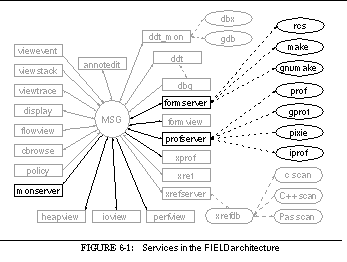

The formserver service handles the interaction between the FIELD environment and the UNIX facilities for configuration management and version control. We combined these two applications into a single server because they serve a closely related purpose and because there exist UNIX tools, such as the Shape system [Mahl89a], serving both functions.
The original implementation of the configuration management interface in the environment was quite different from the current one. Our original intent was to provide an interactive graphical editor for the various versions of the configuration management tool make . This tool, then called build , read and parsed the configuration description file ( makefile ) using a grammar that encompassed most features of the different versions of make . From its understanding of the makefile , build created an internal representation of the various dependencies and macros. It then let the user edit this, using graphical editing to create and remove dependencies and providing dialog boxes to define and edit macro definitions. From the modified or newly created internal representation, build could generate an input file suitable for any of the different versions of make .
While this tool was satisfactory for users needing only a simple make interface, it could not handle the more sophisticated features of make that we were using to build and maintain FIELD. In particular, it could not deal cleanly with recursive invocations of make , mix different versions of make , integrate environment variables into the make process, or use the more sophisticated features provided by the different versions of make , for example, conditionals and function calls for pattern definition in GNU make . Because the different versions of make were diverging and because we felt it important to handle existing UNIX tools completely, we decided that the goal of providing the user with an visual, editable interface had become impractical. We thus scrapped build and produced the formview interface described in See Configuration and Version Management and the formserver tool.
Formserver handles arbitrary versions of make by letting make parse and process the input files. It interprets the output of make to determine what dependencies and definitions are presented to the user. This allows arbitrarily complex makefile s and makes it easier to extend the environment for other configuration management tools. The only requirement is that the various tools provide information about what they are doing; all versions of make provide this information when appropriate debugging flags are set.
The original version of the form tool was implemented as a monolith: it provided a front end, the internal representation of the configuration information, and the back-end interface to the various versions of make . The internal structure separated the back end from the front end and could support multiple front ends as well as message-based commands from other tools. The advantage of this approach was that the internal structure could be optimized for display purposes and that the front end could easily be updated whenever tools sent commands that built the system.
This approach was not practical, however. It required that the user run the front end in order to have any access to configuration management, and also that a front end, once running, stay active as long as any tool might want to use the back end. Realizing these deficiencies, we restructured the tool into two packages, formserver , which does the back-end operations, and formview , which provides graphical and textual front ends to the user.
At the core of formserver is a flexible internal representation designed to contain the information needed to understand both configuration management and version control. The representation consists of projects, items, links, and attributes. Projects are containers that correspond to directories in the UNIX file system. Items can correspond to files, to make targets (i.e. clean or print), or to macro definitions. Projects and items are similar except that projects serve as containers; each item and link is contained in a project, and projects can contain other projects, indicating recursive uses of make . Links represent dependencies among items or projects. Attributes are used to store information about projects, items or links, such as version information for files or whether a dependency link is implicit or explicit.
This simple scheme is sufficient to represent the information that can be gathered from various configuration management and version control systems. The information can be used to process configuration commands (such as compile a source file or build a given system) and simple version control commands (such as check in or check out). It is also a sufficient basis for a graphical dependency display that provides appropriate information about the status of the configuration and of versions. What this scheme does not address are the complexities inherent in managing multiple versions of a system simultaneously. Here different versions of a file need to be represented by different items (and, at the same time, by the same item). The internal representation in this case must also reflect the version tree and information about global versions.
In addition to this internal representation, formserver maintains for each project a transcript containing the textual output of all commands executed for items in that project, both for configuration management and for version control. The transcript is stored in a temporary file and is deleted when the server exits. Formserver provides the option of clearing the transcript file at the start of each command or maintaining a complete transcript.
A separate formserver back end is provided for each version of make . This back end is responsible for both building the internal structures and executing commands. The internal structures are built by running make in a debugging mode so that it prints out dependencies and other relevant information. This output is interpreted line by line using patterns and the pattern matcher used by the message server. The internal structure for a project is built automatically the first time a project is encountered. This provides a list of the items in the project and detailed information about dependencies of its default item. Details on an item that is not related to the default item are determined on demand when information for that item is requested.
Commands are executed by passing the back end an item from the internal structure. The back end uses this item's attributes to execute the appropriate make command. The output from the command is then passed back to formserver so it can be incorporated into the transcript for the project, processed for error messages, and sent back as a reply to the command.
The internal structures supported by formserver are designed to represent both configuration and version data. The interface for versioning is similar to but independent of that for configuration management.
The server again supports arbitrary back ends for version management. While it currently supports only rcs [Tich82a], it is capable of handling other systems including sccs [Roch75a] and shape . Each back end is responsible for both gathering information to be inserted into the internal structures and executing commands. Information is gathered by asking the version control system for information on all files associated with a given item or project. This information is scanned using patterns and the message server pattern matcher and is stored as attributes of the corresponding items.
The command interface for version management supports five distinct commands: CHECKIN, CHECKOUT, MERGE, DIFFERENCES, and CLEAN. Each command consists of the command name, an item, and zero or more of the options shown in See Configuration command options. The command processing routine of the back end interface interprets these options and then runs the appropriate system command. The server takes the output from that command, adds it to the transcript, and passes it back to the requesting tool in reply to the command message.
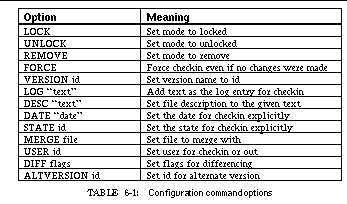
Formserver communicates with the rest of the environment through the message server. It provides services through a message-based command interface for both configuration and version management, and provides information about its internal structure through a simple query interface.
Formserver supports four messages that request configuration management. The first:
requests that the item corresponding to the given file be built. The server first finds the project object for the directory of this file and then finds the proper item in that project. It then requests the back end to build that item. The message
FORM COMMAND <project> <command>
is similar except that it finds the project corresponding to the project parameter and then the item corresponding to the command parameter.
differ from the previous commands in that they take the source for the command rather than the target. The COMPILE command finds the project and item corresponding to the file parameter and then determines what targets can be made from that item. It chooses the target most appropriate for "compiling" and executes the corresponding command. The COMPGO command is similar except it follows the compilation path all the way up to an executable and attempts to build that executable rather than just compiling the single file.
Version management is handled by messages of the form
The file parameter specifies a full path name and hence identifies both a project and an item in that project. The command field is a string consisting of the command name followed by zero or more option-value pairs from See Configuration command options.
Formserver is designed to support viewers on the configuration information. Three message-based commands provide access to the internal information. The message
FORM QUERY TRANSCRIPT <project>
finds the corresponding project and then returns the name of the transcript file associated with that project.
FORM QUERY PROJECT <project> <item> <update>
asks for information about a particular item in a particular project. The update parameter is a flag indicating that the server should ask the back end to update the information on the given item before reporting it. If the item is given as an asterisk, then information about the project itself is provided. The information requested consists of a listing of all attributes and their values as well as all links from the object and the associated attributes. For projects, the information contains not only information about the project, but information about all components of that project. The information to be returned is written to a file and the name of the file is returned as a reply to the message. It is the responsibility of the requesting application to remove the file.
FORM QUERY CONFIG <project> <item>
requests configuration information for the given item in the given project. This is similar to the query project command except that updated configuration information is first requested for the item.
Formserver also sends information messages to other tools to tell them about changes in the system. The message
FORM FINISH <status> <output_file> <item>
is sent after completion of a configuration command. The status field is the status returned from the UNIX command, so that zero generally means successful and non-zero indicates that an error has occurred. The output_file field is either * or the name of a file containing the output for this command; this file exists only if the command was executed as a call rather than a send. Finally the name of the item being built is included. This lets other tools check if the user has successfully rebuilt the system they are currently working on and to update themselves accordingly.
is sent by formserver whenever a line is added to a project's transcript file. This lets other tools, such as the transcript viewer, keep up to date with the current transcript.
Formserver also provides facilities for interpreting the output transcript and generating appropriate messages. This facility is designed to scan the output of the various compilers for errors and to generate messages for each. The facility is based on a list of patterns defined in a resource file that use the message server pattern matcher which are used to gather the file, line number, and message text for each reported error or warning. Since the output is scanned one line at a time, multiple patterns are typically needed for each error. Once an error is found and all three items have been determined, the message:
The interface for profiling is similar to that of formserver in that it handles a variety of different back ends by running the appropriate UNIX tool, interpreting the output using a set of patterns, and building an internal data structure. The system allows any number of different back ends, i.e. alternative profiling tools. To date, we have incorporated the standard prof and gprof [Grah82a] commands on Sun workstations, pixie on the DECstations, and an instruction-count profiler, iprof , written at Brown for Sun systems.
The profiler server can manage profiling data at the file level, the function level, or the line-number level. Moreover, it is designed to maintain a history of incremental updates to the current profiling values. Its internal representation reflects these needs.
The server maintains a tree structure in which each node contains the cumulative data for all its siblings. Two values are maintained in each node. The first is a floating-point value denoting the primary statistic. For most of the standard profilers this is run time, but for pixie and iprof , it is instruction counts. The second is an integral value used for auxiliary data, currently the number of times a line or function is executed. In addition, each node maintains a list of previous values for the primary statistic to show incremental updates.
The root of the tree is a system node. The first-level children represent files, containing the cumulative data for individual files. The second-level children represent functions, and third-level children represent individual lines. Line information is present only when the supporting tool makes it available, as do pixie , iprof , and a version of gprof modified at Brown.
Each profiling back end is responsible for four actions. The first determines if this back end is appropriate for a given system. The second runs the back end to generate the complete internal structure for a binary and the current profiling data file. The third gathers more specific information relevant to a particular item; for example, when gprof is used this action obtains the call breakdown for a particular routine. The fourth gathers information for incremental update.
The profiling server communicates with the rest of the environment, particularly with the profiling front end, through a message interface. It handles three categories of messages: those that cause it to load or update a system, those that set internal flags for updating, and those that query information.
Profserver loads a system automatically the first time a request for information on that system occurs. Alternatively, the message
XPROF LOAD <system> <back_end> <monfile>
explicitly loads the specified system. The back_end parameter can be either the name of the back end to be used for the given binary or AUTO to denote that the server should determine the appropriate back end. The monfile parameter lets the requestor specify a data file other than the default.
Incremental update of the information for a particular system is done when either of the messages
occurs. The second message is the generic update message sent by the debugger to update all tools.
The profiling server allows automatic incremental update every so many seconds. The message
XPROF AUTOUPDATE <system> <flag>
turns automatic update on or off for a given system. If automatic updating is turned off, then no incremental update is done (even in response to an UPDATE message). The message
XPROF DYNUPDATE <system> <flag> <time>
sets the dynamic update parameters for the given system. The flag value turns dynamic update on or off, while time specifies the number of milliseconds between updates. Similarly, the message
XPROF SYNCUPDATE <system> <flag>
determines whether incremental updates are synchronous or asynchronous, i.e. if the system is stopped until the update is complete or is allowed to continue as soon as appropriate data is gathered.
Finally, the profiling server provides a simple query mechanism for extracting information from the internal data structure or gathering additional information appropriate to the back end. The synchronous message
XPROF QUERY <system> <file> <function> <line> <count>
is used to query the internal data structure. The system field determines which system is being queried. If the system has not been previously loaded, it is loaded with default parameters. The file , function , and line fields are used to qualify the request. Each of these fields can be a particular value indicating that only information matching that value should be returned. Alternatively, the fields can be wild cards (* for the first two, 0 for line number) indicating that all values should be returned.
The additional information provided by the back end for a particular item is obtained from the profiling server by the message
XPROF INFO <system> <file> <function> <line>
The parameters here identify a specific internal item. The appropriate back end routine is called to gather more information on this item; this information is saved in a file and the name of the file is returned as the reply to the message.
A variety of FIELD tools provide a dynamic view of program execution. The most focused of these are the heap visualizer, the input/output viewer, and the performance monitor described in See Monitoring Program Execution. All three of these tools work by inserting a monitoring library in place of the system library and then intercepting library calls.
The monitoring library communicates with the display tools through the message server. It is impractical, however, to have the library send messages directly to the message server. The client interface to the message server is a relatively complex piece of code, providing support for buffering and message queueing and making significant use of memory allocation and files, and using it directly would distort the monitoring results and cause us to monitor the monitor.
To avoid these problems, we developed a simple socket interface that resides in the monitoring library as part of the application and a separate FIELD service, monserver , that communicates with the FIELD message server. The monitoring code in the application attempts to connect to a socket opened by monserver . If it fails, then no monitoring is done. If it succeeds, then it is sent any information being monitored. Monserver listens to the connections that applications have created and forwards the messages it gets to the FIELD message server. If the application requested that the monitoring message be sent synchronously, then the communications service does so and, when done, acknowledges the message back to the client.
Adding a monitoring service offers three benefits. First, it greatly simplifies the code that has to reside in the application being monitored and lets it be designed so as not to intrude upon monitoring, i.e. so that it does not require memory allocation and minimizes its needs for input and output. Second, it provides a buffer. Monitoring can produce a significant quantity of messages in a short time. The monitoring service, in conjunction with the FIELD message server, buffers these messages, allowing the application to continue before the messages are processed. Finally, the use of a separate service lets the monitoring be controlled by FIELD tools, which can send messages to the monitoring service to turn monitoring on or off or to synchronize it.
We generate the monitoring messages by providing our own library to replace the system library. Our library replaces standard library calls with ones that do monitoring. To monitor memory allocation, our library replaces the library version of malloc , free , and realloc , and to monitor input and output our library replaces all the input/output system calls with versions that send messages after calling the actual library routine. In both cases, before a message is sent, the execution and real time used by the application are checked and additional messages are sent if these have changed significantly from their previous values. Performance monitoring is done as an extension of this timing mechanism: at each potential message call, the resources used by the application are determined using getrusage or the /proc interface and, if these have changed since the previous performance message, a resource message is sent.
Control over monitoring is provided through the MONITOR environment variable. This variable is assumed to consist of a colon-separated list of items to be monitored. These currently include IO for input-output monitoring, MALLOC for heap monitoring, PERF for performance monitoring, REALTIME for monitoring the elapsed time of the application, and EXECTIME for monitoring the execution time. ALL is a shorthand for monitoring everything. In addition to determining what should be monitored, this variable is used to handle forking. Normally, once a process decides it is being monitored, it changes the MONITOR variable so that children processes are not monitored. A `+' in front of the variables value indicates that monitoring should be deferred to the child. In this case, no monitoring is done, but the initial `+' is removed so that the child is monitored. Finally, an initial `^' in front of the MONITOR string indicates that the monitoring should be done synchronously.
In general an application would have to be relinked with our library to enable monitoring. Sun's shared library facility lets us avoid this. Rather than a normal library containing our monitoring code, we create a shared library called libc.so which is bound to force the loading of a shared library called liborigc.so . The library is put in a known directory and a link called liborigc.so is created in that directory pointing to the standard version of libc.so . If an application is then run with the environment variable LD_LIBRARY_PATH set to include this directory, both our shared library and the standard one are used during execution, with the routines in our shared library overriding the standard ones. This lets any program compiled to use shared libraries be monitored without any modifications. For the newer version of SunOS (Solaris 2), this indirect method for interpolating a library is replaced by using the LD_PRELOAD environment variable to specify our monitoring library.
A further simplification can be made. Since Sun maintains a full external symbol table for each shared library, the address of the standard routine (e.g. the version of malloc in Sun's shared library) can be found at run time. Monitoring code is then written to call the standard routine (its address is looked up the first time it is called) and send the appropriate monitoring messages when it returns.
We exploited the simplicity offered by shared libraries by implementing a simple command, hmon , that takes a set of options and a command line. It uses the options to set the MONITOR environment variable, sets LD_LIBRARY_PATH or LD_PRELOAD, and then executes the specified command.
The monitor server sends the messages generated by the monitoring library. The message
is sent when monitored execution starts; the system field contains the name of the system being executed. The message
MON LIBRARY <name> <base_addr>
is sent for each shared library loaded in the application. The message
is sent automatically when the process being monitored exits.
Timing information messages associate program times with other trace information. If real-time monitoring is enabled, then the message
TIME REAL <system> <time_in_milliseconds>
is sent before any other monitoring message provided that at least ten milliseconds of real time have passed since the previous TIME REAL message. Similarly, the message
TIME EXEC <system> <time_in_milliseconds>
is sent if more than ten milliseconds of execution time have elapsed since the last time message. Performance information is also generated automatically whenever there is any monitoring message other than TIME and the performance data has changed since the last such message. This message has the form:
PERF <system> <#_minor_faults> <#_major_faults> <#_swaps> <max_rss> <resident_set_size> <#_input_blocks> <#_output_blocks> <#_signals> <#_vol_context_switch> <#_forced_constext_switch>
where the data is that reported by the system call getrusage .
The messages for monitoring storage allocation are generated by instrumenting the calls to the standard UNIX memory-allocation routines, malloc , realloc , and free . The message
HEAP ALLOC <system> <start> <size> <request> <header> <from>
is generated for an allocation or reallocation request. The second field gives the start address in memory and the next three fields provide the actual size, the requested size, and the size of the associated header information. The final field is actually a list of addresses representing the call stack. The first number is the address determined by the monitoring library's heuristics as the most likely address to report as the source for the allocation. The remaining addresses reflect the top hundred entries on the call stack (or fewer if the stack depth isn't that great). The corresponding message for freeing storage is
HEAP FREE <system> <start> <size>
where the start and size parameters should correspond to those of a previous ALLOC message. Additionally, the message
is sent the first time any memory allocation is done. The visualization tools use it to clear the current visualization and start a new one.
The messages for input and output monitoring are shown in See Messages for monitoring file operations. The INIT message is sent automatically at the first input or output operation. The INFO message is sent whenever a file is successfully opened or its status has changed (i.e. by a call to ftruncate ); it reports the file's size and type, where the type is one of DIRECTORY, DEVICE, RAWDISK, FILE, LINK, SOCKET, or FIFO. The remaining messages are sent for the corresponding system calls. Each consists of the parameters for the system call followed by the result and the value of errno returned by the system call. Both the dup and dup2 system calls are reported by the DUP message, and both open and creat are reported by the OPEN message.
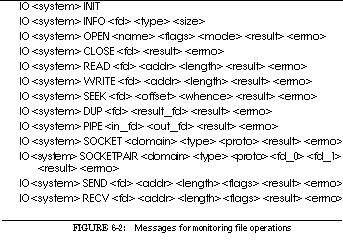
In addition to sending the various monitoring messages, the monitor server listens for two messages from the rest of the environment. The message
causes the monitor to synchronize its message sending with the rest of the FIELD environment. Normally, the monitor server lets the program being monitored run as fast as possible and relies on the message server to buffer the monitoring messages, hoping that the visualizations will eventually catch up. The general purpose UPDATE message forces things to synchronize. The message
MONITOR ENABLE <system> <flag>
allows outside control of monitoring for a particular system. Disabling monitoring causes the messages being sent by the monitoring library not to be forwarded to the message server, but it does not disable the library.
All the interfaces in FIELD are based on a set of tools developed at Brown University for workstation programming. This toolkit, the Brown Workstation Environment or BWE for short, was originally designed to support PECAN and BALSA, extended and extensively rewritten to support GARDEN, and then extended to support FIELD. In the interim it has been used for a variety of other projects.
BWE is both a strength and a weakness of FIELD. It is a strength in that it has greatly simplified the construction of the user interface, particularly through the full function editor, the structured display facilities, and resource file management. It is a weakness in that FIELD's interface is non-standard. When we started developing FIELD, there were no standard portable workstation toolkits so we had no choice but to use our own, which was in reasonably good shape. Now, however, the cost of converting all of FIELD to Motif or some other standard is too high, and thus FIELD's user interface will remain non-standard.

The Brown Workstation Environment was started in 1982 in order to provide a simple, common set of input and output facilities for two projects being done on Apollo workstations. It has evolved since as shown in See Development timeline for BWE. Originally it contained two packages, ASH, which provided a slightly simplified C-interface to Apollo's graphics routines and MENU, which provided a simple, higher-level menu interface.
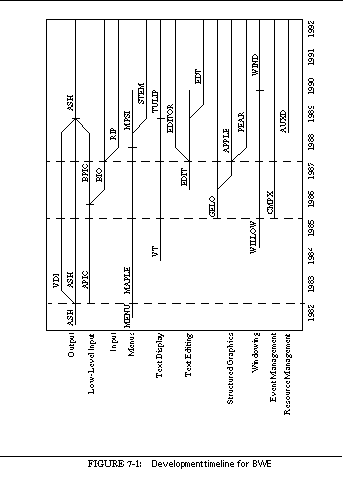
The second step in the development of BWE, from 1983 to 1985, was the extension of its underlying input and output packages to handle more sophisticated applications, notably the PECAN program development system [Reis85a] and the BALSA algorithm animation system [Brow85a]. The first part of this development was to rewrite the output package, ASH. The new package provided inexpensive hierarchical windows on top of Apollo's and Sun's graphics packages. It handled occluded windows and provided such facilities as backing store and save-under for pop-up menus. This implementation provided portability through a machine-dependent interface, VDI, and was later extended to run on top of X10 on Decstations.
In addition to rewriting the output package, the second implementation of BWE contained a more sophisticated menu package, MAPLE, which provided a hierarchy of menus and simple user input (such as text strings and point and region selection). It used a machine-dependent input manager, APIO, to generate a standard set of input events.
Other packages were added to BWE as needed for the driving applications. The second phase included a terminal emulation package, VT, supporting multiple, proportionally spaced fonts and vt100 emulation with enhancements, and a simple in-process window manager, WILLOW, supporting applications that required multiple top-level windows.
The third phase in the development of BWE paralleled the development of the GARDEN programming system from 1985 to 1987 [Reis87a]. In addition to improvements to the output and window management packages, this phase saw a complete rewrite of the input management routines and the addition of a text editor, a window layout package, and a graph editor.
Low-level input management in this phase was divided into a machine-dependent package to generate simple event streams, BPIO, and a machine-independent package, BIO, to handle event queueing, multiple threads of control, complex events such as double clicks, and event mapping. These packages were designed primarily for internal use in BWE and not for the application program. In addition, a central multiplex facility, CMPX, was added as an event manager.
The lowest level of application input was a region-based input package, RIP. Above this package several menuing packages were implemented. The first, MPSI, provided all the functionality of the original menu package and also pop-up menus and prompting facilities. The second, STEM, provided three types of menus: Macintosh-style pull-down menus, pop-up menus, and static, multiple-column menus. STEM also provided scroll bars and dialog boxes.
The first new facility added to BWE in this third phase was a fully-functional text editor that could be used by applications in a window. This was divided into three components. At the lowest level was TULIP, a rewrite of the previous terminal handler. Above this was a program-callable buffer manager, EDITOR, and a separate editor user interface, EDIT. The second added facility was a window layout package, LEAF, that let the application specify constraint-based window layouts.
The third major addition was a graphical editor. The GARDEN programming system needed a tool that could display the graphical structures it created, and the graphical editor had to be able to display a wide range of structured diagrams representing different visual programming metaphors as well as data structures. This tool consists of three packages. The lowest level, GELO, handles the display of graphical objects. A mapping package, APPLE, translates application data structures into GELO structures. The third package, PEAR, provides a user interface for graphical editing and display using GELO and APPLE.
The final phase of the development of BWE paralleled the development of FIELD and the continued development of GARDEN from 1987 to 1990. This phase saw a rewrite of much of the user interface part of the environment, the addition of a resource manager, and incremental improvements to all the tools.
The primary output interface, ASH, was rewritten for X11. Since X11 was available on all the workstation platforms we were interested in, it made sense to recode this package to exploit its capabilities and portability. To accompany this rewrite, we also had to reimplement the low-level input mechanisms to use X11 input. The BPIO package was thus absorbed into ASH.
The move to X11 not only simplified ASH, it also let us provide multiple top level windows from an application and thus use the native window manager rather than the one developed with BWE. To facilitate this, we introduced a new package, WIND, that provides the basic window management facilities but depends on the underlying window manager.
As part of continuing improvements to BWE, we updated the look and feel of all the tools by rewriting the STEM package. In particular, we implemented a 3D style, similar to Motif or Openlook, that is used extensively in FIELD. In addition, STEM was augmented to provide panels and state menus, essentially non-modal dialog boxes.
The new look and feel was also reflected in a new front-end editor interface that was developed during this period. This package, EDT, provided an extensible command set, improved mouse handling, and user-defined mappings from keystrokes to commands.
Finally, we appreciated the need to parameterize programs through resource files, as is done extensively in X11 for window properties and in the Macintosh for program properties. To let us customize FIELD and other applications, we added the AUXD hierarchical resource manager.
The Brown Workstation Environment today consists of the packages that have survived this development process. Each of these packages has been developed with the aim of simplifying applications while giving the user an adaptable interface. The resultant architecture can be seen in See The architecture of BWE.
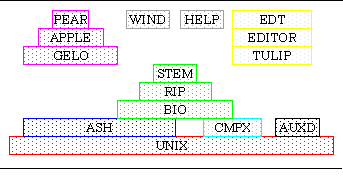
The lowest level of BWE handles basic input and output. While the packages here can be used by applications directly, they are most often used by other BWE packages.
The basic graphics package used by all the other BWE tools and available to the application is ASH. This package provides an application-friendly environment for X11 programming. It offers a single bitmap abstraction, the ASH_WINDOW, for both on-screen and off-screen windows, and has a full range of drawing primitives and attributes in windows, including some not provided by X11 such as splines. Advanced features include support for color-table animation, automatic region highlighting, and window-based locking.
Window locking is used to prevent two operations on a window from occurring simultaneously. This is needed for some of the long-running operations supported by FIELD (such as updating a complex data structure display) and to insure that FIELD interacts cleanly with the underlying window manager. In particular, it lets the FIELD message server be used with nested event loops. This lets MSGcall be used directly and simplifies MSG-based applications, since callback routines are rarely needed.
ASH also handles all communication with the X11 server. It provides simplified access to the X11 resource manager; it maps X11 refresh and resize requests into appropriate program callbacks; and it translates the X11 input event stream into an internal event stream that is used by BIO for input management.
CMPX serves as the main event loop for BWE. It lets tools register either file-based or time-based callbacks. When it is called, it waits for the next event (a file being ready to read or write, an X11 event, or a time-out), executes the appropriate callbacks, and returns.
Input management in the current version of BWE is handled by the BIO package. BIO takes the event stream provided by ASH and provides queueing, mapping and masking facilities. Events can be mapped to call a particular routine, to emulate another event, or to be discarded.
Input to the actual application or to higher level tools normally goes through RIP. This package lets the application define a region of an ASH window as relevant for input. Each region is associated with a callback routine and a set of keyboard and mouse events. If any of these events occurs in the given region, the corresponding callback routine is invoked with information about the event. RIP also provides a main event loop that utilizes the CMPX mechanism to find the next relevant event and invoke the corresponding RIP callback.
Geometry management is handled by the LEAF package, which lets the application define the layout of a given window by specifying its corresponding regions. Regions can be simple text or shaded areas maintained by LEAF or can be passed to other BWE packages or the application as ASH windows.
The application provides the layout to LEAF through a static table that defines the constraints between the regions. Each region can be tied to another region and can be based on a fixed or relative size or on the size needed to hold a given text string or button. The various constraints are solved independently in the two dimensions.
STEM manages all the menuing done in FIELD. It is based on the notion of a primitive button: a region displaying an optional text string or icon that can be drawn in various states, either selected or unselected, either highlighted or unhighlighted. STEM allows different styles to be defined for drawing the button; the current implementation supports a 3D style, a 2D style, and a simple 3D style. All styles are user-selectable at run time. The FIELD bitmaps in this book all utilize the default 3D style.
STEM provides a variety of different menu types. Pull-down menus, with a tear-off button on the menu bar, are used throughout FIELD. These are defined using a static table and can be modified dynamically. Static menus offer a scrollable, possibly multi-column list of options from which the user can select. The items can be defined statically or dynamically. Pop-up menus use an interface similar to pull-downs, but are not used by FIELD.
STEM provides a dialog box facility used extensively by FIELD. Dialog boxes are defined by giving STEM a string description that includes text to be displayed and escape sequences that denote either formatting information (such as centering, right justification, or column alignment) or a button description. Buttons can be Boolean-valued, radio buttons based on a particular value or a bit value, text regions for integer or real numbers, single line text strings, selection lists, or editor regions. STEM takes care of creating all the appropriate subwindows, laying out the dialog box and handling modal interaction with it. A similar facility is provided for non-modal dialog boxes.
Two other STEM facilities are used by FIELD, scroll bars and panels. STEM provides scroll bars that fit the appropriate button style and decides between horizontal and vertical on the basis of the size of the window in which the scroll bar is placed. Panels are windows into which the application can place one or more buttons. STEM aligns the buttons on the basis of the window size and the number and sizes of the buttons.
Unlike most other toolkits, BWE provides a full-function editor. The editor runs in any window and is suitable for such applications as a single line of input in a dialog box or providing a text editor on a file, a program transcript, or a teletype interface to an application.
The editor is structured into three basic layers. The first, TULIP, provides a virtual terminal in a window. TULIP handles intelligent screen updating of large blocks of text. It can handle multiple fonts simultaneously as well as proportionally spaced fonts.
The second level of the editor, EDITOR, provides a set of basic editing capabilities. This level offers editable or read-only text buffers, each of which is associated with a file, and provides a program-callable set of commands for manipulating these buffers as well as commands for associating a buffer with a window through TULIP.
The third level, EDT, provides the application and user interfaces for editing. The program interface can be used in different ways. The simplest is to create an editor on a string value. This is used in FIELD for textual values in dialog boxes, for maintaining the various textual viewers such as the stack view, and for program-generated textual output as in the cross-referencer interface or the information windows associated with the call graph or class browser. A file editor or read-only viewer is used in the annotation editor. EDT also supports the notion of transcript editing where the editor maintains the file position that separates what has been processed from what has not: text before this position is read-only while text after this position can be edited. Input from the editor can be returned either one line or one character at a time. This is generally used to attach a transcript to a UNIX pseudo-tty, thereby providing an EDT interface that can be used as a terminal within an application. FIELD uses this interface as the textual interface in the graphical debugger tool.
EDT provides a flexible and extensible user interface for editing. While it has a large number of built-in commands, new commands can be defined either as specializations of existing commands or by providing the name of a routine that is either present in the application using the editor or will be dynamically linked in by EDT. This facility is used in the FIELD annotation editor to offer key bindings for FIELD commands such as compile from within the editor. Commands can be bound to keys, function keys, escape sequences, pull-down menus, or mouse actions through an user or application-provided resource file. Moreover, the command bindings can be made conditional on the type of editor. Each editor has a set of type properties; some of these, such as READONLY or C or PASCAL, are built-in, while others can be defined in the description file or by the application. This facility is used in FIELD to provide slightly different editing environments for the different tools.
WIND is an in-process window manager that lets a single application manipulate multiple top-level windows. It lets BWE applications do their own window management or coexist with the system window manager. It offers window management facilities by providing suitable decorations around the top-level windows. With the advent of X11 and reasonable window managers, however, little of these facilities are still used.
WIND also provides a control panel for the application that allows new top-level windows to be requested and existing windows recalled, and offers the ability to add commands to the control panel. These options are provided through a combination of pull-down menus and an icon panel. This facility is used in FIELD to provide the control panel described in See The Control Panel.
The HELP package provides a user interface to a hierarchical description of an application. Help information is stored in a combination of files and directories. Directories are assumed to contain one special file that contains the top-level help for that directory and other files or directories that provide the child nodes for this directory. A file can contain either a simple description or a description hierarchy, with new entries identified by a line beginning with a dollar sign. The application invokes HELP by identifying the top-level file or directory of help information. The HELP package formats of the text automatically and uses a combination of EDT and STEM to provide a reasonable user interface to the material. Context sensitive help is provided by looking at the RIP region and ASH window where the help button is pressed, constructing a hierarchical name based on either window names or help strings associated with the window or region, and then looking this name up in the help hierarchy.
FIELD uses the HELP package, though the quality and quantity of the help information are not yet what they should be.
The principal component distinguishing BWE from other toolkits is its ability to display structured graphics, which are the building blocks for most diagrams describing programs and their data. This facility was originally implemented for GARDEN to display both user data structures and a variety of visual languages, and is used extensively in FIELD for program visualizations.
The tools for displaying structured graphics are divided into three packages. The basic package is GELO. GELO uses a set of graphics objects to describe the contents of the display, and also includes facilities for editing the objects, updating the display after a sequence of edits, panning or zooming over the display, and correlating a window position with the object being displayed.
The second package, APPLE, lets the application define a set of mappings from application data into GELO objects on the basis of the data type of the application data. It provides facilities for generating the appropriate GELO objects for an instance of application data of some type. APPLE also provides the facilities to store and reload the mappings.
The third package, PEAR, provides a generic graphical editor for application structures on top of APPLE and GELO. It uses APPLE to define the mappings and to create the appropriate GELO objects. It uses GELO to display these objects and to correlate user input with the displayed objects. Finally, it uses the rest of BWE to provide a variety of menu options to control the display and to edit the data being displayed.
Since APPLE and PEAR are used only in FIELD as part of the data structure display package, we defer their discussion to See Data Structure Display.
Structured graphics can be specified with a small number of primitive constructions. GELO uses this fact to define a small set of graphical object types called flavors sufficient for most applications.
The basic GELO flavor represents a shape. Data -flavored objects consist of a rectangular region of the display into which a shape and text are optionally drawn. A variety of different shapes is provided, including rectangles, rounded rectangles, triangles in various orientations, pentagons, hexagons, octagons, ellipses, rounded rectangles, a vertical line (for places in a Petri net), and composite shapes such as a rectangle with a line through it (representing a null pointer) or a rectangle with a centered dot (for a non-null pointer). Text, if present, is centered within the block. The default size of the block depends on the size necessary to display the text.
Data-flavored GELO objects have an associated set of properties. The basic ones are the text and shape to be displayed. Additional properties let the object have a fixed size and specify the fill style for the interior of the node and the line style for the exterior for drawing.
A second basic GELO flavor represents an arc. Arc -flavored objects identify a source object and a target object. Additional properties allow the specification of a line style and arrow options, such as whether or not an arrowhead is displayed with the source, the target, or the pivot points of the arc and the style of the arrowhead.
GELO provides two flavors of objects for constructing more complex displays, tilings and layouts. These are composite objects responsible for positioning and sizing each of their components, drawing some shape, and then having each of the components draw itself.
A Tiled -flavor object is a rectangular area that is broken down into non-overlapping rectangular regions or tiles. Each tile is associated with zero or one component objects. The tiling is computed by solving a system of equations based on the tiling and additional constraints relating the size of the components. Constraints can be used, for example, to guarantee that an object be square (i.e. its X-size is equal to its Y-size) or that two objects be the same size, or to center an object. Heuristics are used when the system of equations is underconstrained; if it is over-constrained, the additional constraints are dropped. An additional property of tiled objects lets them be enclosed in a box. Arcs connecting components of the tiling can also be added.
See Example of a GELO tiled-flavored object shows an example of a tiling used to draw a tree data structure. The value of each tree node is displayed as a data-flavored object in the center node on the top. The left and right subtrees are displayed as subcomponents (presumably drawn using similar tilings) in the larger nodes at the bottom left and right respectively. Arcs connect the bottom of the value object with the tops of the left and right children.
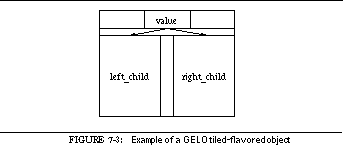
GELO draws an object in three passes. The first pass is a bottom-up pass over all the objects that computes the desired size of each object. This is done for tilings by finding the desired size of each component and then solving the corresponding system of equations. The second pass is a top-down pass in which each object is given its actual size and each composite object computes the size and position of each of its components. The third pass is a top-down pass in which each object is drawn.
The other flavor of composite object supported by GELO is a layout -flavored object. Layout objects consist of a rectangular region in which nodes and arcs are drawn. A layout object is managed by first determining a layout and routing strategy for its component objects, then computing the corresponding layout, then using this layout to size, position, and draw the components. The layout is computed as an array in which each node is assigned a row and column position and is drawn by optionally drawing a box around the layout and drawing the node components and then the arc components of the layout.
The properties associated with a layout object include the amount of white space to be left between nodes as a fraction of the average-size node, whether a box should be drawn around the layout, whether all nodes should be of the same size, and whether nodes should be centered in their row and column position.
In addition, the application can specify, through the properties, what layout and routing heuristics should be used to determine the positions. In GELO, all layout is done automatically, without any user intervention, because the system was designed to display application-generated structures that can change dynamically.
The layout heuristics provided by GELO for layout-flavored objects are designed for efficiency as well as to produce compact and intuitive layouts for the underlying graphs. Our experience has shown that no single layout heuristic is suitable for all graphs.
The simplest layout methods provided by GELO place the nodes one by one in the graph. The depth-first layout method looks at the nodes with a depth-first ordering. Each node is placed as close to its depth-first parent as possible, with a preference given to forward growth and to growth in the primary orientation. If the graph is to appear in a window that is larger vertically than it is horizontally, this means that a node is first tried directly below its parent, then directly below and to the right, then just to the right, then in any other position that is one unit away, then in positions two units away starting below the parent, etc. This process continues until an empty position is found for the node and it is placed. If a node has no parents, it is placed near the top left corner of the graph, with preference being given opposite the primary orientation. Thus in the case cited above, the first node of the depth first search is placed in the upper left corner, and the next disconnected node is placed immediately to its right if possible. This orientation preference is reversed if the graph has no arcs.
Several options exist to qualify or vary this layout strategy. One is to consider the nodes in breadth-first rather than depth-first order. A second option can select the principal orientation as either vertical or horizontal independent of the window aspect ratio. This is useful for graphs such as flowcharts where control is expected to flow downwards, and for other graphs that either are mainly disconnected or have node shapes that bias the use of space in the window. Another option available for these layout methods restricts all connections from parent to child to be forward arcs, i.e. either down or to the right. A final option tells the layout algorithm whether arcs are to be considered directed or undirected in doing the depth-first or breadth-first ordering.
A variation on these two layout approaches is the averaged layout heuristic. Here a node is placed by considering not only the parent but all the nodes connected to it that have already been placed. The target position of the new node is computed as the average of the position of its placed parents. If this position is unavailable, then an empty position close to this one is found. This search for this position looks at all places one unit away starting with the forward direction, then at all places two units away, etc. Averaged layout supports the orientation and preference options of depth-first layout. Finally, averaged layout can consider nodes in the order in which they are defined, in depth-first order, or in breadth-first order.
The default layout method for most of the layouts generated in the FIELD environment, including call graphs, make dependency graphs, and class hierarchies, is level graphs . This method approaches positioning in two passes. On the first pass each node is assigned a level; on a vertically-oriented graph, this corresponds to assigning the Y coordinate of each node. On the second pass, the nodes in each level are considered in turn and each node is assigned a rank (X coordinate). This approach tends to produce graphs that emphasize hierarchical arrangements, making them especially useful in describing program structures. Moreover, this approach produces good-looking layouts if the graph is mainly connected and the number of arcs is relatively small.
The level-graph layout method allows a variety of options that in turn control the heuristics used. The default leveling method is top-down. Nodes without incoming arcs are assigned to level one. Nodes with incoming arcs are assigned a level one greater than the maximum of the levels of the nodes that are its parents. This type of leveling puts nodes as high up in the graph as possible. In a call graph, the node with no incoming edges is the main program and the level of a node indicates its maximum static call depth.
An alternative leveling method is a bottom-up approach. Here the depth of the graph is computed first, i.e. the length of the longest directed path in the graph. This is equivalent to the maximum depth of any node computed via a top-down leveling. Next all nodes with no outgoing edges are assigned to this level, and nodes with outgoing edges are assigned to a level one less than the minimum level of any of their children. This approach to leveling tends to emphasize the leaf nodes.
GELO offers both kinds of leveling. In addition, it allows an optional post-leveling pass that attempts to optimize leveling by balancing it so that the number of nodes assigned to each level is approximately equal. This protects against graphs that have large numbers of nodes at one level and hence must be particularly wide (or tall) to accommodate just that level. Graphs that are squarer tend to make better use of available screen space. The optimization is done by first finding levels that are candidates to have nodes moved out, i.e. those with more nodes than the average. Then, considering these levels in order, the algorithm looks for a node that can be moved up or down the graph to a more appropriate level. A node can be moved down (up) one level if all of its connections are either above (below) it or if the connections are to nodes at least two levels below (above) it.
Rank can be assigned to nodes in a level in a variety of ways. The default way is to make a top-down pass over the data, fixing the nodes at the first level and then, for each subsequent level, sorting the nodes on the basis of those at the previous level. This is done by assigning each node a value consisting of the average rank of the nodes it is connected to at the previous level, sorting all the nodes at this level based on this value, and then assigning ranks consecutively based on this sorted order.
This process can be optimized further in two ways. First, multiple passes can be made, alternating between top-down, as described, and bottom-up. In a bottom-up pass, the ranks of nodes at the bottom level are considered fixed and the ranks of nodes at each previous level are computed using sorting based on the ranks of the subsequent level. Second, once ranks have been assigned, ranks at each level can be expanded. Rather than assigning ranks consecutively based on the sort order, ranks can be assigned so as to minimize the difference for each node between its assigned position and a target position (computed as the average rank of the nodes to which it is connected). This tends to produce straight lines between the ranks and hence more aesthetically pleasing graphs.
Once placement of nodes is completed, GELO uses different heuristics to route the arcs of the layout by selecting where on the source and target nodes each arc enters or exits, and the points at which each arc pivots.
Arcs can be connected to a node at its center or at any of the eight principal compass points. While the application can specify that an arc should exit or enter a node at a particular port, normally this is left up to the routing heuristic. Specifying it is useful in situations such as flowcharts where different ports have traditional meanings. When this choice is left to the routing heuristic, it chooses the port closest to the first pivot point of the arc or the target node. This choice is made before any pivots are assigned and again after pivots are assigned; the initial setting is taken as an approximation while assigning pivots.
GELO currently provides four alternative routing strategies. Two of these are trivial: one does no routing at all so that all arcs are represented as direct connections; the second assumes that the placement method computed the routings and preserves the pivots that were assigned. This latter case assumes that pivots occur at node positions (i.e. arcs are routed through empty spaces in the placement array) and translates pivots based on node positions to actual pivot locations.
The third routing alternative is to use channel routing. Here the spaces between the rows and columns allocated for the nodes are considered as channels that can hold one or more arcs, and each arc is assigned up to three channels. Channels are either vertical or horizontal. The initial channel is determined by considering the port assigned to the head of the arc. The arc is routed along this channel toward the node at the tail of the arc until it arrives at the orthogonal channel halfway to the tail node. Then it is routed along the orthogonal channel until it reaches the channel adjacent to the target port. Finally, it is routed along this channel to the target port. This yields a maximum of four pivot points. Special cases are considered when no orthogonal channel is needed, where the two nodes are adjacent and hence no channel routing is needed, and where the entry and exit ports are in orthogonal channels and the routing goes into the initial channel and then directly to the target channel.
The fourth routing alternative is an optimization that can be applied after the fact to either channel or placement-specified routing. This optimization attempts to eliminate as many of the assigned pivot points as possible for each arc. Considering each arc in turn, it starts at the head node and attempts to find the point corresponding to the tail of the node or a pivot of the arc furthest along the arc that can be reached in a straight line without passing through any of the placed nodes. Once this is determined, any pivots that occur before this point are eliminated. The process then is repeated for the next remaining pivot point of the arc. At the end of this process, the source and target ports for the arc are recomputed. This optimization produces direct routing whenever possible and minimizes the number of pivots needed for most routings.
In addition to these built-in placement and routing strategies, GELO provides hooks for additional methods. Two external methods, implemented outside of the system, have been tried. To support these, GELO writes out a data file that describes the graph to be laid out, runs the program that does the routing using this data file as input, and then interprets the output of this program to determine node placement and node-based arc routing.
Early in the development of FIELD we decided to place as much of the coding of the system as possible in resource files. We wanted to insure that the system was flexible and could be easily configured to the needs of a particular user or application.
Resource files are used extensively on the Macintosh and in X11. Rather than hardcoding items like colors or bitmaps, the application uses the information in the resource file. This allows the user interface, and sometimes even the application, to be defined outside the source code and changed or personalized without the need to recompile.
Wanting to use this concept in the development of FIELD, we started with the X11 resource manager. This was designed to specify X11 properties for drawing in an application and provides a hierarchy of information corresponding to a hierarchy of windows. It is designed to allow the specification of default values that range over the hierarchy and to permit queries from an application that let one specify n of some of the items in the hierarchy while wildcarding others.
The Brown Workstation Environment uses the X11 resource manager to set default properties of all the windows. It provides basically the same functionality, in terms of resources both in a resource file and in the command line, as that provided by the standard Xt toolkit: the user can set the background and foreground colors, the fonts, and border styles of each of the windows in the system.
The X11 mechanism was not sufficient, however, for the types of resources we wanted in FIELD itself. One of the first such items was defining the annotations that the annotation editor would provide. Here we wanted to define a set of annotations each with a set of associated properties. Moreover, we wanted to let the user augment a default set of annotations through a separate resource file. This required the resource manager to support lists of items each of which can have associated properties, a type of support that is not available through the X11 resource manager.
To provide this capability, as well as a simpler specification format for complex resources, we defined our own resource manager as part of the workstation toolkit. This package, AUXD, is used extensively in FIELD.
AUXD supports a tree of resources. Each resource consists of a name and a value. Leaf resources can be string, integer, real, Boolean, or list-valued. List-valued resources must have values that are homogeneous lists of one of the other primary types. Composite resources have values that are lists of AUXD trees. There is a distinguished node which represents the root of all AUXD trees for a given application.
The syntax of an AUXD resource file is shown in See AUXD resource file syntax. The file consists of one or more definitions, each of which is to be defined within the AUXD root. These definitions can be specified either with a colon or a plus sign: a colon indicates that this value replaces any previous value for this resource while a plus sign indicates that this value should be added to the list of values for this resource.
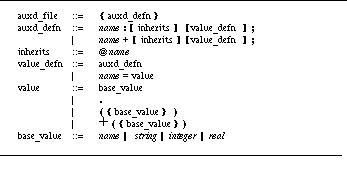
Definitions have two parts. The first part allows the specification of an inherited node, which is a node defined either at the same level as the definition or directly in the root. If an inherited field is defined and if no item of a given name is defined within the definition itself, its value is looked up in the parent. The second part of the definition consists of zero or more fields that specify the resource values for the definition.
Values in the definition can be either new definitions indicating nesting of AUXD trees or base values. Base values can be a period (indicating a Boolean value set to True), a name (indicating a string value), a quoted string, an integer, or a real number. List values are provided by enclosing one or more base values in parentheses. A list value can be prefixed with a plus sign to indicate that the new list of values should be concatenated with any previous lists associated with this resource.
See Sample resource file shows a sample resource file for the control panel. The resources here are nested in the root tree under the name FIELD. At this level of the tree there is one value resource, CONFIG_DIR, with a string value, and three definition-valued resources, USE, SERVICE, and BUTTON. Two definitions are associated with the USE resource, each of which defines two resources, NAME and ENVIRON, both with string values. The one definition associated with the SERVICE resource defines three fields, the first two with string values and the third with a value consisting of a list of strings. The fields associated with the BUTTON resource include one, UNIQUE, that is Boolean-valued while the others are string-valued.

One of the central issues in basing an integrated environment on independent tools is providing a consistent interface to the program source. When each tool has its own source display, as is common under UNIX, the user thinks of the environment as a set of independent tools. A common source interface for all tools, on the other hand, gives the user the feel of a truly integrated environment.
Several problems must be solved in order to provide a single source focus. The primary source activity is editing for both creating and modifying the source. Source access must therefore give the user an editor. Unfortunately, users are very opinionated about editors and attempting to impose a different editor meets with strong objections.
In FIELD, we have addressed this problem in two ways neither fully successful: the EDT editor can easily be customized to look like the user's standard editor, and the message facility allows an existing editor to be integrated into the environment. The EDT editor has been customized to look like emacs and a local editor, but this has not satisfied most users. A FIELD message interface to emacs was developed outside of our project, but it has limited functionality and has been little used. We are still looking for better ways to handle this issue.
The second problem that arises in providing a consistent source interface is characterizing how the source interacts with other tools in the environment. This interaction is two-way. The user wants to issue commands using the source. These commands can be based on the current line in the editor (clicking on the line to set a breakpoint), on the current file (a request to compile), or on the current editor selection (a request to go to the definition of the function selected). At the same time tools want to indicate locations in the source: the debugger wants to show the line currently being executed, and clicking on a function node in a browser should display the corresponding source in an editor.
FIELD addresses these integration issues with a new tool, the annotation editor. This is a wrapper around a full-function text editor that lets the user or the system create annotations in the source file. Annotations are tied into the message system: creating or removing an annotation can send a message causing an appropriate action to be taken, and a message sent by another tool can create or remove annotations. The place of the annotation editor in the overall environment can be seen in See The annotation editor in the FIELD architecture.
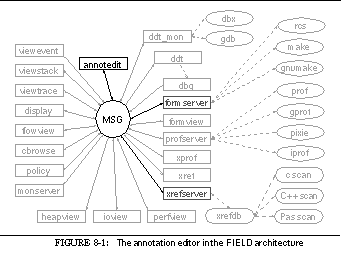
In this chapter we describe the annotation editor in detail. This includes how the annotations work and how a variety of different annotation editors can be defined and integrated into the environment.

An annotation on a source file is an external marker associated with a particular location. In the annotation editor, annotations identify source locations for commands, serve as markers for other tools, and define associations between the source and other representations.
Annotations have already been used in programming environments. Visual debuggers such as Sun's dbxtool [Micr86a] use annotations to show the location of breakpoints and the current debugger focus. Interpreted systems such as PECAN [Reis85a] and instructional environments such as Symantec's Think Pascal use highlighting or annotations to show execution and the location of error messages. Annotation also occur in a more general context in hypertext systems, in which a document is augmented with pointers that can be followed to other portions of the document. Hypertext systems have been used as the basis for software environments. Here they serve to provide a database system for storing the source, documentation, specifications, etc. in such a way that the various items can be easily interrelated.
In FIELD we generalize the simplified versions of the annotations used in these various environments without adding the full complexity of an underlying database or hypertext system. We first associate functionality with the annotations; for example, a BREAK annotation represents a breakpoint and can be used to add or remove a breakpoint. We next provide an open set of annotations, allowing the same annotation mechanism to be used for a wide and extensible variety of applications throughout the environment. We add annotation-based commands to the editor, for example, the ability to search for the next error annotation. Finally, we permit annotations to be permanently associated with a file, so that we can use annotations as a simplified form of hypertext pointer.
Annotations are typed so that all annotations of a given type are treated in a similar fashion. The annotation type determines how the annotation is displayed and how it interacts with the annotation editor and the rest of the environment. The annotation types are defined in a resource file, so that new annotation types can be added to the environment without writing any additional code and users can customize the environment by defining new annotations or specifying how existing ones should be used. The current annotation types are shown in See Annotation types.
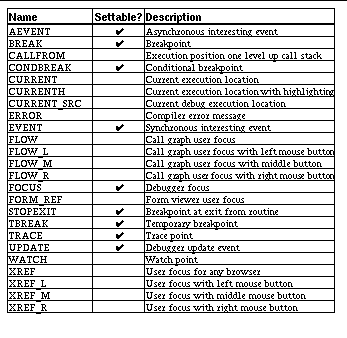
Each annotation is associated with a point in the source file. From the user's perspective this point is generally a line of the source file. However, the internal annotation mechanism actually associates the annotation with a character position. This can be used, for example, to identify multiple statements on a line or to associate an annotation with a particular keyword on the line. The current set of FIELD annotations uses only the line number. Each annotation also has associated values which are used for a variety of purposes such as storing the event number associated with a breakpoint and the text associated with an error message.
Annotations are typically displayed in a separate window alongside the corresponding source. Each annotation type is associated with an icon and a color that determine its appearance on the display. The editor also provides an alternate form of display in which an annotation is indicated not by an icon but by highlighting the corresponding line in the editor. This is used in a code viewer to animate the source as the program executes.
The resource file used to define annotation types is also used to define different instances of the annotation editor. The annotation editor can be used in several contexts, each of which requires slightly different behavior. The different instances of the annotation editor appear to the user as separate tools. The tool annotedit is an annotation editor designed for user editing. It lets most annotations be created and displayed and provides user commands for configuration management and version control and for interacting with the cross-reference database. However, it does not change what is being displayed to show any new annotations. The tool annotddt is designed as a companion to the debugger. It provides capabilities that are similar to annotedit but automatically changes the file and line being displayed each time it creates an annotation for the currently executing line or the current debugger focus. This forces it to stay in sync with the debugger. The tool annotview is a more general viewer. It changes the display for most annotations the user might want to see, including those from the debugger, those generated in response to user actions in the various browsers, and compiler error messages. Finally, the tool aedit is a simplified version of annotedit that provides the editor and command capabilities without an annotation display. Other instances of the annotation editor have been defined for specialized applications, primarily to interact with the TANGO algorithm animation system.
In order for annotations to be an effective mechanism for integrating access to the source file in a programming environment, annotations must be tied to the message system. This is done in a variety of ways. Messages from other tools can first create and remove annotations. Two properties associated with the annotation type define message patterns describing the messages that can add and remove an annotations of the given type. These patterns are extended versions of the basic message patterns used by the message server offering additional escape sequences that either are interpreted by the annotation editor on receiving a message or are filled in by the annotation editor when sending a message. The escape sequences and their meanings are shown in See Annotation pattern codes.
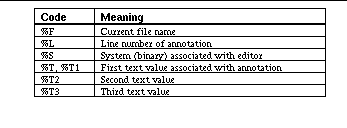
When a message is used to create an annotation, the file name and line number fields determine the location; both must be defined or the request is ignored. The system, if present, determines if the annotation is relevant to this version of the editor. As an example, consider the pattern associated with setting a BREAK annotation:
"DEBUG EVENT ADD %S %T3 BREAK %F %L %T1"
DEBUG EVENT ADD tree 1 BREAK /pro/field/test/tree.c 31 [1] BREAK at line 31 in main of file tree.c
is received from the server, the annotation editor first checks that the current editor is interested in messages from system tree (the %S match). Normally, the editor is interested in messages from all systems, so this test succeeds. Second, the annotation editor checks if the current file is /pro/field/test/tree.c (the %F match). If not, the editor has the choice of changing files so that it is or of ignoring the message. If the file is displayed then a new annotation of type BREAK is associated with the start of line 31 (the %L match). If this line is not currently displayed, the editor can force it to be.
The annotation editor stores additional information with the annotation. This information is used both to give the user a description of the annotation and to construct messages to remove or restore the annotation later on. The example annotation above has two associated pieces of data. The breakpoint number, 1, matches the %T3 parameter. The text
[1] BREAK at line 31 in main of file tree.c
is sent as a quoted string and matches the %T1 entry.
This simple mechanism is extended by additional annotation properties and values. Some types of annotations are unique across a system; for example, there is only one current execution location and one debugger focus. The annotation editors maintain this uniqueness. Each editor monitors all messages causing this type of annotation to be added regardless of the file it specifies. If one is received, any current annotation of this type is removed before the potential add request is processed. The editor allows several different annotation types to be grouped for this check. The different annotation types that show the user focus, for example, are grouped so that only one focus is indicated.
Duplicate annotations, which can arise for a variety of reasons, cause other problems. Duplicate annotations can occur when tools send messages that trigger an annotation more than once. For instance, in FIELD each use of the status command of the debugger sends an EVENT ADD message for each breakpoint. Similarly, multiple error messages on the same line can trigger multiple annotation requests. Duplicate annotations also occur when the editor adds an annotation explicitly and sends the associated message. The tool that processes this message then sends an information message that would normally add the same annotation. This arises in the case of EVENT annotations, used to denote interesting events for algorithm animation in TANGO, where the editor explicitly adds the annotation since it cannot assume that the debugger is running at the time. However, if the debugger is running, the annotation produces a breakpoint request and a message that would trigger the addition of a corresponding annotation is sent.
We have developed strategies for handling each of these cases in the way that seems most appropriate. The default solution is to allow only one annotation of a given type on a line. Multiple annotations of the same type on a line can either be ignored, as with identical breakpoints, or accumulated, as with error messages. In the latter case, the text associated with multiple annotations is concatenated, so that, for example, all errors occurring at a given line are merged into a single annotation containing the combined error messages. Multiple annotations of a given type can also be explicitly allowed. Finally, the annotation editor forbids the message system to set annotations that the editor itself adds. This limits the flexibility of the system, but causes the annotation display to be correct.
The other major task in connecting annotations with the FIELD message system is to let annotations be used as commands to other tools. To accomplish this, each annotation can have two messages associated with it, one to be sent when the user requests the annotation be created and the other to be sent when the user requests it be deleted. These messages are specified with strings using the escape sequences shown in See Annotation pattern codes. For example, a user request for a BREAK annotation has the associated message patterns
DDTR EVENT ADD %S %F * %L * * 0 BREAK 3
DDTR EVENT REMOVE %S %F * 0 * * 0 BREAK %T3
which respectively cause a breakpoint to be created at the current line and the given breakpoint to be deleted.
A third, optional message pattern is used in updating events. This message is sent when the location of an annotation changes and either the file is saved or the user explicitly requests an update. For a breakpoint, the message pattern is
DDTR EVENT CHANGE %S %F * %L * * 0 BREAK %T3
which produces a command to the debugger to update the location of the corresponding breakpoint the next time the binary is reloaded.
The user requests a new annotation by clicking or typing in the annotation area of the editor. When the user attempts to create a new annotation of a given type, the annotation editor does several things. First, some of the data associated with the annotation can be defined as user-settable. In this case, the annotation editor creates a dialog box to let the user enter the corresponding values. The dialog box can be customized through the resource file. For example, it is used for EVENT annotations that represent interesting events for algorithm animation in TANGO. Here the user is asked to enter the type of event and a list of descriptive parameters. See Dialog for creating an annotation shows the dialog box for such an annotation.

The second step in handling a user request for an annotation is optionally to have the editor create the annotation. This is generally not done. Most annotations are created as side effects of the command associated with the request. For example, requesting a BREAK annotation sends the command to define a breakpoint, but the message the debugger sends when the breakpoint is defined is the one that actually creates the annotation in the editor. This lets breakpoint annotation appear to be independent of how the breakpoint is set, and ensures that the line of the annotation corresponds to the debugger's notion of where the breakpoint is. Some annotations, such as EVENT annotations for algorithm animation, cannot insure that their associated command will have a side effect. These are created by the editor and the corresponding EVENT ADD message from the debugger is ignored.
A user request to delete an annotation is handled much as a request to add one. A message is associated with the delete request. While no dialog box is created, fields set when the annotation was defined can appear in the message using the escape sequences. Again, the delete request typically does not actually remove the annotation. Instead, the editor lets the message that results from the issued command remove it. For example, BREAK annotations are removed by EVENT REMOVE debugger messages.
A final problem in dealing with annotations involves keeping the source display synchronized with the rest of the system. Each editor has a set of messages it sends when it first starts and a set of messages it sends whenever it opens a new file. The former are used to help the editor identify what file should be displayed. The latter are generally commands requesting an initial set of annotations, such as requests to the debugger for the current focus and any breakpoints defined in the file. Moreover, the annotation editor detects if the file it is displaying is updated by another editor with the next annotation request and automatically reloads the file. This mechanism is used as an additional way to support external editors; in this situation the annotation editor runs in read-only mode and all changes are done in the user's editor.
In addition to relating annotations to the message system, the annotation editor offers permanent annotations. These are useful in relating the source to other documents such as documentation, in providing the interesting events needed to drive an algorithm-animation package, and in letting graders comment on a student's program.
Implementing permanent annotations is complicated by the need to maintain and emphasize open systems in FIELD. If we could assume that the annotation editor is the only one used, it is relatively simple to extend it to maintain a set of annotations on a permanent basis, either by keeping information in the file or by keeping a separate file of such annotations. However, we want to let the programmer use other editors as well.
The first solution we tried was to embed the annotation as a comment in the source file. This worked, but had the drawback that the file the user saw in the annotation editor was not the same as that seen in any other editor or any other tool that happened to read the source. This lack of transparency, along with the problems inherent in letting the user edit the stylized comments, caused us to search for another solution.
The current solution is to maintain two additional files for any file with permanent annotations. One of these files is a copy of the original file exactly as it was when the annotations were last saved. The other is the list of annotations. In addition, we created a small system, fixannot , that takes these two files and the current version of the source, recomputes the locations of the annotations, updates the saved files, and returns to the annotation editor an updated location list of the permanent annotations.
This system works by first running the UNIX program diff over the saved and the most recent version of the file and considering each change found. If the change involves an addition in the new file, then fixannot simply keeps track of the difference in line numbers for future annotations. If the change is a deletion, fixannot updates the difference and marks any annotations on affected lines for later processing. If the change is a modification of a single line, then any annotations on that line are maintained at that line. If the change is a modification of a set of lines, the difference is updated and the system compares the original source line of each affected annotation with each of the lines in the changed portion of the new file. If any line is a "good" match (currently this means that about half the line matches the original one), then the best matching line is chosen as the new location for the annotation. If no line matches in this way, the annotation is marked for later processing.
The system offers three options for those annotations not placed using the previous strategy. The choice of which option to use is based on the annotation type. In the first strategy, the annotation is just moved to the nearest original line of the file, i.e. the line where it previously was before the deletion or change. In the second strategy, each line of the new file is compared against the line of the original file where the annotation occurred, and the annotation is placed on the best matching line. If no line is a "good" match the annotation is placed as in the first case. The third strategy discards the annotation when it cannot be placed successfully.
The annotation editor interface is designed as a wrapper around a text editor. We chose to make it independent of the editor to simplify its implementation and to allow different base editors to be used in the future.
The annotation editor uses the window shown in See Sample annotation editor. The annotation portion of the window consists of the first four menus on the menu bar and the annotation panel on the left side of the window. The remaining three menus, the text portion of the window, the scroll bar on the right and the status line at the bottom are all part of the EDT text editor. The annotation panel in this figure contains a cross-reference annotation at line 29 and three annotations at line 33. The rectangular box between these highlights the current mouse position.
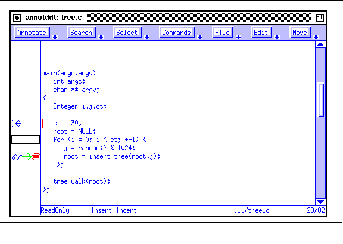
The annotation panel on the left side of the window is the primary region maintained by the annotation editor. It is used both to display the annotations on the given file and to let the user request new annotations, delete existing annotations, or get additional information about existing annotations.
Using a separate annotation panel was a design decision made early in the development of the annotation editor. The alternative would be to put annotations directly in the file, intermixing annotation icons with the actual text. While this might produce a more consistent interface and is closer to the interface provided by hypertext and similar systems, it was rejected for several reasons. First, it requires that the text editor itself be knowledgable about annotations, which would dictate the use of a particular text editor. Second, it would be much more complex to implement, since it would require changing the editor rather than writing a relatively simple wrapper. Third, we wanted the annotations to stand out while at the same time not inhibit the readability of the text. It should be possible to add and remove annotations while FIELD is running without disturbing the programmer; inserting annotations should not change the formatting or indentation of the user's code; and the annotation editor should be usable for actually editing the source program without annotations getting in the way.
The primary use of the annotation panel is to display the annotations. Each annotation is shown by its icon within the region of the panel corresponding to the associated line of text. The panel is of fixed size and can display only three annotations on a given line, which is generally both necessary and sufficient. See Sample annotation editor shows a common instance of three annotations on a line. The first, a pair of eyeglasses, indicates the current line being looked at by the debugger. The second, a green arrow, indicates that this is the line currently being executed. The third, a red stop sign, indicates that a breakpoint exists at the given line. The annotation editor allows more than three annotations on a line. In this case, the additional annotations can be viewed either by using the Rotate command from the Annotate menu or by typing an `R' over the annotations to be rotated.
The second use of the annotation panel is to let the user request that annotations be created or destroyed. This can be done from either the keyboard or the mouse. The editor maintains two current annotation types, a primary and a secondary selection, which are set using the Select menu above the editor. Clicking with the left (right) mouse button in the annotation panel for a given line requests the creation of a new annotation of the primary (secondary) type if no such annotation already exists at that line. If such an annotation exists and no modifier (i.e. shift or control) was used during the mouse selection, the mouse click is interpreted as a request to remove that annotation. From the keyboard, the user can request an annotation of any type by typing the first letter of the annotation name (in lower case) or another character defined in the resource file. The request is again taken as a delete request if an annotation of the specified type already exists.
An alternative way of creating an annotation is to shift or meta click with the mouse over the editor itself. Such clicks in EDT first set the cursor position and then simulate a click on the corresponding line of the annotation panel with either the left or the right mouse button.
The third use of the annotation panel is to give the user additional information about the annotations that are present. By clicking with the middle button on a line in the annotation panel or by typing `I' (for Information) on that line, the user causes a dialog box to appear for the first annotation on the line. Information on other annotations on the same line can be obtained using the Rotate command to make the desired annotation the first one on the line. The dialog box that is created displays the annotation type, its location (file and line) and any associated text strings. In addition, the dialog box permits the user to change editable information fields and either to explicitly delete or update the annotation once such editing is complete. The information dialog box for the EVENT annotation created in See Dialog for creating an annotation is shown in See Information display dialog box for an annotation.
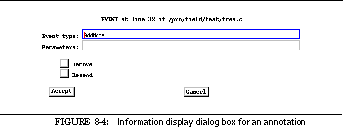
In addition to commands for creating and deleting annotations, the editor provides manipulation commands that can search for annotations of given types. The Search menu provides a Search button for a generic search in which the user is prompted for the type of annotation to search for and for the direction and origin of the search; the Search Again button repeats a previous search. The editor resource file can define additional buttons that search for a fixed annotation type. The standard editor, for example, includes a Search for ERROR button. A search request can also be initiated by typing `S' in the annotation panel. This defaults to a repeated search if a previous search has been specified and to a generic search otherwise.
Another facility provided by the annotation editor is the ability to select the annotation types to be displayed and monitored by the given editor. If an annotation type is monitored, than any message that adds an annotation of that type causes the editor to change file and line so that the line containing that annotation is displayed. This is used in the annotation editor tool annotddt , which tracks the debugger, and in the tool annotview , which provides a more general viewer. The Annotations button on the Annotate menu provides a dialog box in which the user can change the display and monitor settings for all known annotation types. In addition, the Monitor button on the Annotate menu lets the monitoring capability be turned off temporarily for all annotations.
Two other commands are provided on the Annotate menu. The first is explicitly to remove all annotations of one or more types, for example, all ERROR annotations. It is accomplished using a dialog box triggered by the Remove All button. The other command lets the user set the display level for annotations in the editor. Each annotation type has an associated display level, and the editor does not display any annotation of level greater than the current editor level. This is useful for excluding more sophisticated annotations from the display. For example, an annotation editor can be set up to allow EVENT annotations for Tango, but not to display them, thus providing a simplified viewer that hides the EVENT annotations from the user.
The Commands menu provides commands for other tools that are initiated from the editor but are not directly associated with a line. These include commands to the configuration and version manager and queries to the cross-reference database.
The editor provides several options for command buttons. First, it lets the command force the editor to save any changes to the file. This is useful for a Compile command since the user generally wants to compile the edited file. Second, the editor lets the command specify a set of annotation types to be removed. The Compile command, for example, removes all ERROR and WARNING annotations from previous compiles. The actual command is issued by sending an appropriate message. If the message is sent synchronously, the editor puts up a dialog box indicating that the command is executing and the user should wait; when the command completes, the editor displays the result in another dialog box. This result can be a simple message indicating that the command has completed, it can be the reply from the command, or it can be the contents of the file in the reply from the command. This last is used, for example, for commands sent to formserver that return the file name of the transcript file.
The interface to the cross-reference database is more complex and can be used only if the editor is associated with a given system. A query button is defined in the resource file by providing the output and conditional expression that define the query. Within these definitions, the user can embed control sequences to be filled in: %S indicates the current system, %L the current line, %F the current file, and %E the current editor selection. In addition, %s and %d can be used for arbitrary parameters. If there are parameters and either some of them are undefined or %Q is not specified, the editor pops up a dialog box asking the user to verify the parameters. Once this is done, the editor constructs a query command message and sends it to the cross-reference server.
The editor provides two options for displaying the output of the cross-reference query. First, it can simply be displayed, either in a dialog box or in a separate editor window. See Annotation query output window shows the output of a Find References query that finds all names referenced at the current editor line. Second, the output can be used to move the current position. This is used for the Goto Declaration query, which finds the declaration associated with the current editor selection. If such a query returns exactly one tuple, the editor automatically updates to display the corresponding location. If no tuple is returned, then the user is informed the query failed. If more than one tuple is returned, then the editor constructs a dialog box showing the different results and asks the user to pick the proper one.
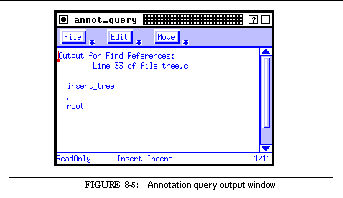
The different instances of the annotation editor, annotedit , annotddt , annotview , and aedit , are defined in the annotation editor resource file. The instances differ in the initial setting of the various user interface options and in how they set up the window. Each editor tool is defined with two lists of annotation types: the first defines the set of annotations this editor will display, while the second defines the annotations the editor will monitor. The user interface definitions also specify whether the editor is read-only, whether monitoring is enabled or disabled, the display level, and the primary and secondary annotation selections.
The definitions control how the editor uses its window. They define the set of commands and queries that the editor provides on the Command menu, and any additional search commands for the Search menu. They provide the set of messages that are sent initially and for each new file. They control whether the editor prompts the user for an initial file or waits for a message that would normally be monitored to set the file, and also whether an annotation panel is present and whether the editor should provide the Select menu or an equivalent control panel.
The second graphical interface developed for the FIELD environment was the debugger interface which provides a graphical front end to the textual interface provided by ddt (see See The FIELD Debugger). This interface was modeled in part on Sun's dbxtool [Micr86a], which offered a simple graphical interface to dbx .

The goal of the our interface to ddt is to make it as easy as possible to enter common commands while at the same time letting the user enter complex commands through a textual interface. To allow easy entry of common commands we provide buttons. The set of common commands tends to vary from one user to another and, for the same user, from one debugging session to another so the buttons are user-definable. The interface maintains the debugger transcript since it is important for the user to have a history of the debugging session. It also provides automatic displays of the information that the user is most likely to request from the debugger.
The debugger interface in FIELD can be viewed as five different front ends built on top of three different packages. The primary front end, dbg , provides the basic textual and button interface to ddt . It also provides status windows to show the current focus and either say that the program is running or show the location where the program is stopped.
The second set of interfaces, viewstack , viewevent , and viewtrace , are instances of a common package, providing textual displays that monitor message traffic and format and display selected items. Viewstack monitors messages sent by the debugger describing the current run-time stack; viewevent monitors messages about the creation and removal of breakpoints and other events; viewtrace catches messages generated when variables being watched or displayed change values.
The final interface to the debugger provides a virtual terminal that lets the application display its output and take its input from a separate window. This allows a setup whereby the debugger transcript and the application's output are not interspersed.
See Debugger tools in the FIELD architecture shows these tools in the context of the overall environment. The following sections describe each in turn.
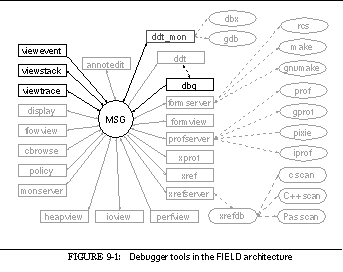
The dbg interface can be seen in See The dbg debugger interface. The window is divided into five parts. The top row contains a pull-down menu. The first button on the menu, Buttons , is used to control the definition of the user-defined buttons and to provide a Quit button for the window. The remaining three menus are the standard edit menus from the BWE editor EDT.
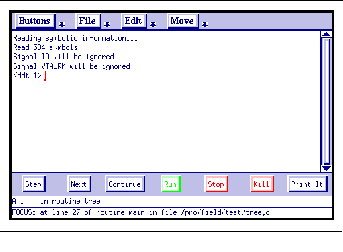
Below the menu bar is the textual interface, provided by the EDT editor running in transcript mode. The transcript reflects a UNIX psuedo-tty talking to the ddt process being run. An EDT transcript editor for a pseudo-tty provides a scrollable window with the complete session history and lets the user do read-only edits anyplace in the session. Any insertions or characters typed, however, are sent on the pseudo-tty to ddt . Any output from ddt (including echoed characters) is put at the end of the transcript window.
Below the textual interface is the panel of user-definable buttons, which are displayed using the panel features of the STEM package of BWE (see See Menuing)
The final two components of the dbg window are the two status lines at the bottom. The first shows the current debugger location if the program is halted or tells the user that the program is running. The second tells the user the current debugger focus, i.e. the first line that would be listed if the user typed the debugger's list command with no arguments. The status windows are maintained by monitoring messages from ddt .
Dbg 's command buttons are defined by information on how they are displayed and what they do. The display information includes the name and the color of the button and whether the button is a normal button, a run button (highlighted when the program starts running), a continue button (highlighted when execution continues), or a toggle button (highlighted when it is turned on).
Each button operates by sending an appropriate string through the textual interface to ddt. The string is defined by a pattern with embedded control sequences that permit the command to be sensitive to the current context and to take parameters. The valid sequences are shown in See Escape sequences for buttons. In addition, the up-arrow character can be used to insert a control character ( ^A ) or the user's interrupt key ( ^? ).
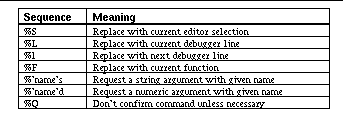
Normally, if the string contains any escape sequence replacements, a dialog box such as shown in See Query dialog box for debugger button is generated to let the user enter or confirm the values the debugger will use in the command. If the %Q option is specified in the string, this dialog box appears only if argument is explicitly requested or if the value to be inserted cannot be determined.
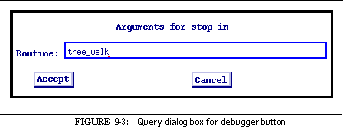
Toggle buttons are defined with two command strings. The first is sent when the button is off, as it is initially. After this command is sent, the button is highlighted to indicate that it is on. Pushing the button again sends the alternate command string and turns the button off.
The basic set of buttons is defined in the standard AUXD resource file for dbg . These can be edited and additional buttons can be defined interactively using the Buttons menu, which provides commands to remove a button, add a button, and change any properties of an existing button. Each of these commands pops up an appropriate dialog box to handle the interaction. See Dialog box for editing a debugger button shows the dialog box for editing the Print It command.
Commands are also provided to store and reload the buttons definitions. Current definitions can be stored either locally in the current directory or globally in the user's home directory, in either case, in the file .dbgbtn . By default, when dbg starts it first considers the buttons in the AUXD resource file and then searches for a local .dbgbtn file if one exists and a global .dbgbtn file otherwise. If either is found, the buttons defined there are used for the given window. Otherwise the default buttons given in the resource file are used. The Buttons menu also contains Default and Reload buttons to reset the button definitions: Default causes the button definitions to revert to the resource file definitions, and Reload uses the initial set of buttons.
The resource file also allows the user to set global properties of the dbg front end. These include the window title, the font used for user buttons, and the number of buttons per line. In addition, it lets the debugger interface pop up a dialog box containing an appropriate message if the program halts due to an error. We found this useful for novice programmers who find the screen too active and lose context when their program aborts.
.The debugger interface interacts with the ddt debugger primarily through the textual interface, and sometimes through the message server. Message-based interactions are used both for control of the status line display and for debugger interactions that cause creation of a dialog box. The status display uses the DEBUG FOCUS and DEBUG AT messages from ddt to determine the contents of the two status lines in the window.
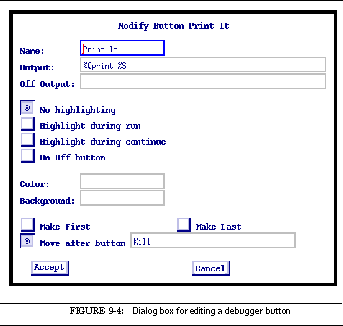
The interface monitors DEBUG NO_SYSTEM messages from the debugger to pop up a dialog box that lets the user enter the system name interactively rather than through the debug command. This also ensures that commands are sent to ddt only when there is a valid system. The DEBUG SYSTEM message indicating a valid system has been found is then used to place the system name in the window's title bar. The DEBUG PICK message is used to pop up a dialog box with the different choices when the user gives the debugger an ambiguous name.
The debugger interface also monitors the DEBUG RUN , DEBUG EXIT , DEBUG CONTINUE , and DEBUG ERROR messages from the debugger to keep track of the current status of the process being debugged. This status is reflected in the status windows by a message indicating that the program is running and in the buttons window by highlighting run and continue buttons. In addition, the DEBUG ERROR message can be used to display a dialog box indicating that the program aborted.
In addition to the primary debugger interface described above, FIELD includes display windows for information associated with debugging. To provide these windows, we identified a target set of applications and then built a single package that could provide the needed functionality.
The target applications included a stack viewer to display the current run-time stack, an event viewer to show the current set of breakpoints, and a trace viewer to show the current values of variables being traced. All the displays are textual, line-oriented viewers using an EDT read-only editor window for output. See Event viewer display shows an example of an event display consisting of a menu bar and the textual display region. The menu contains the three standard editor menus and a View menu for local buttons. The View menu provides a Quit button, a button to set the system being monitored, and additional buttons depending on the type of viewer.
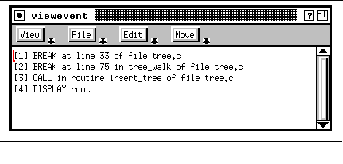
These viewers assume that the information they need is available in messages and that their job is to display it. The common package is a message-monitoring tool that listens for messages until it gets a relevant one and then updates its display.
The different instances of this tool are defined in an AUXD resource file. Each instance is described by a set of messages along with information on how to map these messages into lines of text.
Messages are organized into classes, each of which is used to generate one line of the resultant display from a single message generated by the message server. Associated with the class are a message pattern to create a line of text, a message pattern to remove a line of text, a message pattern to indicate the last line of the display, and formatting information to convert the create message into a display string.
The different message patterns use the message server's pattern matcher to identify arguments. Six arguments can be defined. These are extracted from the pattern and can then be used in the formatting string. The first argument, used to order the messages, is assumed to be a key (either numeric or string) and messages are placed in the window in the order of this key. A message with the same key as an existing message replaces the corresponding line on the display. The sixth argument. if present, is assumed to be the system name. All the viewers can be customized to accept messages for only a given system or for all systems.
The formatting information specified in the resource file lets the data from the incoming messages be displayed appropriately. The information is defined as printf -style strings that contain argument specifications. For example, %2s indicates that the second argument from the pattern match should be inserted as a string value.
A viewer type is defined by specifying a window name, a set of message classes, and additional options. The options include a message to be sent when the window is opened to get an initial display and a message that causes the window to be cleared. The latter is used by the event viewer to clear itself if the debugger goes away and by the stack viewer to invalidate its current display when a new set of stack messages is sent. The definition can also provide additional buttons for the View menu.
The event viewer, viewevent , looks for one class of messages, those defining debugger events. The message pattern
DEBUG EVENT ADD %6s %1s %s %s %s %2s
adds an event to the display. The key ( %1s ) is the debugger event number. The display string for an event is " %2s ", indicating that the information string describing the message passed from the debugger is what should be displayed. The message pattern
DEBUG EVENT REMOVE %6s %1s %s %s %s %2s
removes the corresponding event from the display. When the event viewer starts, it requests that the debugger broadcast all events for all files. The result is a display of current debugging events using the event strings created by the debugger, as shown in See Event viewer display.
The stack viewer viewstack, shown in See Stack display viewer, monitors debugger messages concerning the stack. These include a message indicating that the stack display is starting, a message for each frame of the stack indicating the level and what is called from where, messages for each local variable of a frame, messages for each global variable of the program, and a final message indicating that the set of messages is complete.
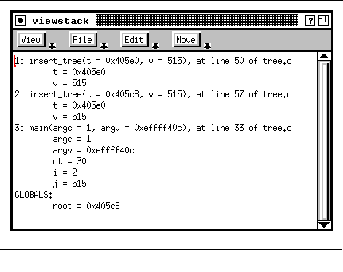
The stack viewer looks for several debugger messages. The message pattern
detects the initial message and is used to invalidate the current display. The remaining messages fall into four classes. The first class describes a frame on the stack using the message pattern
DEBUG WHERE %6s %1s %2s %3s %4s %d %5s
and the format string " %1s: %3s(%5s), at line %4s of %2:s ". The colon in the file format ( %2:s ) indicates that only the tail of the file name should be displayed. The second class describes a stack frame for a function compiled without debugging information. This uses the message pattern
DEBUG WHERE %6s %1s * %3s 0 %2d %s A
and the format string " %1s: %3s(%5s), at 0x%2x ". The third class describes the message sent at the end of the stack display. This uses the message pattern
DEBUG WHERE %6s %1s * * 0 0 * G
and the format string " GLOBALS: ". The final class is used for both local and global variables. This uses the message pattern
DEBUG WHERE_DUMP %6s %1s %2s %3s
and the format string " %s2 = %3s ".
Numeric keys are used in the messages to handle local variables. Each stack frame has a depth value associated with it, and each local variable is assigned by the debugger a key value that is this depth plus a fraction (i.e. a decimal value between this level and the next level). Global variables are assigned values beyond the maximum depth of the stack.
The stack viewer provides an Option button on the View menu by which the user can control what messages are sent by the debugger for stack tracing and hence what is displayed. The user can specify a fixed number of levels at the top and bottom of the stack as well as whether global and local variables should be provided. The result is passed on to the debugger and takes effect the next time the stack is displayed.
The third display using the view package, viewtrace , shows the values of all variables being traced or displayed by the debugger. This viewer provides additional buttons on the View menu that let the user add or remove variables from the display using dialog boxes. A variable is added by creating an appropriate MONITOR, WATCH, or DISPLAY debugger event. When a variable is removed, the corresponding events are deleted. The viewer monitors one message from the debugger using the pattern
DEBUG VALUE %6s %2s %3s %1s %4s
and the format string " %1s = %4s ". This message is sent whenever the debugger detects that a value being traced has changed. It uses the variable name as the key for sorting and replacement. See Variable trace viewer shows an example.
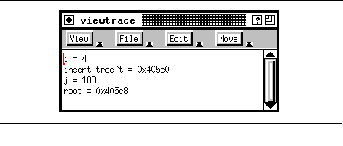
The final FIELD tool that is part of the debugger interface is a separate window for handling program input and output. Normally, when the UNIX debugger is run the program and debugger input and output are interspersed. The flexibility offered by the message server let us create a tool that puts up a transcript window tied to a pseudo-tty and have the debugger use this window for program input and output.
The sample user input-output viewer shown in See User input-output viewer contains a marker region on the left and an EDT transcript window on the right. The menu bar contains the standard editor buttons for a transcript menu.
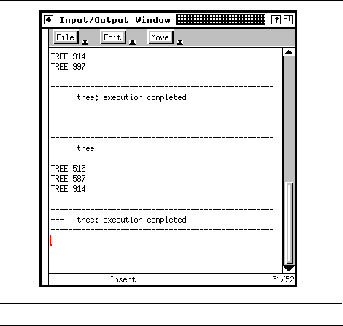
Each input-output viewer is attached to a particular system. When a viewer is first brought up, the set of currently active systems is considered. If only one such system exists, the window is assigned to that system; if none exist, the window remains unassigned. If there are more than one, then the user is asked which system's input and output should be placed in the window.
The input-output viewer also monitors debugger messages related to changing systems. When the DEBUG FINISH message is received, any viewer on the specified system is marked as unassigned. When the DEBUG SYSTEM message is received, the viewer searches for an unassigned window and assigns it to the given system. This lets the user change systems in the debugger or bring up a user input-output viewer before the debugger is started.
Whenever the debugger reinitializes itself for a system, the input-output viewer sends the message
DDTR SET <system> USER_TTY <pty_name>
to the debugger. This causes ddt to automatically redirect program input and output to the pseudo-tty associated with the transcript window unless the user requests a different redirection.
In addition to normal program input and output, the input-output viewer adds information to the transcript window to indicate the start and stop of each invocation of the program. This information consists of a row of dashes, a message line, and another row of dashes, as seen in See User input-output viewer. The message contains the system name when the program starts and the system name and termination status when the program exits. These displays are triggered by the appropriate messages from the debugger.
The input-output viewer can also alert the user when the program is requesting user input and move the mouse to the center of the viewer whenever a read from the user is attempted. The marker region to the left of the transcript is used for alerting. It is set to the background color when no reads are pending and to a highlight color when a read is being done.
The logic to determine when a read is active is twofold. First, the input-output viewer keeps track of the state of the program by monitoring the messages DEBUG START , DEBUG STOP , DEBUG AT , and DEBUG CONTINUE . A read can be active only when the user program is actually running. The input-output viewer also monitors when the read routine is called for the standard input tty. Highlighting is done only when the read routine is being used and the program is running.
We have tried various ways to check when the program is actually reading from standard input. The first was to set breakpoints in the start and stop of the system read routine and send a message indicating what file was being read for what system using the program facility of the debugger. This requires knowledge of the internals of the read routine and doesn't handle the situation where the user redirects input from a file. A second way was to create our own version of the system read routine that checked explicitly for a read from a standard input tty and then called a routine to mark the start of the read and a second routine to mark the end. The input-output viewer set update points at the start of these two routines to determine when the read began and ended. This required binding the application with our own library and did not work in general.
The approach in the current student version of FIELD uses the facilities offered by the monitoring library and service described in See EXECUTION MONITORING. The monitoring messages
mark the start and end of the read operation on standard input; these messages are controlled by the parameter TTY set in the MONITOR environment variable.
The cross-reference database described in See Cross-Referencing in FIELD provides a convenient source of information about a system. This information is used in several of the tools of the FIELD environment, including the annotation editor described in See The Annotation Editor and the call graph and class hierarchy browsers described in the next two chapters. This chapter describes the user interface that FIELD provides for direct access to this database.
While we wanted to provide a general interface to the database information, we did not want to force users to learn a sophisticated query language such as SQL since most users would be put off by the task of specifying the query. Most queries that are going to be asked are relatively simple, such as "Where is variable foo used?" Even when the user needs more specific information, it is generally sufficient to ask a general query and let the user pick out the relevant information from a well-formatted result, since the amount of information involved is generally not overwhelming. On the other hand, it is difficult to know a priori what queries a programmer or set of programmers will want answered. This makes it difficult to put together a simple interface to let these queries be asked very simply and naturally.
As an alternative to these two extremes, we chose an approach in which arbitrary queries are permitted but are specified in a resource file and presented as forms to be filled out. Defining the queries in the resource file means that once the system is running only the predefined queries are accessible. However, each programmer or group can customize the available queries to suit their particular project or individual needs. Using predefined queries in this way lets us provide a natural interface that is easy and attractive to use.
The result of this design process is the simple interface of the xref front end that communicates primarily with the cross-reference server, as shown in See The xref interface in the FIELD architecture. It has three basic functions: defining queries based on user interaction, processing these queries by sending them to the cross-reference database and interpreting and formatting the output, and allowing the user to interact with the display.
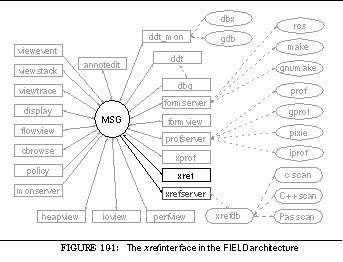

The xref interface views a query as a set of fields. Each field corresponds to a value that can be specified by the user, output as a result of the query, or both. A query is presented to the user as a dialog box in which information can be entered for any settable fields. The query is constructed for the xrefdb database by requesting the fields needed for output and restricting the query to the AND of the Boolean conditions associated with the fields for which the user provided information.
The resource definitions specify the set of fields for the query. Each field is given a name, a data type, the information required to relate the field to the database for both input and output, information for displaying the result, and a set of flags that determine how the field is used. Normally, fields for which the user provides input are omitted from the output. This can be overridden by either forcing the field to be included in the output or allowing the user to control whether the field should be output as part of the dialog.
Fields can have integer, string, file name, Boolean, enumeration or multiple-value types. File-typed fields are treated as strings for input but are converted to relative path names to simplify the output. Enumeration type fields define their enumerants as part of the resource file and are presented to the user as a single button on which each user click moves it to the next state. Multiple-value types are enumerations in which the user can choose a set of possible values and are presented to the user as a set of selectable buttons. Boolean inputs can be True , False , or Either . The resources also allow the specification of an initial value for each field. In addition to a constant value, this can be the string " Selection " to indicate the current editor selection, or one of the strings " File " or " Function " to indicate the current debugger file or function.
The output options allow Boolean values to be displayed as arbitrary strings that are present if the value is True and absent otherwise, let multiple values be placed on a single line, and generally control the formatting of fields. These are used most effectively in the output of the Reference query, which asks for all references to a given name. The query returns the name, file, line number, and assignment flag from the reference relation for all matched names. As shown in See Reference query display output, the output groups these so that each output line contains the name, the abbreviated file name, and a set of line numbers each of which can be followed by an asterisk to indicate an assignment. The resultant compact representation is easy for the user to understand.
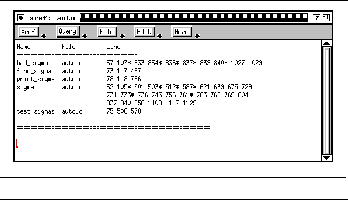
The xref interface presents a simple read-only EDT text viewer to the user, as shown in See Reference query display output and See Cross-reference query output. The display region shows the output of the user queries. Each output starts with the header line associated with the query and a single line of dashes and is terminated by a line of double dashes.
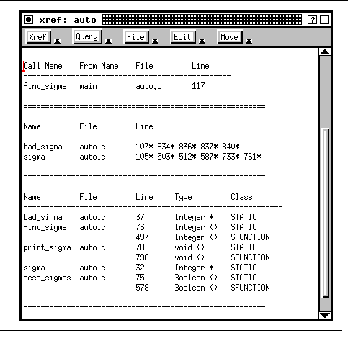
The menus provided by the interface include the three standard editor menus ( File , Edit , and Move ) as well as two menus specific to the interface. The Xref menu contains buttons to change and reload the system or directory being cross-referenced as well as a Quit button. The Query menu contains buttons for each of the resource-defined queries. Selecting one of these buttons causes the appropriate dialog box to be created and displayed. Once the user has completed the dialog, the interface formulates the query, sends it to the cross-reference database through the message server, gets the result from the database, and formats that result into the editor window.
The dialog box is generated by iterating through the fields of the query. A format string is created for each field that can be used as input based on the type of the field and the settings of the various resources for that field. These format strings are concatenated to create an appropriate dialog box definition for the BWE component STEM. See Cross-reference query dialog box shows the dialog box for the standard member query. Here the user is asking for all public members that are virtual and inline.
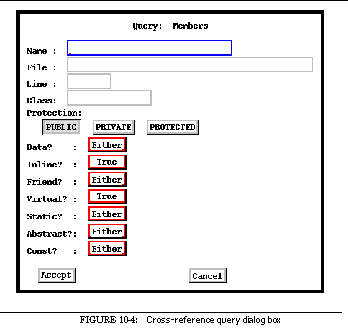
Once the dialog box is accepted by the user, the interface again iterates over the fields to construct the query. This is done in two steps. First, the list of output fields is computed by considering whether the value is needed for each field. Second, the qualifying expression for the query is generated. Each field that can be used for input is considered in turn; if a value was specified for that field, then an appropriate local expression is created. The actual query expression is formed by ANDing these local expressions.
The result of the query is returned from the cross-reference database system in a file. Each line of the file contains each of the fields requested separated by delimiters. This format, however, while convenient for the database system and for interpreting the output, is not what we want to present to the user. As a result, the interface formats the output.
The formatting involves tabulating the output into fixed-width columns, eliding duplicate information to make the display more readable, combining multiple entries into a single entry, and combining multiple fields. The output fields are presented in the order in which they are defined in the query. The database query forces the result to be sorted by these fields as well. This lets the formatting routines remove field values for an output line that are the same as those of the previous line. In See Cross-reference query output the bottom query shows entries that share the same name and source file but differ in the declaration line where the second entry name and file fields are left blank.
If the field is defined as outputting multiple values, then multiple values of the field can be combined on one line. In this case, up to ten values of the field are output on one line if all previous fields values are identical, as is shown in See Reference query display output. If the multiple field is not the last field specified, then the value for it and all subsequent fields are concatenated on the line. In the Reference query, the asterisk indicating the assignment field is output with the line number field.
The cross-reference interface interacts directly with the cross-reference server and indirectly with other tools. Direct interaction allows the interface to load a database, force it to be updated when the user requests an explicit reload, and issue queries. The indirect interaction from other tools involves getting default values for fields based on the last file and function specified by the debugger and the current editor selection.
The interface also supports messages sent to other tools based on user interaction with the query output display. The idea here is that the user should be able to click on any portion of the query output and see the corresponding source either in the editor or in one of the graphical views. When the user clicks on the query display, the interface first determines what is referred to and then generates the message
XREF USERFOCUS <file> <line> <button>
The file and line fields identify the location being referred to and the button field identifies the mouse button (LEFT, MID, or RIGHT) used in the selection. Including the button field allows other tools to differentiate on the basis of the type of user selection.
The only difficulty in implementing this interface was that information on past queries and where their results appear in the editor transcript is not saved by the interface. Thus, the interface makes certain assumptions about the query output and determines the file and line number simply by looking at the output text. In particular, it looks at the text line selected by the user. It first attempts to fill in elided fields of this line by backing up in the transcript file until it finds a line without elided fields. It then internally constructs a line in which the elided fields are replaced with their actual values. Next it assumes that the first number on the line is a line number and that the field preceding this number is a file name; this is logical since locations are generally presented in file-line pairs. This is used to identify the file to use and the default line. Before using this line, it checks the character position of the user's selection. If this is in a digit string, that string is assumed to be a line number and it is used instead. Finally, if the file name is a relative path name, it is made absolute by prepending the current working directory.
One of the first visualization tools we wrote for the FIELD environment was the call graph browser flowview . Its purpose was to demonstrate that program visualization was practical for large systems. We wanted to show that large call graphs could be displayed graphically and that graphical browsing and interaction with such a display was worthwhile.
The visualizer uses the cross-reference database to get the information. It makes two simple queries to the database system. The first returns all the functions defined within a system to provide information about each function including the file and line at which it is located. The second query returns all the call links stored in the database.
The visualizer works by first building an internal data structure that represents the call graph using the information returned from the database. This data structure organizes the functions into a hierarchy based on files and directories. The actual display is generated with the BWE component GELO by traversing this internal structure. The visualizer then allows the user to interact with the GELO display and takes appropriate action. See Flowview in the FIELD architecture shows flowview in the overall FIELD architecture.
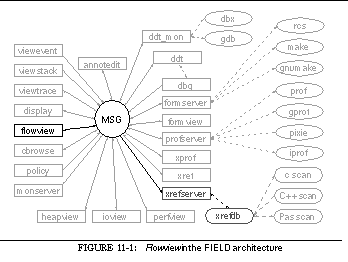

The key to displaying a large call graph on the screen is eliding irrelevant information. Flowview offers different ways to do this: selectively displaying or suppressing individual items or groups of items, restricting the display to nodes reachable from a set of selected nodes, user-defined groupings of nodes, and the use of hierarchy.
The most important concept in organizing the call data is the use of a hierarchy for representing functions. Each source file containing functions is viewed as a parent node for the functions it contains. Source files are in turn viewed as child nodes of the directory the file is stored in. Directory nodes are considered children of their parent directory. This allows us to create a hierarchy starting with the UNIX root directory / and containing all the program-defined functions. This is augmented by viewing this directory as a child of a root node and adding to that root node a node labeled *SYSTEM* containing all functions that do not have an associated source file. A simple example hierarchy is shown in See Sample directory-file-function hierarchy.
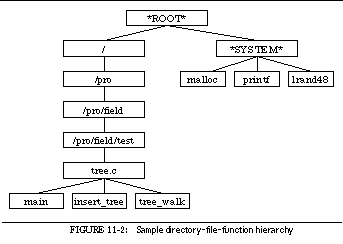
Once such a hierarchy is set up, it can be used for browsing. The internal data structure of the browser supports two flags for each node. The first flag, ignore , indicates that this node and everything below it in the hierarchy should not be displayed. The second flag, expand , indicates that the children of this node should be displayed instead of the node itself. By setting these flags appropriately, the user and the system can modify the display so that only relevant information is displayed. For example, See FIELD call graph shows the call graph of the combined user interface tools of FIELD, representing about 200,000 lines of code.
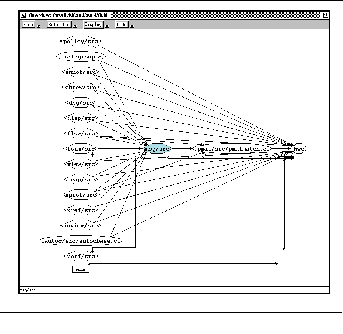
See FIELD call graph views most of the system at the directory level. Each directory node is represented as a hexagonal box. The directories on the left are the various components of FIELD: the policy server, the annotation editor, the class browser, the debugger, etc. These correspond to the corresponding source directories. The directory on the right, labeled bwe , represents the complete directory hierarchy of the BWE toolkit (over 100,000 lines of code). In addition to directory nodes, the figure shows file nodes displayed as ellipses. File nodes appear in the figure for two reasons. First, we have expanded the directory representing the main program and utility routines to yield the file object for fieldgroup.c at the upper left. Second, the system automatically expands any hierarchy node that has only a single child. Thus the directory nodes for the pattern matcher and the autocommenting package have been replaced by their corresponding single file node. Finally, the figure also contains at the lower left an instance of a function, main . To get this we expanded the file containing the main program and then indicated that all functions from this file other than main should be ignored.
The important point about this picture is that it makes visible the structure of the FIELD implementation. From the picture one can see that FIELD consists of a set of tools that talk to the message server and not to one another. The message server and some of the tools use the pattern matching facilities. All the tools as well as the message server and the pattern matcher make use of the BWE toolkit. Moreover, this view of FIELD was generated by the system with only a little user interaction.
The starting display for flowview makes use of the hierarchy. The system automatically creates an initial display with a small number of nodes. It does this by marking all nodes as unexpanded and then, from the root of the tree down, expanding the tree one level at a time so that at most ten nodes are displayed. See Initial display of the FIELD call graph shows the top level display for FIELD.
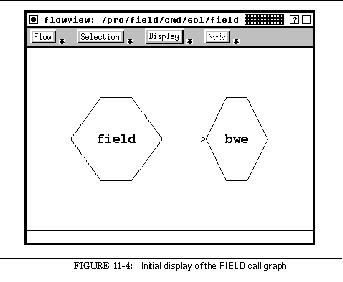
The grouping hierarchy based on files and directories works fine for most applications. When we expanded the environment to C++, however, we found that other groupings would also be useful, such as combining member functions on the basis of either their name or their class. There are times when the user wants to view all methods of a given class as a single node. Similarly, there are times when it would be appropriate to view all methods with the same name, for example all print methods, as a single node.
The call graph browser supports both of these groupings as special cases of name-based groupings. The system defines these groupings as a pair of patterns. The first is a regular expression that specifies what names should be considered as part of the group. The second is a pattern using the message server pattern matcher that specifies (with %1s ) what part of the name forms the group. If no regular expression is present, then all names that match the other pattern are assumed to be applicable. The grouping of all methods by their class is defined using the pattern
while the grouping of all methods by method name uses the pattern
Both of these are restricted to names of the form Class::Method. All function nodes that do not match the patterns are placed in a default group.
These groupings can be defined either through the AUXD resource file or interactively by the user. Moreover, the user can dynamically change the current grouping or revert to using the directory hierarchy.
Name-based groupings are implemented by creating new hierarchy nodes when a grouping is selected. Each function node is first checked to see what grouping it appears in. If it belongs to a grouping, then the appropriate grouping node is created if necessary and the function is added as a child of that grouping. The grouping nodes are in turn placed in the directory-file hierarchy at the lowest common ancestor of all their children. See Class groupings used in a call graph display uses class groupings to show a simple C++ program.

The user can control what nodes are displayed in the call graph by setting two flags, expand and ignore, on each node. The expand flag is used to control hierarchical display: when set, the corresponding node displays its components rather than itself. The user can explicitly request that individual nodes be expanded or compacted. This interactive mechanism has proven sufficient for hierarchical browsing.
The ignore flag lets the user selectively indicate nodes that should not be displayed. The system allows the ignore flag to be set either explicitly, by specifying a node or set of nodes, or implicitly, on the basis of distance from selection. To differentiate between explicit and implicit settings, the system actually maintains two separate flags and ORs them to determine if a node should be displayed.
The explicit ignore flag is generally set by the user, either by clicking or through menus. It is used internally to eliminate system functions from the initial display by marking the node *SYSTEM* as ignored.
A more general mechanism lets the user provide regular expressions describing what should be displayed. The user may specify a pattern of nodes either to include or to exclude. Each of these patterns can be applied to functions, files, directories, or groups. Moreover, the patterns can be applied incrementally or directly. When applied incrementally, nodes that don't match the pattern are ignored; when applied directly, nodes that don't match the pattern are either excluded or included, as appropriate.
The browser supports the implicit ignore flag by letting the user indicate that the display should be restricted to the current selected nodes. (If no nodes are selected, the function representing the main program is used.) The system then computes the backward and forward distance of each other node in the display from the set of selected nodes. Then the system includes in the display only those nodes that are selected or are within a user-specified distance in either the forward or the backward direction.
We generally use this facility to show the complete call graph induced by the selection set, considering all functions that can eventually invoke one of the selected functions as well as all functions that can be called by the functions directly or indirectly. See Local call graph display shows the local subgraph for the function first_class from the call graph shown in full in See Call graph animation display. Setting the depth parameter to one would show the local one-level call graph, i.e. just those functions that explicitly call a selected function or those functions called by a selected function.
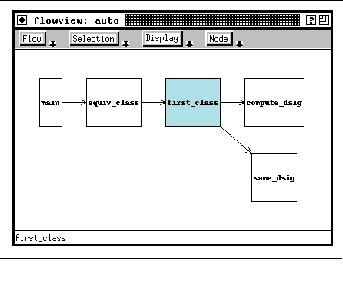
Another problem that arose primarily with C++ is that the static call information contained in the debugger is not complete. Missing from the information are calls for which the target cannot be determined statically, including those for which the target is computed or stored in a variable and, for object-oriented languages, virtual calls in which the target is dependent on the type of the arguments.
Flowview detects dynamic calls by monitoring trace information from the debugger. Each function entry message received by flowview is decoded and compared against the information obtained from the database. If the message indicates a call not in the database and not previously seen, the browser creates a new entry in the internal data structure. The set of dynamic calls thus found is automatically saved after new calls are found in the file .<system>.flowdyn in the current system's directory. Whenever the internal structure is recomputed, this file is read, if it exists, and the dynamic calls it contains are added.
The interface supports dynamic calls by providing user options to control their use and by displaying dynamic call arcs using dashed rather than solid lines. A menu option is provided to let the user clear the set of accumulated dynamic calls. A resource file option is provided to enable or disable checking for dynamic calls. This is useful because finding the functions and the call arc associated with each incoming trace message can be time-consuming.
The call graph browser provides a wide range of options to let the user control the format and contents of the display. Defaults for these options are set through resource files; menus and dialog boxes are used to change the current presentation.
User interaction with the display goes beyond just setting the display properties. By clicking over appropriate nodes with the mouse, the user can pick the current set of selected nodes which are then highlighted and can form the basis of which items to display, and can selectively compress, expand, and ignore nodes. The mappings, which are shown in See Mouse actions in the call graph browser, are designed to be consistent with the rest of the environment. The left button selects a node, the middle button shows information about a node, and the right button performs an alternate selection. Selecting a node that is already selected causes that node to be expanded or compacted as appropriate.
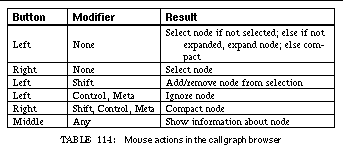
The user can also interact with the browser via the menus. The Node menu lets the user expand, compact, or ignore all the nodes in the current selection set. The Select menu offers a variety of techniques for setting the current selection: the Set Function button lets the user specify a function by typing in its name; the Clear Selection button removes the current selection; and the Set Selection button allows the user to browse over a sequence of dialog boxes listing, hierarchically, all the nodes in the display.
When a node is selected with the middle mouse button, a dialog box pops up containing information about that node, including the full path name, the line number where the function was defined, the number of children if it is a group node, and a count of the number of input and output arcs. The browser can also display such data through an information window. This window is selected by the Info Window button on the File menu and consists of a read-only editor that displays strings created by the browser. Once this window exists, whenever the user selects a node, information about that node is displayed. This information contains the data put in the information dialog box and a list of each child node for groups and of each call site for function nodes. See Call graph information window shows a sample of the call graph information window.
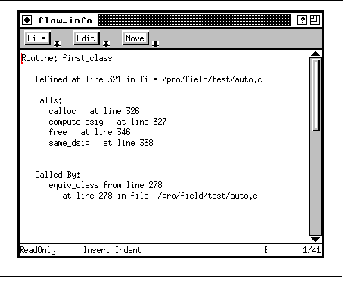
This information window is maintained by adding the appropriate text at the end of the editor window the first time a node is selected. The starting line for this text is saved in the browser and the editor is forced, under program control, to scroll so that the first line of the display is at the top of the screen. If the same function is selected a second time, then the editor is repositioned so that the previously added information is shown starting at the top of the display. This strategy allows us to compute the information only as needed and to handle large numbers of selections over the course of the run.
Flowview also supports interaction with the information window. When the user clicks on the displayed information, the browser interprets the click by reading the text in the editor at that line and checking how and for what node it was output. Clicking on a reference to the line in the definition causes the node to be selected. Clicking on a reference to a parent or child selects that node. Clicking on a call site makes the browser send a message causing any available editor to position itself at the corresponding line.
In addition to providing an interface for browsing over a static call graph, flowview makes possible an animated display of the call graph as the program executes. This is done by monitoring trace messages from the FIELD debugger and highlighting the display appropriately.
To determine the current execution state of the system being displayed, flowview monitors messages from the debugger, including the messages DEBUG START , DEBUG STOP , DEBUG CONTINUE , and DEBUG ATSOURCE . This lets the browser know if the program is running or has stopped. In addition, it monitors the function entry and exit trace messages
DEBUG ENTER <system> <file> <function> <line> <from_function>
DEBUG EXIT <system> <file> <function>
It uses the information contained in these messages to maintain an internal view of the run-time stack of the system as it executes. This internal representation is used to control highlighting of the display.
Two different animation styles are provided. Both highlight in red the currently executing routine. The more detailed one also highlights in green nodes the functions that compose the call stack. If a function node is not present but an ancestor of it in the function-file-directory hierarchy is, the ancestor is highlighted accordingly (with red taking precedence over green). See Call graph animation display shows an intermediate step in a call graph animation.
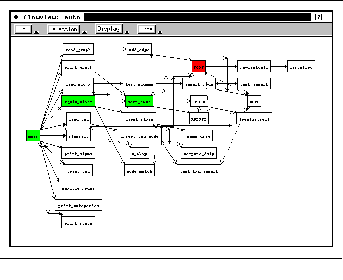
Trace messages for function entry and exit are not normally sent by the debugger. To have them sent, the user must request tracing of the functions using the debugger's trace or traceq commands. Because this is inconvenient when a large number of functions are being displayed, flowview provides its own tracing interface. The user can set the trace mode either through resources or by clicking on the Trace Display button on the File menu. When tracing is invoked, the browser automatically sends the appropriate commands to the debugger to turn on tracing for all displayed routines. These commands are reissued whenever the debugger reinitializes, the user changes the trace mode, or the display is reset to show a different set of functions. Tracing is removed automatically when the browser exits.
In addition to interacting with the debugger for execution animation, the call graph browser uses messages to correlate nodes in the call graph with selections in the environment. This correlation is two-way.
When the user selects a node in the call graph, the browser sends one of the messages
FLOW USERFOCUS <file> <line> <button> FUNCTION <function>
FLOW USERFOCUS <file> <line> <button> FILE
FLOW USERFOCUS <file> <line> <button>
FLOW USERFOCUS <file> <line> <button> CALL
The button argument is LEFT, MID, or RIGHT if the selection is made with the mouse, and NONE if it is made indirectly through menus. The selection can be made in either the display window or the information window. The auxiliary information depends on the type of node selected: clicking on a function identifies the first line of the function; clicking on a file identifies the first line of the first function in that file; clicking on a directory identifies the first line of the first function of some file in that directory. Clicking on a call arc sends a message of the last form with the line number of the call. All these messages are used by the annotation editor to display the corresponding source.
The browser also responds to messages sent by other tools to set the focus. In particular, it looks for the messages
<source> USERFOCUS <file> <line>
DEBUG FOCUS <system> <file> <function> <line>
A message of the first form is ignored if the source is FLOW (i.e. is sent by the browser itself). Otherwise, the browser determines if the file is part of the system being displayed and, if so, determines what function if any corresponds to the given line. If a function is found, it is automatically selected. The debugger message, if it applies to the system being displayed and if the function can be found in the given file, cause the corresponding function node to be selected. In both cases, selecting the node automatically causes it to be displayed, by clearing its ignore flag and that of its parents and forcing its parents to be expanded.
The call graph browser also interacts with the environment by automatically updating its display whenever the underlying cross-reference database is updated. To do this it monitors the message
which is sent by the cross-reference database after a system reload. When this message is received, the system rereads the database and resets the display.
The FIELD class browser, cbrowse , was developed to display additional information about object-oriented programs. It is similar to the call graph visualizer in that it takes the data to be displayed from the cross-reference database using the message server and uses the BWE package GELO to manage and lay out the display.
The primary challenge in creating the class browser was to provide as much information as possible within the limited screen space. We attempted to provide encodings for all the information requested by our users about classes, the class hierarchy, class methods, and class data. At the same time, we kept in mind that the display had to handle realistic programs with hierarchies of hundreds (or thousands) of classes. We thus attempted to use many of the view-simplification techniques developed for the call graph visualizer. The place of cbrowse in the overall FIELD environment can be seen in See The class browser in the FIELD architecture.
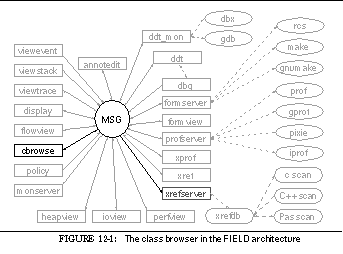

The class browser displays as much information as possible about the class structure of the program. It starts with the classes themselves. To this it adds information about the fields and methods of each class, the class hierarchy, and other relationships between classes, such as friend classes in C++ or the client-supplier relationship.
The browser works by querying the cross-reference database and building an internal data structure that is used as the basis for constructing a display using GELO. The query interface between the browser and the database is fairly simple. The browser initially asks the database to provide all the information it has on the class , hierarchy , member , and member definition relations. If usage information is later required, the system queries for all tuples from the call relation or the client-supplier relation.
The internal data structure contains three types of nodes. The first represents a class. The second represents a member, either a function (method) of the class or a data element (field) of the class, and contains information from both the member and member definition database relations. The third type of node defines relationships between classes. Each piece of the hierarchy is represented as a node that points to the superclass and the subclass. Other relationships, such as friend classes, calls between class methods, and the client-server relationship described in See The client-server relation, are indicated by a node pointing at the from and to classes.
It is impractical to display a graphical class hierarchy containing several hundred classes and several thousand members such as that shown in See Complete class hierarchy for moderate-sized system. Instead of attempting to display everything, cbrowse initially provides a limited amount of information and then lets the user zero in on the information actually wanted.
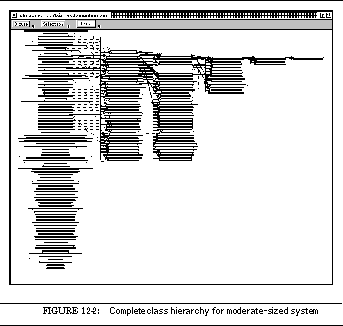
Localized information is provided in a variety of ways. First, the system allows the display of a local class hierarchy. The user can select one or more classes by clicking on the classes with the left mouse button, by entering the selection by name, or by choosing the selections from a sequence of dialog boxes. Once a selection is made, the display can be restricted to those classes that are selected or that are related to those selected. The degree of relatedness can be specified, i.e. the user can specify the number of levels of hierarchy to include. See Display for a single class shows the previous display restricted to the selected class PalmFileType .
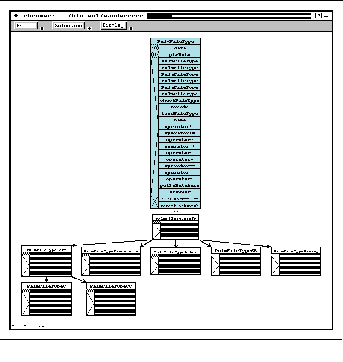
A second approach taken by the browser is to collapse hierarchies. Collapsing is done on a class-by-class basis. Each class that has subclasses is originally marked as unexpanded. When such a class is displayed, its graphical display has a visual cue indicating that it reflects a hierarchy. When a class is selected, it is automatically expanded. The user can control the expansion either globally, expanding all classes currently on the display, or locally, expanding or collapsing the hierarchy for a class by shift-clicking on it using the right mouse button. See Class display with collapsed hierarchy shows the display of See Display for a single class with the hierarchy collapsed.
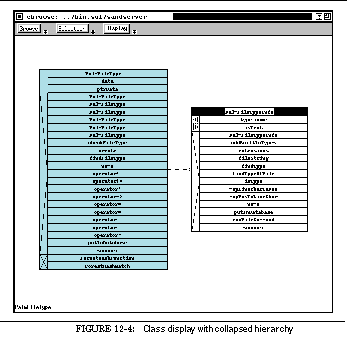
A third approach allows the user explicitly to exclude or include classes on the display. Certain classes are designated as system classes. The user can define these by providing, either in the resource file or interactively, a list of system directories. Any class defined in a file in one of these directories is considered a system class. The system does not display system classes unless explicitly told to by the user.
An alternative approach to specifying the classes to display is through regular expressions. The user can provide patterns for class names that should be included or excluded from the display. These patterns can be applied incrementally, either adding or removing classes from the display, or globally, specifying a new set of classes to be displayed.
A fourth approach to selectively displaying information is to elide the member information for classes. Normally a class display includes the name of the class as well as information about each of the class members. The browser allows classes to be displayed as a box containing only the class name. The abbreviated display can be used for all classes to provide a view of just the class hierarchy without member information, or only for those classes not currently selected. This allows the user to view specifics about the selected classes and while still seeing their location in the class structure. See Class hierarchy without member information shows the previous display with member information elided for non-selected classes and the hierarchy expanded.
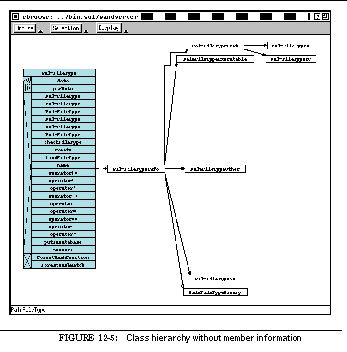
Member information can also be excluded selectively. Display options are provided to exclude either function or data members, to exclude all members not in the public interface, and to suppress inherited members. Any combination of these can be selected from either the menus or the display dialog box. Members can also be included or excluded using regular expression patterns. As with class patterns, these patterns can be applied either incrementally or globally.
The class browser uses a variety of visual codings to provide as much information as possible on the display. The display in See Class browser display showing visual encodings represents a portion of a simple hierarchy. Here the display has been restricted to show member information for two selected classes, EMPLOYEE_RANK and EMPLOYEE . These classes are shown with a light blue background. In addition, the member systemCost of the class EMPLOYEE has been selected and is shown with a green background.
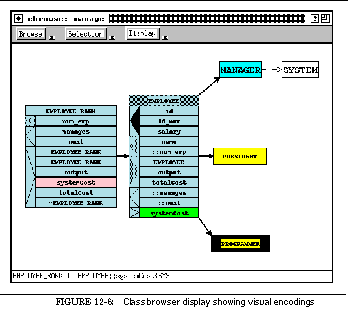
The display of a class has several options. The display of the selected classes in See Class browser display showing visual encodings is the standard one consisting of a title bar with the class name, a left margin denoting types of items, and a box containing the members. The title bar can be shaded to indicate different types of classes. The empty shading, seen here on EMPLOYEE_RANK, indicates a normal class. A hashed shading as on EMPLOYEE indicates that this is an abstract class, i.e. it has pure member functions and cannot be instantiated directly. A solid shading indicates that the class represents a hierarchy, as seen in the restricted display for the class PROGRAMMER .
The codings to the left of the members in a class display indicate the members protection and whether they denote data or functions. A box containing a left-pointing triangle indicates a data member, while a box with a right-pointing triangle indicates a method or function member. The shading of the triangle indicates the protection level: solid for private, shaded for protected, and hollow for public. Friend methods are indicated by a box with an X, as seen in See Class hierarchy without member information.
The members within the class can also be displayed in various ways. The standard display, seen in See Class browser display showing visual encodings, just shows the member's name, with inherited members being given a prepended " :: ". The browser allows full member names, in which case inherited members include the name of the class they are derived from. An additional box to the left of the member name can contain a brief coding about the member involving zero or more of the letters S for static, I for inline, C for constant, P for pure, and V for virtual. Finally, for selected classes, an additional box can be displayed to the right of the member name that contains a link for the member type specified as an arc leading to the class object of that type. The last two options can be seen in See Class browser showing member details.
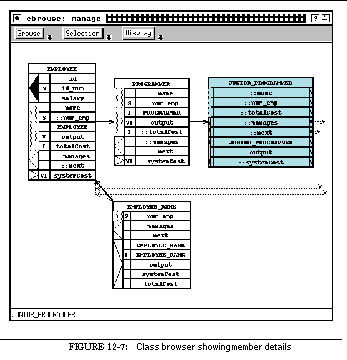
Finally, the class browser uses arcs to display a variety of information. Arcs representing inheritance are displayed as solid lines: public inheritance is shown by a thick line and private inheritance by a thin one. Virtual inheritance is indicated using an arrowhead with a bar, as opposed to a simple arrowhead. Arcs representing the friend relationship between classes are displayed as thin dashed lines. Dotted lines show links to member types, and thick dashed lines represent the client-supplier relationship. Finally, the call relationship, indicating that a method in one class may invoke a method in another class, is shown by thick dotted lines.
Another means for encoding information in the class browser is through highlighting. Highlighting is used to indicate the currently selected classes. On a color display, these classes are shown in light blue. In addition, the user has the option of changing the size of the selected classes: they can either be expanded by some constant factor relative to their original size or can be set at their default size, i.e. a size in which the text is displayed in a normal-sized font. The latter option is used in the display in See Display for a single class.
Highlighting is also used to display information about members. The browser allows a single member selection independent of the current class selection. The currently selected member is displayed with a green background, and the browser then uses different highlighting colors to indicate other members' relationships with the selected member. Member nodes representing inherited instances of the selected member are given a yellow background. If the member is inherited, its defining instance is highlighted with an orange background and any intervening instances are highlighted with a thistle (light purple) background. Finally, any members that the selected member redefines are given a pink background while members that redefine the selected member are given a cyan background. Member highlighting is also used to show execution on the class graph. If trace messages from the debugger indicate that a member is being executed, it is highlighted with a red background.
Member highlighting is most effective when the amount of information being displayed is small enough that individual members are visible. To make this information available on more complex displays, the browser moves the highlighting from the member to the class when a class is displayed without any members. Thus, boxes representing classes are displayed with background colors that reflect the relationship of the member of that class with the same name as the selected member. The example in See Class browser display showing visual encodings shows both types of member highlighting. The selected member is the method systemCost in the class EMPLOYEE . This member redefines the method systemCost in the superclass EMPLOYEE_RANK, as indicated by the highlighting of that member. It is overridden in the class MANAGER and inherited by the classes PRESIDENT and PROGRAMMER ; these latter facts are shown using class highlighting.
The various display options supported by the class browser are available to the user through menu buttons for the common choices and through dialog boxes for choices that change infrequently. In addition, the user can set up the initial display options using resources in the AUXD resource file.
In addition to using menus and dialog boxes, the user can interact directly with the class browser display. The browser supports different operations depending on the mouse button used, what type of object it points to, and what modifiers are used. The interface is summarized in See Mouse commands for class browser.
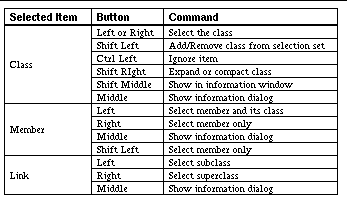
The browser also supports an information window similar to that provided by the call graph browser. This window displays all the information gathered by the class browser from the cross-reference database about a class and its members. This includes the file and line where the class and each of its members is declared and, in the case of members, defined. The user can request an information window by using the appropriate button on the File menu. Once the window is present, it displays information for a class whenever that class is selected. The window is also mouse-sensitive: the user can click on a reference to a class or member in the window to select the corresponding item. See Class browser information window shows an example of an information window.
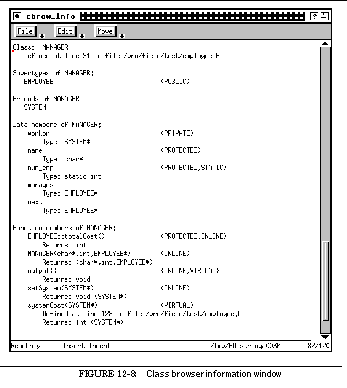
The class browser also interacts with the rest of the FIELD environment through the message server. It monitors DEBUG ENTER messages in order to highlight the currently executing member function with a red background. It also monitors location messages of the form
<source> USERFOCUS <file> <line> <button> FUNCTION <function>
where the source is not CBROW and uses the function and file fields to select a corresponding member function when possible.
In addition to interacting with the cross-reference database to get the necessary information, the class browser sends messages when the user selects an item. When a class is selected, the message
CBROW USERFOCUS <file> <line> <btn> CLASS <cls>
is sent. When a member is selected, the message
CBROW USERFOCUS <file> <line> <btn> MEMBER <cls> <member>
is sent. If the left or middle mouse button was used in making the selection or if the selection was made from a menu, the line number corresponds to the declaration of the member (i.e. in the class declaration). If the right mouse button was used, the line corresponds to the definition (i.e. the body of the method).
The first performance visualization tool integrated into the FIELD environment was xprof , a simple interface to the information gathered by the profserver described in See PROGRAM PROFILING. The initial implementation combined the two, so that the tool both gathered and displayed the relevant information. The current implementation separates these two tasks so that other tools can have message-based access to the performance data without the user running the visualization front end. This is shown in See The profiling interface in the FIELD architecture.
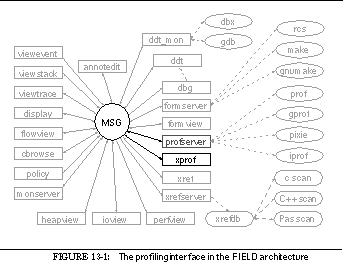

The performance visualizer provides a histogram of the accumulated performance information. It offers the user a variety of menu-selected options to determine what data is displayed and how.
See Sample profile histogram display shows a sample display consisting of a menu bar, a label window on the left, and a histogram window on the right. A scroll bar is added on the extreme right if needed. The Profile menu contains commands to change the system being displayed and to recompute or incrementally update the display, the Display menu gives the user options to control the display, and the Update menu allows the user to control when incremental updating is done (for profilers that support incremental update).
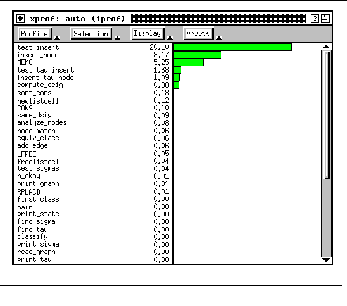
The basic display can be organized by files, functions, or lines. The standard display shows functions and their run time as seen in See Sample profile histogram display. The ability to merge functions into their corresponding file gives the programmer an overview of where the program is spending its time without having to look at the details. The ability to look at individual lines lets the programmer determine more precisely where the time is being spent. (Line number profiling is available only if the underlying UNIX profiling tool provides the data.)
The display can also be sorted either by the level being displayed or by its immediate outer level. Generally, as in See Sample profile histogram display, a function display is sorted by putting those functions that use the most run time first. However, to get a closer look at a function, the user will want to see the line display for just that function or the line information display organized by function. The latter is achieved in xprof by sorting the line display by function and maintaining the order of the line within that function, as shown in See Line display for profiling.
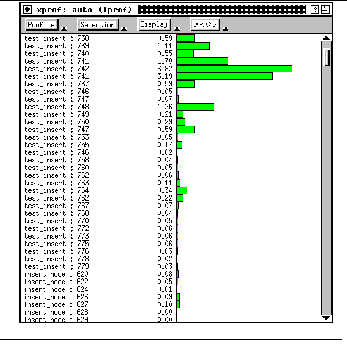
In addition to varying the display organization, the performance visualizer supports selected display. The user can request a display of only the contents of a particular file or function. This is most useful for understanding the behavior of a single function: by selecting the function on the display, the user can see the histogram of only the lines of that function.
Other display options can control the size of the histogram. The user has the option of making each line of the histogram a standard height (the size needed to display a readable text string in the left-hand window) and providing a scroll bar if necessary, or of squeezing the complete histogram into the display window and omitting labels that do not fit. The length of the histogram bars can be set to be relative to the total execution time or to the maximum execution time for an item of the type currently being displayed. In addition, the number displayed on the right of the left-hand window can reflect either a performance statistic (total run time or number of instructions) or the percent of the total statistic that this number represents. Next, the user can control whether the histogram should include all routines or only those routines with a non-zero statistic. Finally, the display can be labeled either with the names of the items at the level of the display or with the names of the group for these items. This allows a line-number display to be labeled by function names and is useful if the display is being squeezed into the window. See Full profiling display shows such a display.
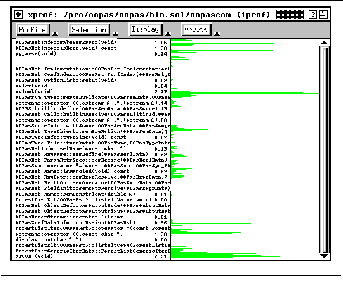
The profile visualizer supports user interaction both through menus and through direct interaction with the display. The user can click on a display line in the left-hand window or on a histogram bar in the right-hand window. The various options are shown in See Mouse actions in the performance visualizer. Clicking with the left button on a label causes the item selected to become the current item, which is then used to determine the display. If the current item is of the current display type or a parent of that type, then the components of that item are displayed in their natural order within the grouping. If the current item is of a finer type than the current display type, it is ignored. The result of these rules is a natural interaction with the display. Given an initial display by function, if the user selects a particular function, then the display shows just the lines in that function in the order in which they occur. If the user clicks on the tag for one of these lines, then the display reverts back to showing all functions.
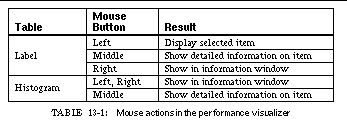
The profile visualizer can interact in two other ways. Like the call graph and class browsers, it supports both an information window and information dialogs. If the user creates an information window by selecting the appropriate button on the File menu, then whenever a node is clicked on with any mouse button, detailed information about that node is displayed in the information window. This information includes auxiliary information requested from the back end, such as the call profiling breakdown for that function from gprof . Clicking on a line with the middle mouse button causes similar information to be displayed in a popup dialog box, an example of which is shown in See Information dialog for profiling.
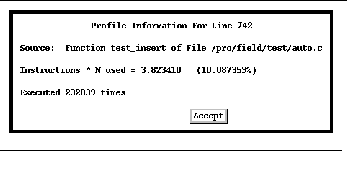
Second, the visualizer interacts with the rest of the environment. Whenever an item is selected, the visualizer sends the message
XPROF USERFOCUS <file> <line> <button>
with the file name, line number, and button of the click. For a function or file item, the line number reflects the first line in the function or file. This message is used by the editors and the other browsers to display the selected item.
The final browser interface is a browser over the file-dependency data. This browser, formview , servers as an interactive graphical front end to the formserver utility described in See CONFIGURATION AND VERSION CONTROL, and hence to both configuration management and version control.
Formview is similar in many ways to the previous browsers. It collects its data from other tools through the message server, it provides facilities for easily eliding or selecting the data of interest, it allows both global and localized views, it offers a variety of information through visual encodings, and it permits user interaction with the display. However, the browser gets its data from the formserver utility rather than from the cross-reference database. It lacks a notion of hierarchical decomposition. It provides facilities for actually building and maintaining systems. And, in place of a information window, it provides a window containing a transcript of the commands that have been executed. How formview fits in the overall architecture can be seen in See Formview in the FIELD architecture.
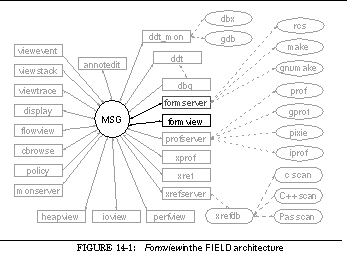

The formview browser obtains the information to be displayed from the formserver back end, using the server's QUERY message to dump all the items for the project to be displayed. It then essentially duplicates the formserver 's data structures to create an internal structure that serves as the basis for the display. The duplication of data structures is a result of the history of the formserver and formview . Initially, these were one and the same tool. This had the undesirable effects of forcing the user to run the front end to provide configuration services to other tools and requiring the front end not to exit as long as other tools were running. Hence, we split the tool into two parts.
Once the internal data structures are set up, the formview tool creates a display of the corresponding project. The display is built using the BWE package GELO by creating an outside layout object and then creating data objects to represent the items to be displayed and arc objects to represent the links between these items. A sample display is shown in See Formview example.
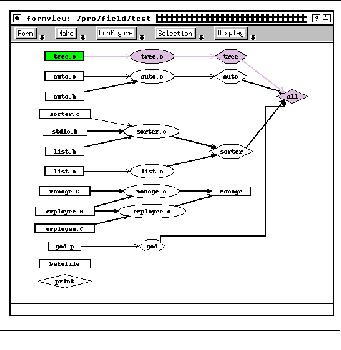
The display of an item encodes information. The shape of the node created for the item identifies the basic item type. Nodes representing source files are displayed as rectangles, nodes representing intermediate items such as object files are displayed as ellipses, and nodes representing target systems are represented as hexagons. Commands from the makefile are represented as diamonds. Files that are part of the version management system (e.g. fieldmain.c,v for rcs files) are displayed as semicircles. Nodes that represent projects are displayed as pentagons. (Project nodes are displayed only when a command in one directory causes a command in another directory to be executed.)
The line style used in outlining the item encodes information about its source-code control status. Items are normally enclosed with a thin solid line. If the item is locked for modification by the current user, then the line is a thick solid line. If the item is locked for modification by some other user, then the line is a thick dashed line. If the item is locked for read-only access, it appears with a thin dashed line. Finally, if the object is not checked out at all but is available from the source code control system, the outline is a thin dotted line.
Arc styles are used to encode information about relationships. Normally arcs denote that the source of the arc is used in generating the target of the arc. If this dependency is explicitly stated by the user, the line representing the arc is thick, and if it is implicitly generated by make , the line is thin. In addition, arcs that represent recursive invocations of make , i.e. commands instantiated in another project, are displayed as thick dotted lines.
Finally, color highlighting in the display indicates the current status. Currently selected nodes are displayed with a light blue background. Nodes newer than nodes that depend upon them have a green background, and nodes representing targets that need to be rebuilt have a thistle (light purple) background. For example, in See Formview example the node for tree.c is green to indicate that it has been modified recently and the nodes for tree.o , tree , and all are thistle to indicate that they need to be rebuilt.
The dependency display viewer provides a subset of the browsing options available with the class browser of the call graph display. No implicit hierarchy exists for browsing, so all the browsing options that deal with hierarchies are not available. However, the user can select one of more items either with the mouse or through dialog boxes, ignore particular items, and specify patterns of items that should or should not be displayed. The user can also restrict the display to local dependencies of the selected items and control the number of levels of dependency to be displayed. See Formview display restricted to a file, for example, shows that portion of the dependency graph for building FIELD relevant to the source file fieldmain.c .
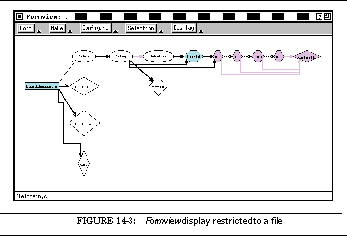
The mouse is used for selection and browsing as shown in See Mouse actions in formview. The left and right mouse buttons are used primarily for selection. If the left button is used without modifiers over an already selected item or if the right button is used with the control key down, then the browser is to request that formserver update information on that item, possibly finding dependencies not found originally if the item is not part of the default build for the directory. The middle mouse button, as in other browsers, creates a dialog box describing the item selected. This dialog contains version control information on the item, as can be seen in See Formview dialog box showing file information.
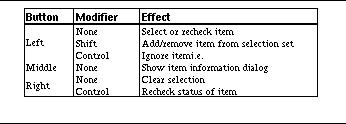
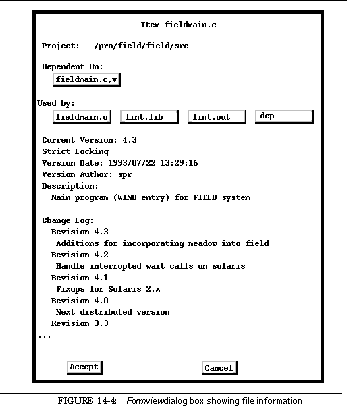
The interface also provides an easy way to build any particular item by first selecting the item or items and then either choosing the Make Current button in the Make menu or typing the character ` m ' in the window. An alternative to this is the Make... button on the Make menu. This pops up a dialog box with a list of items to let the user select the item of interest or type in an item. Finally, to build the default item of the project, the user can use the Make Default button on the Make menu or just type ` M ' in the window. These commands send a FORM MAKE message to the back end.
The browser also provides a front end to configuration commands. Currently, three commands are supported: Check in , Check out , and Clean . Each of these commands appears in two forms on the Configure menu. The first applies to the current selection while the second ignores the current selection and asks the user to specify the items to operate on. In both cases, the system pops up a dialog box requesting the additional information needed to complete the command. Check in , for example, needs to know whether the item should be checked in even if no change occurred; whether it should be checked out again after checking it in and, if so, whether it should be locked or unlocked; the version number if not the next logical version; and the log change description to be inserted in the log. The corresponding dialog box can be seen in See Checkin command dialog box. Each of these commands is handled by sending FORM CONFIG messages to the back end.
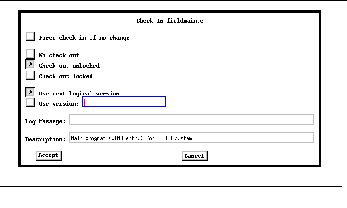
In addition to the dependency display, the interface provides an optional transcript window such as shown in See Formview transcript window, which can be brought up either independently or from the File menu of the dependency browser window. This transcript window provides a history of each command issued for configuration or version management. The window is active in that, if the user clicks on an error message within the window, the browser attempts to determine the file and line number of the error and sends a message through the message server that can cause the editor to display the corresponding line. An additional option available for the transcript window is to clear the window at the start of each command. This option, which makes the window only show the most recent build rather than the whole history of builds, is used in the student version of FIELD.
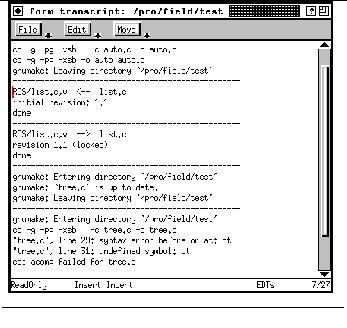
Formview monitors several messages to keep track of the system state and sends messages based on user requests. It monitors the message MSG SET_WD that accompanies a change in the working directory; when it receives this message, it adds that directory to the list of known projects. It also monitors the BUILD FINISH message from the formserver back end as well as the ANNOT SAVE message from the editor, and on receiving them updates the display accordingly. Finally, it monitors FORM TRANS messages from formserver that include the next line of a project's transcript to update the transcript display.
The only messages sent by the front end, other than requests for information or to execute commands to the formserver back end, are messages indicating the user's focus. The message
FORM USERFOCUS <file> 1 <button> FILE
is output when the user selects an already selected file. This lets the user select a file in the formview and have the editor display it. When the user clicks on the transcript, the browser determines if the click was on an error message by using the same message patterns used by the back end in monitoring error messages. If a message is found, the patterns are used to determine the corresponding file and line number and the message
FORM USERFOCUS <file> <line> <button> TRANSCRIPT
is sent; the annotation editor then can go to the corresponding line and show an appropriate annotation.
One of the most obvious and yet most difficult uses of program visualization is the display of user data structures. Myers' early work with the Incense system [Myer80a] has been followed by extensions to dbx [Bask85a], new debuggers [Isod87a], smart compilers [Henr90a], and instances of data structure display in commercial systems such as Centerline's environments and SGI's CodeVision. These efforts all provide fairly restrictive sets of displays for relatively simple user data structures. Algorithm animation systems such as BALSA [Brow85a] and TANGO [Stas90a] allow the user to define more complex data structure displays by tying display code to the application using interesting events. Our GARDEN system [Reis87a] provided generic facilities for the definition of visual languages based on the display of the underlying syntactic structures. These facilities were designed for the general display of data structures as well as visual languages.
The display tool of FIELD provides automatic data structure visualization without user interaction and lets the user customize the displays using a visual editor. It uses packages from the BWE toolkit originally developed for the GARDEN system: the GELO package described in See GELO for the basic display, the APPLE editor for customizing the display, and the PEAR editor for modifying the data structure once it is displayed. The display tool acts as an interface between these display packages and the rest of the environment, maintaining several internal structures representing the values and types to be displayed and calling the packages as appropriate. It obtains the information for its internal structures by querying the system debugger through the message server. See Data structure display in the FIELD architecture shows how it fits into the overall environment.
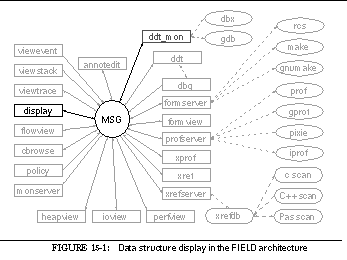

The display tool is designed to visualize one data structure at a time. The user specifies this structure by giving the tool the system name and the name of a variable in that system. The visualization then includes the contents of this variable and any structures that can be reached from it by following pointers.
The display tool queries the debugger for information about the types and values of the data structure to be visualized to build a shadow copy of this structure. Information about the structure's root is obtained using the VARINFO option of the debugger's SYMINFO command, information about data types is obtained using the TYPEINFO option of the SYMINFO command, and values are obtained using the EVAL command. The display tool also uses the DYNAMIC_TYPE option of the SYMINFO command to determine the actual type of pointers in polymorphic languages such as C++.
The shadow copy of the data structure being displayed must be kept up to date to show the data structure as it evolves. To do this, the display tool monitors two messages. First, it looks for the general request
When is sees this message it invalidates all the value information accumulated so far, obtains new values from the debugger, and updates the display. Second, it looks for the message
indicating that the debugger has reloaded the system in question. This generally occurs after the system is recompiled. When it receives this message, it invalidates its knowledge both of the values of the structure being displayed and of the types that compose these values, it then proceeds to recompute the display.
The data structure display facility tries to provide a reasonable default display for arbitrary user data structures. The default display is determined by the type information. Examples can be seen in See Default data structure display for a tree, See List data structure display, and See Default data structure display for an array. See Default data structure display for a tree shows a tree represented by a set of records each of which contains an integer value, a left child pointer and a right child pointer, See List data structure display shows a linked list, and See Default data structure display for an array represents an array of integers.

The default display for a record structure is a rectangle with the name of the structure on top. The fields are represented as boxes underneath this using the default display for each of their types. If the record does not contain any pointers, then the fields are indented as seen in See List data structure display. Basic types such as integers or strings are represented just by placing the data in the box. Fields containing pointers are represented as a box that if the pointer is NULL contains a diagonal line, and otherwise contains a centered dot and an arc pointing to its contents. The top-level display is a layout consisting of nodes that represent the contents of the data structure. This can be seen in See Default data structure display for a tree and See List data structure display. The default display can also show, at the user's option, the names of the various fields.
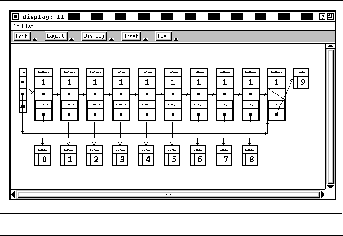
See Default data structure display for an array shows the default array display which consists of a series of tilings, one for each array element. Each tiling contains a label on top indicating the array index inside brackets and a box below that contains the element's value. These tilings are also contained in a layout, and can contain pointers to other structures.
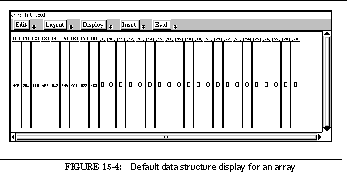
While the default display heuristics are satisfactory for simple data structures, they are not sufficient for complex structures. Typically the user wants to see an abstraction of a complex structure, omitting fields irrelevant to the display, reordering fields, etc. The user might also wish to change the way in which certain structures are displayed so that, for example, a tree is displayed as a tree rather than as a set of linked nodes. This type of facility is provided by the type editor component of the data structure display tool through the APPLE component of BWE.
APPLE is essentially a front end to GELO designed to map arbitrary user structures into the flavors supported by GELO, i.e. data objects, tilings, arcs, and layout objects. The mapping is done on the basis of the types of the user structures.
An application uses APPLE by providing a set of callback routines that convey the application's type model from the application to APPLE. They let the application define a type as a primitive type, a sequence type (array or list), a pointer type, or a record type with a given set of fields. The routines also provide a value abstraction that lets the application specify the contents of the data structure in terms of the type model, either as type-value pairs that must be further expanded or as strings to be displayed. The display interface of FIELD provides these routines, interfacing between its internal representation and that required by APPLE.
APPLE maps user structures to graphical displays using user types. Each user type has an associated ordered set of mappings. Each mapping contains a condition that must be satisfied for that mapping to apply. When a value is to be mapped, APPLE first finds the set of mappings for the corresponding type. Then it goes through this set testing the associated conditions, and uses the first mapping whose condition is satisfied. If no mapping is found, APPLE automatically generates and uses the default mappings described in the previous section.
In display , APPLE supports five types of conditions. The first is whether the object is NULL; this is tested by a callback routine to the application. The second and third depend on the placement of the object being drawn within the generated structure. One is true if the object is drawn inside a layout-flavored object. The other is true if the object is nested in an object other than a top-level layout. Since this sort of nesting is generally used to display an abbreviated form of the object, the condition is also set to true if the object is drawn in a top-level layout and the number of pointer links required to find the object is large. The fourth condition is true if the value is an array element. The fifth, more general, condition uses a string that can be associated with each defined subfield. A mapping can depend on a given value for this string, so that specialized drawing methods are possible for objects within other objects. The user can also specify a match string for the top-level object to select among alternative top-level displays.
The user specifies the mappings for APPLE using the visual editor shown in See Editor for defining type-based display mappings in which the window is divided into five regions. The top line contains the name of the type being edited; the user can click here to change the type. Below this is a menu bar. The File menu lets the user remove or save the current mappings. The Top menu lets the user select the basic type of mapping to be used, set conditions, and order the mappings appropriately. The Edit menu provides options for defining the mappings for components of the type mapping. The Options menu lets the user specify options for the currently selected component or the overall mapping.
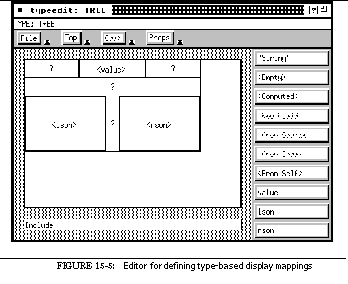
Below the menu bar is the main editing window, which provides an abstract display of the current mapping showing the values that have been specified and letting the user select and define components. The window to the right of this contains a list of buttons used to define the contents of the mapping or of its components. In addition to literal strings, the buttons allow the selection of the object itself, any field of the object, or, if the object is an array element, its index. The From Source field lets one select the object that caused this one to appear. The remaining buttons, <Computed> and New Field , are not used by the FIELD interface. Finally, the area at the bottom of the display labeled Include specifies other objects to include if this object occurs in a layout.
APPLE supports five basic types of mappings. The first is a simple box. The user can select the box shape, the style of the line enclosing the box, and the fill style and font to be used in the box. The text for the box is specified using the buttons on the right of the window.
The second basic mapping is an arc for which the user selects the source and target of the arc as well as its label, as shown in See Editor for defining arc objects. These are selected by choosing first the appropriate part of the arc and then the item from the right side. Arc options let the user specify the source and target ports, the line thickness, and the type of arrowhead to be drawn on the arc. Both the source and target items are implicitly included in the layout of the arc.
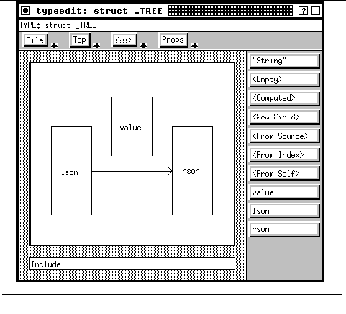
The third basic mapping is to ignore the object. This is useful when conditions are such that nothing should be drawn. This can be used, for example, to elide empty objects.
The fourth basic mapping is a layout object for which the user can select among the layout and routing heuristics described in See Layout Heuristics. Fields selected here are items to be included in the layout as either nodes or arcs.
The final mapping represents a tiling. When a tiled mapping is selected, the main window becomes an interactive editor and the user defines the tiling by drawing tiles using the left mouse button to sweep out appropriate rectangular regions, as seen in See Editor for defining type-based display mappings. The editor automatically fills in tiles to insure that the overall region remains rectangular. Tiles can be selected with the middle mouse button.
Each component of the tiling can have its own mapping. In the usual case, the component is specified as a field with an optional match string for conditional selection, and the component's object is drawn using the mapping of its type. The component can also be mapped as a box with the standard box properties and a string value determined by one of the items on the right of the display, as a layout containing items chosen from the right-hand panel, as an empty region, or (if the object is conditioned to be within a layout) as a pointer field the contents of which are implicitly added to the layout.
In addition to tile components and their contents, the user can specify arcs and constraints within the tiling by using the right mouse button to choose the two affected components. The user can specify the port, thickness, and arc style for arc. Constraints are linear relationships between one of the dimensions of each of the selected components.
The Include option at the bottom of the window is active when an object is constrained to be drawn in a layout by its condition. By clicking on Include and then selecting objects from the right, the user can cause other objects to be drawn in the layout in which the current object is being drawn. A linked list, for example, typically has a pointer to the first element that in turn points to the second element, etc. The mapping for a linked list specifies a layout that contains the first element, and the mapping for a list element is conditioned so that a list appearing in a layout includes the next element in the layout as well. In this way, all the elements of the list are added to the layout. The options associated with included objects let the object simply be included or be included with an arc connecting it to the current object.
The display tool also provides facilities for saving and restoring the APPLE definitions. It creates a directory .display_defs in the current directory in which it stores any definitions created by the user. When it starts, it reads all definitions from this directory. This lets the user define the display for a data structure once and use this display for several debugging sessions.
The easiest way to understand the use and power of the mapping editor provided by APPLE is through examples.
See Editor for defining type-based display mappings shows an example tiling for the tree example of See Default data structure display for a tree. Each node of the tree is drawn as a tile with the value on top and the left and right children drawn as fields below. In addition, arcs are inserted from the label to both the left and the right child, the label is constrained to be just the size needed to hold text, and no outline is drawn around the tiling. A second mapping for trees, shown in See Display mapping for an empty tree, is used when the tree is NULL. Here the tree is drawn as a simple box containing a circle constrained to be a fixed size; the other tile components are empty and can expand to fill whatever space is required. The result of these two mappings can be seen in See Data structure display using user-define mappings.

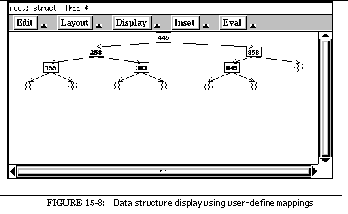
The linked-list display in See List data structure display was generated from the type definitions abstracted in See Structures used for linked list display. But this display, while accurate, is too complex if the user wants to see only the list contents, not the structures used to construct the list.
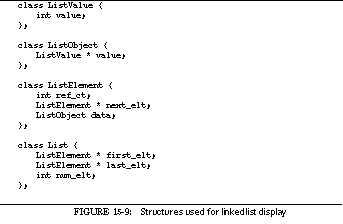
A simpler display for this example is created by defining mappings for each of the types. The first mapping is for the type List . This mapping, conditioned for when the list occurs in a layout, includes only the first_elt field, which it shows as a pointer to the element. The type mapping and the display that results from applying this mapping appear in See List mapping and the resultant display.
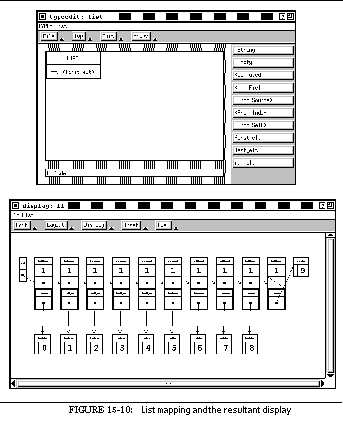
The second mapping is for the type ListElement . This mapping, again conditioned on being in a layout, displays only the contents of the data field, and uses the Include facility to draw an arc from this display to the contents of the next_elt field, which is then included in the layout. The type mapping and the resultant display are shown in See ListElement mapping and resultant display. The resultant display still shows two objects for each list element. We can eliminate one of these by creating a mapping for the type ListObject that shows the contents of value as a nested field. Finally, we can simplify the display of ListValue elements by displaying an object of that type as a box containing the value field rather than as a record tiling. The result of these two mappings is shown in See Final list structure display.
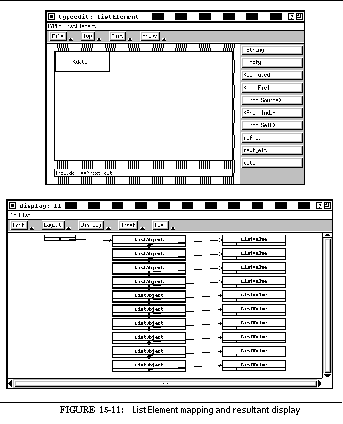
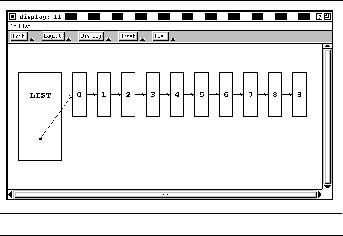
While the APPLE package in BWE provides a visual editor for defining the type-based mappings from an application's structures into diagrams, the PEAR package provides a generic editor of those diagrams. PEAR works in conjunction with APPLE and GELO to provide facilities for both browsing and editing the resultant displays. Editing is handled by a standard set of callbacks to the application.
The display tool uses PEAR to let the user browse over the data structure. While normally the whole structure is displayed, the user sometimes needs to focus on a particular portion of the structure. This can be done in four ways. First, the user can pan and zoom over the display. This is controlled by the scroll bars seen in See Final list structure display and by the ` z ' and ` Z ' keys and buttons on the Display menu for zooming in and out. Second, the user can select a particular item with the left mouse button as the root of the display. The third browsing facility is an inset window, a small window that appears in the lower right quadrant of the display, as shown in See Inset window used in tree data structure display. The user can select items to be displayed in the inset window dynamically. The display for the selected items is recomputed so that different display strategies can be used. Finally, the user can emphasize or deemphasize an item on the display, i.e. make it relatively larger or smaller. This can be done with menu buttons or with the ` e ' and ` E ' keys respectively.
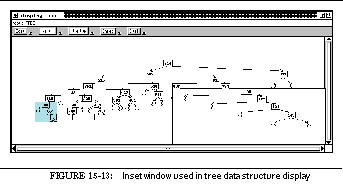
In addition to browsing over the display on the screen, the editor lets the user generate a Postscript image of the display. This is done in a format compatible with the InterViews tool idraw [Lint89a] so that the user can later edit the picture.
Display allows the user to define both a primary and secondary selection for editing. The primary selection is chosen with the left mouse button and is highlighted with a light blue background. The secondary selection is selected with the middle button and is highlighted with a green background. These selections are used by the Set Value and Set Contents buttons on the Edit menu. If both a primary and a secondary selection are chosen, the value represented by the secondary selection is assigned to the object represented by the primary selection. If only a primary selection is chosen, then the user is prompted for a new value with a dialog box.
Program understanding and debugging both require detailed information about the dynamic behavior of the underlying application. The call graph browser and the data structure display, our early efforts, provide this information using the debugger. This approach introduces considerable overhead but has the advantage of being totally non-intrusive: it requires no effort on the programmer's part and it works on existing programs. In developing further dynamic visualization tools for FIELD, we wanted much better performance and non-intrusive monitoring.
To achieve this we developed three visualizers that use the monitoring library described in See EXECUTION MONITORING. The first provides a dynamic view of the heap to show how the application uses memory. The second provides insight into the application's use of files by showing all file operations. The third offers performance data in graphical form. Their place in the overall architecture of FIELD is shown in See Monitoring tools in the FIELD architecture.
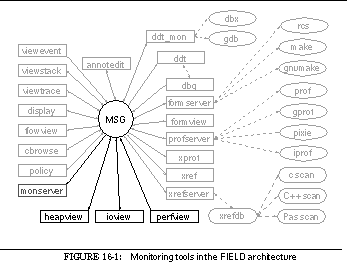

We had several objectives in mind when constructing the first visualization tool, heapview . The primary one was to give the user a visual representation of an application's memory usage. We hoped that understanding memory-usage patterns would yield insight into how the application operated. Second, we wanted to give the programmer information on when and how memory was used by the application. We wanted the programmer to be able to identify a location in memory and see when and why it was allocated. Finally, we wanted to give the programmer tools to identify memory allocation problems such as memory leaks.
To achieve these objectives, the heap visualizer provides the user with a two-dimensional map of heap memory, as shown in See Graphical display of heap memory. Each row of the display either can represent one page of memory or can be automatically scaled to be proportional to the window dimensions. The first method is useful when data is page oriented, when using a page-oriented memory-allocation method, or when the programmer is interested in paging behavior as well as memory-allocation behavior. The latter allows more meaningful displays when the heap is particularly large or small.
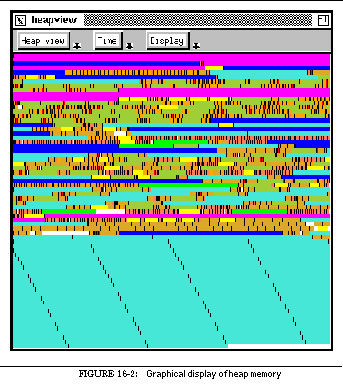
The different patterns in See Graphical display of heap memory correspond to different colors, the number and choice of which can be set in the AUXD resource file. The visualizer allows the colors to represent either size or time, where time can be real time, execution time, virtual time, or user time. Virtual time is a count of the number of memory allocations or frees; user time is measured by a counter incremented when the user clicks on the Mark button in the Time menu. User time lets the programmer use different colors to represent allocations at different points in the execution, and is handy for detecting memory leaks.
The heap visualizer associates information with each block. The monitor library automatically passes along the call stack and its best guess at what address to report to the user as the source for each allocation. The display tool saves the reported address. Additional information such as the data type of a block or the allocating routine can be passed explicitly by the application through calls to the monitor library. For C++, this can be done using a modified new operator. This information is used by the visualization tool in two ways. First, the user can click on any block of storage at any time. The result is a dialog box that describes that block and that includes the type and source of the allocation, as at the center of See Heap display showing various optional windows. Second, display options allow different colors to represent different data types, source routines, or source addresses as alternatives to block size or allocation time.
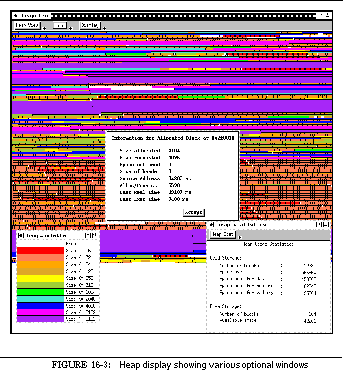
Heapview offers two additional windows also shown in See Heap display showing various optional windows. The first displays the current palette indicating the current coding of colors on the display. The second, a statistics window, displays current statistics on memory and malloc usage and is continually updated.
The input-output visualizer, ioview , shows how the program interacts with the outside world by displaying file operations. It lets the programmer locate input / output bottlenecks and detect simple file-related problems, such as failure to close a file or opening a file more than necessary.
The visualizer provides a scrollable display showing all open files, including those open when the process started running. Each entry has the associated name, if known, and if not the type of file, e.g. SOCKET, PIPE or TTY. The entry also includes the current file length and a map of operations on the file consisting of a scrollable horizontal bar representing the file. On this bar each operation is represented as a colored region, the location of which corresponds to the location of the read or write in the file. An example is seen in See Display of file input and output.
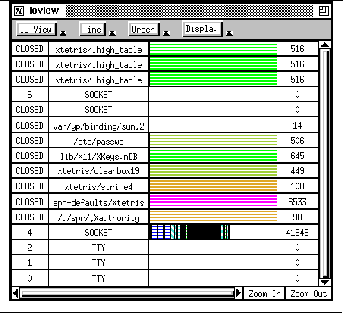
Colors are used in the bar to indicate either the size of the input / output operation or the time at which the operation was performed. As in the heap display, time can be measured in terms of virtual time (where each input / output operation marks a time interval), execution time, real time, or user time. Read and write operations are indicated with complementary fill patterns, horizontal and diagonal lines respectively. These can overlap to indicate file areas that were both read and written.
The user can click with the mouse on any portion of the file display. Clicking on the file name or length yields a dialog box containing global statistics for that file. Clicking on the horizontal bar produces a dialog with this display plus a display of all the operations at the corresponding location in the file. An example of such a dialog is shown in the center of See Input/output viewer showing auxiliary windows.
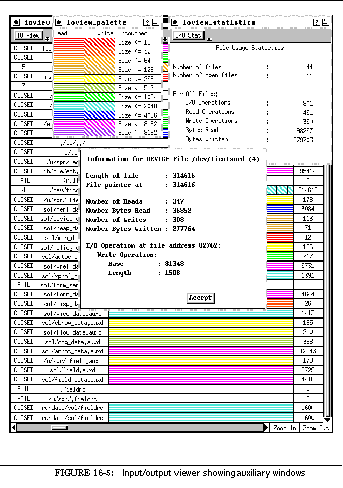
The visualizer provides a variety of display operations. Users can turn on and off the display of closed files, device files, empty files, and opens that failed. The display order can be based on the time the file was opened, the length of the file, the file number, or the file name. The user can zoom and pan the horizontal bars for all files by using the buttons and scroll bar at the bottom of the display.
Like the heap viewer, ioview provides two additional windows, both visible at the top of See Input/output viewer showing auxiliary windows. The first is a palette indicating the current color and fill-style codings for the horizontal bar displays. The second is a statistics window that gives accumulated file statistics dynamically for the overall application.
In addition to information about the heap and files, we wanted to give the programmer information about performance. We currently provide the information available from the getrusage system call including counts of page faults, swaps, block input and output operations, signals, and context switches, and memory usage information.
The actual set of statistics displayed by the performance visualizer, perfview , is determined by its AUXD resource file. This file lets the system specify what messages contain the statistics, what the statistics are, and what their units are. In addition, it allows new statistics to be defined from source statistics by combining existing values or computing a rate by differencing successive values of a counter. For example, the number of context switches is computed by summing the number of voluntary and involuntary switches reported by getrusage ; and the page-fault rate is computed by looking at successive values of the page fault counter. Defining new statistics from the ones gathered allows the programmer to design appropriate displays.
The various statistics are displayed as graphs on a single display where the X coordinate represents either execution or real time and the Y coordinate is automatically scaled for the given statistic. To accommodate related statistics, such as the major and minor page fault rates, a group of statistics can be forced to share the same Y scaling factors on the display. While multiple statistics can be displayed simultaneously, one of these must be denoted the primary statistic so its values can be used to label the Y axis. In addition, the user can insert vertical lines into the display to mark user events.
An example display appears in See Performance visualization display. The right hand side contains the user-selectable set of statistics. Clicking on a statistic name toggles whether it is displayed or not and displayed statistics are indicated by a box around the name. The primary statistic is selected using the radio boxes next to the statistic names. In this case, the primary statistic is PAGEFAULTS, the total number of page faults during execution; this statistic's scale is shown on the left and it is displayed in red. Two other statistics are displayed, MAXRSS, the maximum resident set size, in yellow and CONTEXT, the total number of context switches, in magenta. The display also shows the optional grid and a green vertical line between 8 and 16 seconds that is a user mark.
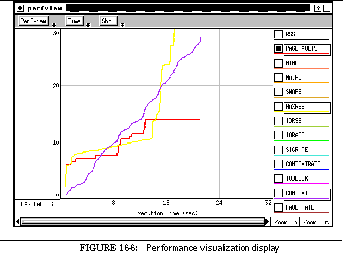
The last FIELD tool is actually a front end to the other tools. While users can run any of the FIELD tools individually, they can also run field itself. This provides a control panel with buttons that let users invoke the various tools, that provide a front end for policy tool, and that offer such basic services as changing the working directory, setting environment variables, and choosing the message group.

The control panel consists of a window with a menu bar and a panel region, as shown in See Default FIELD control panel. All the buttons are defined in an AUXD resource file, which is also used to initialize the system correctly. The large gothic letters are used in place of icons for historic reasons.
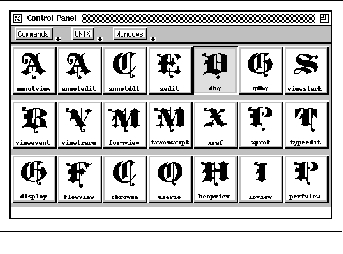
The field binary is designed for easy customization and to merge the binaries of the various FIELD tools that use BWE in order to minimize the amount of swap space required when running multiple tools. Multiple commands are created by linking new names to the common binary. When the system starts, it looks at the command line arguments for the name used to invoke it. This name is used in selecting the resource file that defines the environment and in the routine called when initialization is complete.
The resource file used depends on the name of the system. The default is to run the system as field and use either ~/.field.auxd from the user's home directory or field.auxd from the default FIELD directory. If the system is run with another name, the files ~/.<name>.auxd or <name>.auxd are used if they exist and the default files are used otherwise. The resource file can also be specified using the -auxd <file> command line option.
The resource file contains several sets of definitions that control initialization. It provides the names of other resource files that should be included, so that separate resource files can be maintained for each of the tools. It defines environment variables that should be set before any tools are run. It specifies binary files that should be dynamically loaded to provide any additional functionality for the editor or any of the tools. It specifies any FIELD services, such as xrefserver , formserver , profserver , or monserver , that should be started. It provides the name of the routine to be called after initialization is complete, based on the name the system is invoked with.
The resource file also defines the buttons that appear in the control panel. Each button can be given a name, an icon, a keyboard accelerator, and a menu name. If the menu name is omitted, then the button appears on the control panel, otherwise a pull-down menu is created for the given menu name and the button is placed on this menu. Buttons are placed in the order in which they are defined.
Buttons can represent either tools that create windows on the display or commands to be executed directly. If they represent windows, then a top level window of the appropriate type is created and passed to the routine specified in the button definition when the user clicks on the button. If they represent commands, then they either specify the routine that implements the command or provide a string to be executed by the shell when this button is invoked.
The FIELD control panel uses the BWE package WIND to act as a simple window manager for FIELD windows. The buttons initially represent generic windows, i.e. commands to create a window of the appropriate type. If the system allows only one window of a given type, for example the annotation editor that follows the debugger, then this button either creates the window if none exists, or pops the window to the top of the screen if it has already been created. If the system allows more than one window of the given type, for example a debugger or a general editor, then the original button remains as a creation button and new buttons are created to pop the created windows.
In addition to providing a common front end for all tools that offer a visual interface, the control panel offers a set of common utilities that handle common services needed by the tools.
The message server supports multiple message groups. When a tool starts, it has to determine which message group should be used if the user has not specified one explicitly on the command line. Common code for this is provided by the control panel. This code first checks if the default message group has the same working directory as the tool. If so, it assumes this is the correct group and uses it. Otherwise, the code queries the message server for the list of all current groups. A dialog box is then created for the user to either select one of these groups or start a new group. If a current group is selected, the user is also given the option of changing the tool's working directory to that of the group or changing the group's working directory to that of the tool.
A second common facility provided by the control panel lets other tools determine the current system. The code monitors the debugger messages related to opening and closing a system to keep track of what binaries are currently being debugged. When a tool requests a system name, this code looks at the current systems. If there is only one active system, the name of this system is returned. Otherwise a dialog box is created for the user to enter a new system, select one of the existing systems, or, if allowed by the tool, select all systems.
Another common facility monitors debugger location messages to keep track of the most recent function and file. These can be requested, along with the current editor selection, for use in a tool. For example, the cross-reference interface uses these as default field values in constructing its query dialog boxes.
Field provides a number of standard commands that can be invoked from buttons.
The Help command invokes the BWE HELP package, creating a window to the hypertext help information defined for the system. Context-sensitive help is then available by hitting the help key at any point. The amount of help information currently available, however, is quite limited.
The Refresh command executes the shell command xrefresh , to refresh all windows on the display. The Shell command puts up a transcript window running the user's shell. This window inherits the current working directory and environment of the FIELD tools.
The Directory command lets the user change the working directory in all FIELD tools. Similarly, the Environment command sets an environment variable to a given value in all active FIELD tools.
The Build Default command sends the message
which causes the default system in the current directory to be rebuilt.
The Policy Variables command causes a dialog box to be popped up that allows the setting of all user-definable policy variables. The set of variables is determined from the policy tool's resource file.
The Pop All command causes all FIELD windows known to the control panel to be popped to the top of the display. Similarly, the Close All command closes all such windows. Closing a window actually sends a close request to the window. If the editor sees such a request and the file being edited has been modified and not saved, it asks the user if the changes should be saved, discarded, or the close request ignored.
Finally, the Quit command causes all windows to close and FIELD to exit. Again, it first asks the windows to close so that an editor or other tool that does not want to exit immediately can abort the command.
FIELD has been remarkably successful. The ideas first exhibited in the environment now form the basis for most of the current generation of programming environments, including Hewlett-Packard's Softbench, DEC's FUSE, Sun's SPARCworks, Lucid's Energize, and Silicon Graphics' CodeVision. FIELD pioneered the notion of broadcast messaging as a basis for tool integration, and many of the other tool concepts introduced in FIELD have found their way into these environments as well.
We have been working on the FIELD environment and the current BWE user interface tools since 1986. While much of FIELD was originally designed to be small and simple, it has grown to become a large, stable and powerful system. See Code size for FIELD components shows a breakdown in terms of approximate lines of code for each FIELD component, and See Code size for BWE toolkit components does the same for BWE.
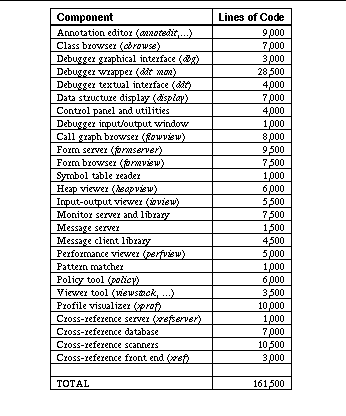
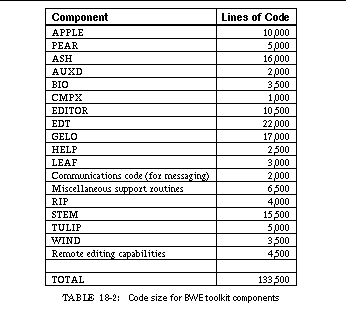
This chapter describes our hindsight on the FIELD environment. We have attempted to analyze which decisions and ideas contributed to its success and which ones, in retrospect, were wrong. We hope that the lessons we learned in FIELD can guide others in developing programming environments.

The messaging mechanism is probably the most successful part of the FIELD environment. Its success can be attributed to several factors. The first is its simplicity. Our initial message server was under 2,000 lines of C code. Even today, with many more facilities and much more error-handling, it is only 8,500 lines (this includes the BWE and FIELD components used by the server). The program interface to the message server is also very simple, consisting of basically three calls, one to register for a message pattern, one to send a synchronous message, and one to send an asynchronous message. Tied to this simplicity is the relatively low cost of messaging: messages can be sent and received without excessive overhead and without noticeably affecting the program.
The second factor in the success of messaging is its easy integration into existing tools. This was done initially with simple wrappers that mapped normal tool output to messages and mapped messages into commands. While our interfaces have grown more complex, the complexity is in the presentation graphics, not in the messaging. The amount of effort required to add a message interface to a stand-alone tool it is still quite small.
The third reason for the success of messaging is the inherent power of messages. The message concept is used in FIELD, with only minor modifications, to notify one tool of what another is doing, to request information from one tool for use in another, to synchronize the actions of two or more tools, and to have one tool execute a command for another. This wide range of applications meets most of the integration requirements in a programming environment.
Of these factors, the easy integration of messaging into existing tools is probably the most important. It let us build the initial environment without a major investment of time and effort, and also let us build the environment incrementally. The other two factors are also essential, but messaging would have been successful even had there been some loss of functionality or had it been slightly more complex.
There have been several implementations of control integration beyond FIELD, primarily Hewlett-Packard's Softbench and Sun's Tooltalk. The primary difference between these systems and FIELD is the structure of the messages. We used simple strings in FIELD because they offer the greatest degree of flexibility and extensibility and are a natural basis for pattern matching. Softbench and Tooltalk both view the messages as structures. To achieve the same effect we have been forced to adopt the set of coding conventions for our strings described in See Message Conventions, which can be mapped almost directly onto the message structures these systems use.
Our work with broadcast messaging has not been without problems. We've had three primary concerns: speed, message size, and nested event loops.
The first problem with messaging is one of performance. The maximum message rate using TCP/IP sockets has varied from about 100 messages per second on older 1-mip machines to about 2,000 messages per second on a 100-mip Sparcstation 10. This is sufficient for almost everything needed in a programming environment: the message rate during typical interactions is only a few messages per second and messaging is not a bottleneck. However, in two situations the message rate goes up substantially. The first is in data structure display, when the display facility needs to get all the information about a complex data structure from the debugger. This problem is compounded and overshadowed by the speed of the debugger and is discussed later on.
The other place where messaging is used heavily involves the dynamic visualization tools, i.e. the heap, input/output and performance monitors that use the monserver service described in See EXECUTION MONITORING. The message rate here can be many times greater than messaging can acceptably handle. We have gotten around this problem to some extent by first sending the messages to monserver , so as to buffer the messages before sending them to the message server for further buffering. Monserver gives priority to reading messages from the application and attempts to minimize the effects on the application. The fact that the message server itself buffers messages infinitely lets the application run at its maximum speed independent of what tools are reading the messages. The result has been that applications run at an acceptable, albeit slow, speed when this monitoring is in effect and that the visualization tools can be far behind. While hardly ideal, the resulting performance is still quite useful.
The second problem in broadcast messaging is large messages. Most messages and replies are quite small (about fifty bytes on the average). However, in instances in which data is requested from one tool for use by another the reply can be quite large. This occurs primarily in requests from the program database where, for example, the call graph visualizer requests the complete contents of the call relation. It seemed impractical to send back a megabyte long message (although our message server can handle this). Our solution is to store the data in a file and send back the file name. The problem that then arises is where to put the file so it can be accessed by both the sending and receiving tool. We currently put it in the FIELD temporary directory, normally /usr/tmp , but this works only if the tools are on the same machine, since /usr/tmp is a machine-local directory.
The third problem involved the implementation of synchronous messages. From a programming point of view, a synchronous message should look like a procedure call, i.e. the message is sent and control resumes when the reply to that message is passed back to the caller. Our implementation provides this facility. While it is easy to program on the surface, however, its interaction with the underlying window system created many problems. When a message is sent, the tool has to wait for the reply, but it still must process other messages and window events during this time, i.e., waiting has to be implemented as a nested event loop. Problems arise if, while a response from a synchronous message is being awaited, a message or user window action arrives that changes the data structures being used in processing the original synchronous message. This caused innumerable problems in the early days of the FIELD environment. We got around it by augmenting the Brown Workstation Environment toolkit used in FIELD with facilities for window locking and automatic queueing of user requests when a window was locked. The appropriate use of this facility within the various tools has enabled us to use nested event loops safely. More recently, we have attempted to augment FIELD with tools that use the X11 toolkit and Motif. These packages do not provide safe support for nested event loops and we have been forced to move from a procedure-call model for synchronous messages to a callback-based model that is less convenient for the programmer.
In developing the FIELD environment, we added the policy tool described in See The FIELD Policy Service. While this seemed a practical concept, we have actually made little use of it, in part because it was added late in the development of the system. We could use the policy tool to insure that message formats between tools are compatible and to implement various options currently implemented in the message handlers of the various tools. The slight simplification this would yield did not seem to warrant the rewriting effort required.
FIELD consists of independent tools communicating with the message server. The integration mechanism makes the environment appear to the user to be a single tool set and hence a single environment. The result from the user's perspective is that there is only one tool. Practically, this means that if the user changes the working directory (so that file names can be specified more easily) or sets environment variables in one tool then the effect should be seen in all tools. We had to implement this as basic functionality in the message server: when a new tool comes into the environment, its working directory was set to that of the rest of the environment. This worked fine as long as FIELD was being used on only one system at a time, but failed when debugging two different programs simultaneously. Our solution here was to add groups to the message server, allowing the message server to handle multiple independent sessions, as described in See MESSAGE GROUPS. This, along with reasonable heuristics for choosing or asking the user to choose the proper group at start-up, has worked out quite well.
Another lesson we learned from the environment concerned tool decomposition. Our initial strategy was to wrap a front end around the UNIX tools and the tools we developed, as seen in See Tool composition methodsa. The front end would provide a graphical interface and the hooks for messaging. This seemed to make life simple, since the graphical interface is a command interface and provides natural hooks for message sends and receives. However, this approach broke down when we wanted to use the various tools without their front ends. We needed to have available the message interface to UNIX make , to profiling data, and to the cross-reference database even if the front end wasn't being used. Moreover, the user should be able to exit the front end for one of these tools without affecting other tools that need the data.
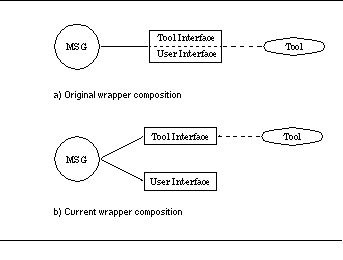
The solution to these problems was to decompose the tools into a back end service and a separate front end, and have the front end interact with the back end solely through the message server, as shown in See Tool composition methodsb. This type of decomposition has been instrumental in allowing tools to share information. To make this work, we had to insure that the various back ends would be running when needed and would terminate when no longer needed. This was accomplished by augmenting the message server with the facilities needed to support services, as described in See Service Management.
Another problem we encountered was in developing wrappers for different UNIX tools. We wanted a generic wrapper for the several flavors of make and for the different UNIX profilers. Both of these were achieved by creating an internal data structure containing the information needed for either the front end or the back end, and then writing scanners that ask the tools to dump the information, scanning the output using the message pattern matcher, and creating or updating the internal structures. This has proven to be a very powerful mechanism that has been fairly easy to extend and duplicate for other applications, for example, a back end supporting configuration management.
One of the features that differentiates FIELD from Softbench and other similar environments has been our emphasis on good graphical interfaces. We realized early on that the natural graphical interface to a tool can differ substantially from the textual interface, and put considerable effort into determining what the natural graphical interfaces were, how the user would want to interact with the interfaces, and how the interfaces should interact with other tools in the environment. Then we implemented and experimented with the interfaces. We found that it is not enough simply to provide mouse buttons for textual commands; new commands had to be added as well. For example, the make interface needed a Compile command that took the source file as an argument and built whatever needed to be built from that. Other commands needed to be implemented incrementally; for example, the interface to gprof displays a simple profile and, as the user selects a routine, shows the call profile for that function.
One of the reasons we put so much effort into the graphical interfaces was our experience with simpler interfaces. An interface that provides essentially no more functionality than a textual interface -- for example, debugger buttons that just echo canned commands -- is not particularly useful. They offer limited help by giving users easy-to-find, easy-to-remember buttons. They also help by letting users issue the command using the mouse, if they happen to be using the mouse. The real benefits of graphical interfaces, however, come from exploiting their graphical capabilities to display additional information and then using this information to provide additional functionality.
One of our goals in developing FIELD was to demonstrate the power of workstations for programming. We were particularly interested in the graphical capabilities. We thus provided a variety of different visualizations, including a call graph browser, a class browser, make and rcs dependency display, data structure display, a memory visualizer, input/output visualizer, dynamic performance monitor, and a bar graph display of profiling data. A key question then arises: how useful are these visual displays?
This question can be answered in a variety of ways. To evaluate the class and call graph browsers, for example, we ran an experiment to test the difference in program understanding between users of these tools and users of more standard tools. The experiment showed there are at least minor advantages to the visual tools [Meye92a].
More relevant might be anecdotal reports and our own evaluation as a FIELD user. A simplified version of FIELD is used as the programming environment in our introductory courses. Here the students are provided with most of the visual tools as well as the textual ones. One day, I was told that the call graph browser was not working and the environment was useless because the students couldn't find their way around the source files. It turned out that the students had come to rely on this browser as their primary means of program navigation. Again, the heap visualization tool described in See HEAP VISUALIZATION was originally developed for use in detecting memory leaks, and we have used it for this purpose several times. More importantly, though, we have found that it is also very useful for detecting memory-allocation patterns and in understanding the sometimes aberrant behavior of large systems. We have used the tool extensively in understanding, finding, and fixing bugs and in tuning the performance of our more recent efforts.
Overall, the utility of graphical interfaces varies considerably. They are most useful when they display information not readily gleaned from textual files. A simple call graph or class hierarchy is useful for understanding primarily if the programmer is not at all familiar with the system. These displays are most useful as navigation aids when tied to the rest of the environment and when they can provide suitable abstractions for offering an overview of a large system. Similarly, the make dependency display is most useful as an interface for checking the status of what needs to be done and as a means for selecting items to build. The visual front end to UNIX profiling is useful because it presents the combined profile data quickly and lets the user navigate through this data quickly and thus understand it.
The dynamic visualization efforts are more useful. The input / output visualizer has been used to understand the input / output behavior of programs, showing when files are opened too often or when lots of information is read or written. However, this portion of program behavior is usually well understood by the programmer and has not been an issue in our applications. The performance visualizer has not been utilized extensively because the information received from the getrusage system call about the most important factor, paging, was not accurate in previous versions of UNIX. The memory visualization tool, as noted above, has proven more useful than was originally imagined.
The call graph browser described in See The Call Graph Browser and the class browser described in See The Class Hierarchy Browser are useful for displaying program information when they abstract information and provide a relatively compact display. The success of the various browsing features incorporated in these tools indicates that any visual browser for a large system must provide a notion of hierarchy and an easy way for the user to exploit this notion. Even better would be to let the user define semantically based hierarchies using some means more direct than individually choosing nodes to ignore or expand.
Our final lesson from our work on graphical interfaces is the importance of a high-level toolkit. We did a lot of experimentation to try to achieve the right display for each tool. Moreover, we worked to provide as much information as possible through unobtrusive visual encodings. Developing each of these visualizations from scratch would have required prohibitive time and effort. The GELO package described in See STRUCTURED GRAPHICS DISPLAY is the basis for all the browsers and for the data structure display facility, so that writing and modifying the browsers was relatively simple. Each was written initially in about two days. Even today, with all the functionality that has been added, the class browser is under 7,000 lines of code and the call graph browser is under 8,000.
Another toolkit feature we found essential was an editor window. Text is a key portion of the environment, even in the various graphical interfaces. One of the key weaknesses in modern toolkits such as Motif is that their text widget is not a full-function editor. The EDT editor in our toolkit provides the equivalent of an editor widget and has been used throughout the environment, from simple one-line text entry in dialog boxes, through transcript windows for debugging or make , through textual information displays to go along with the visual browsers, to a fully functional source editor. The editor is adaptable to all of these contexts. Moreover, it is extensible and provides easily defined keyboard and menu mappings. The extensibility can be used to emulate various standard editors or to add tool-specific commands, for example editor commands to compile or find the declaration of an item. The keyboard and menu mappings allow the editor to be customized both for the user's preferences and for the needs of the tool in which it is embedded.
The primary lesson we learned from FIELD about editors is that users want to use the editor they're used to, no matter what additional functionality a new editor provides. The only users of the FIELD environment who actually use the annotation editor as a program editor are first-time programmers who are forced to use the editor. Even these students would prefer to use emacs or their personal editor. This is not a reflection on the functionality or capabilities of the FIELD editor, but rather on what students are accustomed to for other applications and their desire to use a single editor for all applications.
Beyond this, the editor in FIELD demonstrated the power of annotations. The single concept of annotations tied to the message system serves a variety of purposes and effectively connects the source program with the rest of the environment. Annotations are used to create and report breakpoints of various types, to show source locations selected in other tools, to create interesting events to drive algorithm animations, to animate program execution, to show error messages generated by the compiler, to relate code to pseudocode, to update breakpoint locations after editing, to show the call stack during debugging, and to connect source and documentation. While annotations have not been touted as much as control integration, our feeling is that they are essential for tying the source to the rest of the environment.
By far the largest component of the FIELD environment is the debugger wrapper described in See The FIELD Debugger. This was neither intended nor desired. The original debugger interface was supposed to be a relatively simple wrapper around the system debugger that took messages and translated them into debugger commands and read debugger output and translated it into messages, message responses, and terminal output. However, the lack of important capabilities in the underlying system debuggers and the need to support multiple debuggers and multiple debugging tools led to a more complex interface.
Perhaps the feature that produced the most complexity is the need to support additional debugger functionality. Most of this functionality, i.e. mapping names for C++, Modula 3, or Object Pascal and pattern-based breakpoints, required that the debugger front end maintain the symbol table of the program being debugged. Reading and processing the symbol table and doing the different language mappings comprises about a quarter of our interface. Both dbx and gdb lack a programmable interface. We added this with a relatively small amount of code, and also added a command history interface and a few additional commands.
The most complex portion of the debugger interface is that dealing with the system debuggers. We currently handle Sun's dbx , DEC's dbx , and GNU's gdb . Adding DEC's dbx and gdb both took about a week of work. Updating the system for a new version of one of these debuggers generally takes a day or two of effort and considerable debugging, since subtle changes in the debuggers, such as the format of an error message, can have significant effects on our interface. Many of the bugs in FIELD can be tracked to this part of the interface or to bugs or "features" in the underlying debuggers that this interface has to work around.
Since our interface is message-oriented, we had to process messages coming from multiple tools at arbitrary times. We eventually decided that the debugger interface should keep track of its own state and the state of the underlying debugger, queue messages as they arrive for later processing, provide separate queues for user-oriented and tool-oriented commands, and enable a tool to suspend program execution so as to send a series of debugger commands. We needed to keep track of all the debugger events (i.e. breakpoints, trace points, etc.) since some of these are extended commands supported by our interface for other tools and not simple user breakpoints. For efficiency, we also needed to have the interface cache the call stack. Each of these requirements added to the complexity of the interface.
The debugging portion of FIELD consists of several tools in addition to the debugger interface. Some of these, namely the event, trace, and stack viewers described in See VIEWERS OF DEBUGGER INFORMATION, were written as passive monitors of debugger messages. This has worked well for events and variable tracing, because the debugger normally sends these messages and the amount of message traffic is not significant. It has been a problem, however, for the stack viewer. The difficulty arises when the stack is deep and complex, since the system debuggers turn out to take a significant amount of time in reporting a deep stack. Moreover, since we send a separate message for each level of the stack and for each local stack variable, a deep stack can necessitate significant message traffic and take several seconds to update. Because the stack is obtained and the messages sent before the debugger returns control to the user, the upshot is a noticeable delay whenever the debugger stops. This is true even if the stack display tool is not present, since its passive nature means that the debugger does not know if it is there or not.
A better approach for this tool would have been to catch messages indicating the debugger was stopped and then query the debugger directly to get the stack information. This would have alleviated the problem of having the debugger keep track of the information currently required as tools appear and disappear. It also would have provided a framework for other viewers. For example, a machine-code viewer could display the current assembler code whenever the debugger stopped; such a viewer would again catch messages indicating the program had stopped, query the debugger for the current instruction counter, and then display the corresponding instruction.
Another debugging tool is the graphical data structure display facility display described in See Data Structure Display. While this tool showed great promise and is used extensively in our introductory classes for relatively simple data structures, it has not lived up to our expectations. The first problem has been performance. Even something as simple as a monitoring the generation of a thirty-node binary tree generated about a megabyte of debugger transcript in the initial implementation. By having the tool cache values and the debugger print whole structures and the tool decode the output, we achieved an order-of-magnitude performance improvement. While enough for this simple application, this is far from sufficient in general, since it can take a minute or more to obtain a typical complex program structure from the debugger. To be really practical, the back end for data structure display will have to be made part of the system debugger.
The other drawback of the data structure display facility is that it is not sophisticated enough to show complex data structures. While it can display the actual structure of complex data, this is generally not what the programmer wants to see. For example, we currently use a complex list representation in our C++ programs. When we display a data structure that contains a list, we do not want to see the list header and all its fields, each of the list node pointers, and the contents of the list. All we want to see is a linked representation of the contents of the list. While our data structure display provided a type editor for customizing the display of a particular data structure, it is difficult to use (we are probably the only ones who have used it successfully), and is not powerful enough to handle more complex abstractions, such as eliding both the list header and all the list elements, without some programming support. Considerable work and research will be necessary before automatic visualization of complex data structures is practical.
Overall, the debugger is a central tool in a program development environment. If we were going to implement FIELD again from scratch, we would probably not implement a separate debugger interface, but would try to add the needed functionality into a portable debugger such as gdb . (When we started development, this was not an alternative, since gdb was not available for Sun 4 workstations.) This would have presented many other problems (for example, gdb does not support Pascal or Sun's latest compilers), but would have dealt with the symbol table and performance issues.
The other large component of the FIELD environment is the cross-reference database described in See Cross-Referencing in FIELD, which consists of a simple in-core relational database system and a set of scanners, one for each supported language. The database system is specialized so that it can easily remove all entries corresponding to a file, run the appropriate scanner for that file, and then update the database based on the result of the scanner.
The database is an integral part of the environment and is used primarily as a basis for the call graph and class hierarchy browsers; it is also available through editor commands and a direct QBE-style interface. It is used extensively for smaller applications, such as student programs up to several thousand lines of code, but not for large systems or by other tools of the environment.
The principal reason for this restricted use is performance. The database for the field binary (all FIELD display components and the BWE toolkit, but without any servers or utilities, about 200,000 lines of code) is about eight megabytes in size. It takes slightly under twenty minutes to rebuild it from scratch and under a minute to reload and update it after minor revisions. The update time, probably the more significant, is too slow: users do not want to wait a minute each time they compile just so they can have the most up-to-date database. Even for student programs (where the delay is measured in seconds) the wait is still a bothersome one.
For smaller systems, or when significant changes are made in the source, the bulk of the update time is spent scanning source files for the cross-reference information. The C and Pascal scanners are relatively fast, taking several seconds per FIELD source file. However, our C++ scanner, because it has to run cfront to get semantic information, is quite slow. Using separate scanners, while necessary when source to the compilers is not available, is not the right way to get the necessary information. Since the information is used and known to the compiler, having the compiler produce it is relatively simple. Minor modifications (less than 1000 lines) to the GNU g++ compiler enabled it to output the necessary information without noticeable loss in compilation speed. More recently, we have written a program that converts Sun's source browser database files to the format needed by our database.
We feel that the cross-reference database adds a lot to the FIELD environment. It was a tool that was not included in the standard UNIX toolset and it has served as the basis for our program browsers. It hasn't been used to its potential, most users still prefer to use tags or grep through sources to find things. This is primarily due to the cost of using the database, both in bringing it up initially and on keeping it up to date as the source changes. A second factor involved is that, because the database requires a scanner that effectively parses the file, the database reflects only the source the last time it was compilable, not changes made that cannot be compiled. Similarly, the database is not useful during the construction of programs until such programs do compile. Any program database that is going to be effective in a programming environment will have to address these issues.
While FIELD has been successful in spawning ideas and in showing the way for the current generation of programming environments, it has not been widely used outside of Brown. This is in part due to the fact that we have not advertised its availability and we have provided only minimal support to outside users. Another equally important factor has been the lack of documentation. As with most systems developed initially as research projects, FIELD has lacked a detailed users' guide, tutorial or reference manual, although it does include detailed man pages. This deficiency makes the task of using the new tools quite daunting and is enough to discourage potential users. We have developed a tutorial for the simplified version of the system used in our courses, but this version is not what is distributed and the documentation would thus be confusing. We are currently putting together a detailed tutorial and user manual. It would probably have been worth our while, several years ago when the system was still under active development, to write these manuals and thereby establish a strong user base to drive future directions.
Even within Brown there have been problems. The primary drawback for the student users has been performance. While some of the performance problems have been addressed, for example those dealing with data structure display, others still remain. The principal annoying performance problem occurs when a compile is requested. What students think should be instantaneous can actually take several seconds (or longer when large graphics libraries are bound in). Some of this time is taken in updating the cross-reference database, but the bulk is spent by the underlying UNIX compilers, loader and debugger, none of which were designed for rapid turnaround of small programs.
One of the primary lessons we learned from FIELD is the importance of open systems. By leveraging off existing tools, we were able to construct a large environment with minimal effort. Moreover, we were able to integrate a wide variety of tools into the framework. We were also able to provide a system that could be used incrementally. One of the advantages of FIELD is that users can slowly migrate to the use of FIELD tools from existing tools, since FIELD tools retain compatibility with existing tools. Also, the user does not have to buy into the whole environment to make use of any one tool, and can switch back and forth between FIELD tools and standard UNIX tools. This is a big advantage in the long term. Another advantage of openness is that it has allowed the environment to evolve as the tools have evolved. We have adapted to new compilers and debuggers, added new profilers, etc. We have been able to keep the system in step with C++ from its inception in version 1.2 through the many major changes to its current release. Any new programming environment effort should strive to be as open as possible.
FIELD was designed originally to do several things. It was created in an attempt to show that workstations could be used effectively for programming. This, with its collection of visualization tools and graphical interfaces, it has done successfully. It was created to show that it was possible to create practical environments that approached the promise of the tightly knit programming systems developed in the early to mid 1980s. This has also been achieved, modulo performance problems with the debugger and the cross-reference database and the inability to use arbitrary editors.
More importantly, FIELD was designed to increase programmer productivity. Graphical interfaces look nice and are easier to use than simple textual ones, but they don't substantially increase productivity. When coding, the efficiency of the editor is more important than anything else. When debugging, the capabilities of the debugger and related tools are more important. The integrated tools in FIELD relieve much of the drudgery of using these tools, for example correlating the source with the debugger or with the profiler. The visualization tools provide additional insight into the structure and execution of the program. Experiments showed that the structural insights help somewhat in program understanding. Execution insights are much more helpful. Some of the problems discovered using the memory visualizer, for example, would probably have taken days of effort to track down with existing tools.
It is the development of new tools and new capabilities in existing tools that will, we believe, make significant differences in programmer productivity. FIELD integrates some of these new tools and capabilities: the visualizers, the program database, advanced debugger commands. Other tools developed along the way have also had a significant impact. Perhaps the most successful was an incremental loader that cut the average load time for rebuilding FIELD after a change from two minutes to ten seconds. Others practical tools include interpreters such as Centerline's [Kauf88a] and memory checkers such as Purify's [Hast92a]. What FIELD has done is to establish a framework that allows these and other advances to be easily integrated into a comprehensive environment.
Bask85a. David B. Baskerville, "Graphic presentation of data structures in the DBX debugger," UC Berkeley UCB/CSD 86/260 (1985).
Brow85a. Marc H. Brown and Robert Sedgewick, "Techniques for algorithm animation," IEEE Software Vol. 2(1) pp. 28-39 (1985).
Caga90a. M. R. Cagan, "The HP Softbench environment: an architecture for a new generation of software tools," Hewlett-Packard Journal, pp. 36-47 (June 1990).
Corp91a. Digital Equipment Corporation, DEC FUSE for ULTRIX, Digital Equipment (March 1991).
Deli84a. Norman M. Delisle, David E. Menicosy, and Mayer D. Schwartz, "Viewing a programming environment as a single tool," SIGPLAN Notices Vol. 19(5) pp. 49-56 (May 1984).
Donz84a. Veronique Donzeau-Gouge, Gerard Heut, Gilles Kahn, and Bernard Lang, "Programming environments based on structured editors: the MENTOR Experience," in Interactive Programming Environments, ed. D. R. Barstow, H. E. Shrobe and E. Sandewall,McGraw-Hill, New York (1984).
Feld79a. S. I. Feldman, "MAKE: a program for maintaining computer programs," Software Practice and Experience Vol. 9(4) pp. 255-265 (1979).
Fisc84a. C. N. Fischer, Anil Pal, and Daniel L. Stock, "The POE language-based editor project," SIGPLAN Notices Vol. 19(5)(May 1984).
From90a. B. D. Fromme, "HP Encapsulator: bridging the generation gap," Hewlett- Packard Journal, (June 1990).
Garl90a. David Garlan and Ehsan Ilias, "Low-cost, adaptable tool integration policies for integrated environments," Software Engineering Notes Vol. 15(6) pp. 1-10 (December 1990).
Gold83a. Adele Goldberg and Dave Robson, Smalltalk-80: the language and its implementation, Addison-Wesley (1983).
Grah82a. S. L. Graham, P. B. Kessler, and M. K. McKusick, "gprof: A call graph execution profiler," SIGPLAN Notices Vol. 17(6) pp. 120-126 (June 1982).
Gras90a. Judith E. Grass and Yih-Farn Chen, "The C++ information abstractor," Proceedings of the Second USENIX C++ Conference, pp. 265-275 (April 1990).
Hast92a. Reed Hastings and Bob Joyce, "Purify: fast detection of memory leaks and access errors," Proc. Winter Usenix Conf, (January 1992).
Held75a. G. D. Held, M. R. Stonebraker, and E. Wong, "INGRES: a relational data base system," Proc. NCC Vol. 44(1975).
Henr90a. Robert R. Henry, Kenneth M. Whaley, and Bruce Forstall, "The University of Washington Illustrating Compiler," SIGPLAN Notices Vol. 25(6) pp. 223-233 (June 1990).
Isod87a. Sadahiro Isoda, Takao Shimonmura, and Yuji Ono, "VIPS: a visual debugger," IEEE Software Vol. 4(3) pp. 8-19 (May 1987).
Kais85a. Gail E. Kaiser, "Semantics for Structure Editing Environments," Ph.D. Dissertation, Carnegie-Mellon University (1985).
Kauf88a. Stephen Kaufer, Russell Lopez, and Sesha Pratap, "Saber-C: an interpreter- based programming environment for the C language," Proc. Summer Usenix Conf, pp. 161-171 (1988).
Leff86a. Samual J. Leffler, Robert S. Fabry, William N. Joy, Phil Lapsley, Steve Miller, and Chris Torek, "An advanced 4.3BSD interprocess communication tutorial," in UNIX Programmer's Supplementary Documents, Volume 1, U. California at Berkeley (April 1986).
Lint89a. Mark A. Linton and John M. Vlissides, "Unidraw: a framework for building domain-specific graphical editors," Proc. UIST '89, pp. 158-167 (November 1989).
Mahl89a. Alex Mahler and Andreas Lampen, "An integrated toolset for engineering software configurations," SIGPLAN Notices Vol. 24(2)(February 1989).
Meye88a. Bertrand Meyer, Object-Oriented Software Construction, Prentice-Hall (1988).
Meye92a. Scott Meyers and Steven P. Reiss, "An empirical study of multiple-view software development," Software Engineering Notes Vol. 17(5) pp. 47-57 (December 1992).
Micr86a. Sun Microsystems, Inc., Debugging Tools for the Sun Workstation. 1986.
Micr87a. Sun Microsystems, Inc., NeWS 1.1 Manual. 1987.
Munc89a. Robert Munck, Patricia Oberndorf, Erhard Ploedereder, and Richard Thall, "An overview of DOD_STD_1838A (proposed), the common APSE interface set, Revision A," SIGPLAN Notices Vol. 24(2) pp. 235-247 (February 1989).
Myer80a. Brad A. Myers, "Displaying data structures for interactive debugging," Xerox csl-80-7 (June 1980).
Notk85a. D. Notkin, R. J. Ellison, G. E. Kaiser, E. Kant, A. N. Habermann, V. Ambriola, and C. Montanegero, "Special issue on the GANDALF project," Journal of Systems and Software Vol. 5(2)(May 1985).
Reis85a. Steven P. Reiss, "PECAN: program development systems that support multiple views," IEEE Trans. Soft. Eng. Vol. SE-11 pp. 276-284 (March 1985).
Reis87a. Steven P. Reiss, "Working in the Garden environment for conceptual programming," IEEE Software Vol. 4(6) pp. 16-27 (November 1987).
Roch75a. M. J. Rochkind, "The source code control system," IEEE Trans. Software Eng. Vol. SE-1(4) pp. 255-265 (1975).
Sche86a. R.W. Scheifer and J. Gettys, "The X window system," ACM Transactions on Graphics Vol. 5(2) pp. 79-109 (1986).
Stas90a. John T. Stasko, "TANGO: a framework and system for algorithm animation," IEEE Computer Vol. 23(9) pp. 27-39 (September 1990).
Sull90a. Kevin Sullivan and David Notkin, "Reconciling environment integration and component independence," Software Engineering Notes Vol. 15(6) pp. 22-33 (December 1990).
SunS93a. SunSoft, Tooltalk 1.1.1 User's Guide. November, 1993.
Teit81a. Tim Teitelbaum and Thomas Reps, "The Cornell program synthesizer: a syntax-directed programming environment," CACM Vol. 24(9) pp. 563-573 (September 1981).
Teit74a. Warren Teitelman, Interlisp Reference Manual, XEROX (1974).
Tich82a. W. Tichy, "Design, implementation and evaluation of a revision control system," Proc. 6th Intl. Conf. on Software Engineering (September 1982).
aedit . 149, 160
annotation editor . 15, 23-24, 65, 83, 94, 132-133, 142, 146-147, 149-156, 158, 160, 175, 185, 195, 225, 255, 260, 269
annotations . 9, 15, 142, 146-154, 156-160, 269-270
annotddt . 144, 149, 158, 160
annotedit . 15, 52, 149, 160, 260
annotview . 149, 158, 160
APPLE . 128, 134-135, 227, 230-232, 234, 236, 238-239, 261
architecture . 19, 54, 129, 217, 243
arcs . 14, 42, 135-138, 140-141, 191-192, 195, 204-205, 218-220, 229, 231, 234-237
ASH . 125, 127-128, 130-131, 261
attributes . 36, 111-113, 115, 130
breakpoints . 8-9, 12, 23, 53, 55, 57-58, 60, 63, 65-66, 74, 76, 79, 145, 147-148, 150-153, 162, 167, 173, 269-271
Brown Workstation Environment . 36, 125-130, 132-135, 142, 163, 178, 183, 185-186, 197, 218, 227, 238, 255, 259, 261, 263, 268, 273
build . 109
C language . 3-6, 100-105, 133, 259, 273
C++ . 3-4, 35, 56-57, 87-88, 97, 100-105, 187-188, 197, 228, 231, 245, 270, 272-273, 275
call graph . 52, 81, 83, 132, 139, 183, 187-197, 207, 216, 220, 243, 260, 263, 267-269, 273
call graph browser . 52, 183-184, 187, 191-192, 195-196, 207, 243, 260, 267-269
cbrowse . 197-198, 260, 268
cfront . 104-105, 273
class browser . 81, 132, 185, 197-198, 203-209, 220, 260, 267, 269
color . 141-142, 148, 164, 173, 203, 206, 220, 241, 244, 246-248, 250
command line . 19, 27-28, 31, 77, 79, 121, 142, 253, 255
compilation . 4, 11-12, 50-51, 74, 97, 102-103, 105-106, 159, 274
configuration management . 149
control integration . 11-13, 262, 270
control panel . 15, 133, 143, 253-255, 260
cross-reference database . 14, 27-28, 51, 81, 83-84, 88, 91, 95, 97-100, 105-106, 109, 132, 149, 159, 175, 178-179, 183, 196-197, 207, 209, 217, 260, 273-275
cross-reference interface . 176, 181, 256
cross-reference scanning . 101, 260
cross-reference server . 28, 51, 106-108, 159, 175, 181, 260
data structure display . 41, 55, 130, 135, 227-231, 238, 242-243, 260, 262, 268, 272, 275
dbg . 15, 54, 74, 161-163, 165, 260
dbxtool . 147, 161
ddt . 20-21, 54, 62, 64, 70, 74, 78-79, 161, 163-164, 166, 173, 260
ddt_mon . 14, 54, 56, 260
dialog box . 71-72, 131-132, 152-153, 157-159, 164-167, 176, 178, 180, 192, 203, 216, 221-223, 242, 246-247, 255-256
diff . 154
display . 227-229, 232, 236, 260, 272
default definitions . 229, 238
editor selection . 145, 159, 164, 177, 181, 256
EDT . 129, 132-134, 145, 155, 163, 167, 172, 177, 261, 269
education . 7, 74, 174, 224, 267, 274
environment variables . 30, 43-44, 48, 66-67, 75, 97, 99-100, 108, 110, 120-121, 174, 253, 264
events . 9, 17-18, 39, 41, 55, 58-61, 63-65, 72-73, 76, 127, 130-131, 151, 153, 162, 169, 263, 269, 271
field . 185, 253, 256
FIELD architecture . 15, 20, 40, 55, 83, 110, 146, 162, 176, 184, 198, 212, 218, 228, 244
fixannot . 154
floating point . 20, 22-23, 116
flowview . 183-184, 186, 190, 192-193, 195, 260, 268
formserver . 14, 51, 109-116, 144, 159, 217, 221, 224-225, 254, 260
GARDEN . 125, 127-128, 134, 227
gdb . 53-54, 59, 67, 74, 77, 79, 270, 272-273
GELO . 128, 134-137, 139-141, 183, 197, 218, 227, 231, 261, 268
getrusage . 120, 122, 248, 250, 268
GNU . 53, 74, 100, 110, 270, 273
gprof . 116-117, 216, 266
heapview . 243, 246, 260
hierarchy . 17, 88-89, 102, 104, 127, 134, 141-142, 183-185, 187-188, 197-203, 220, 267-268, 273
highlighting . 130, 147-148, 173, 193-194, 206, 220
hmon . 121
idraw . 241
information window . 192-193, 195, 207-208, 215-217
integrated programming environment . 1, 3, 6, 8-11, 53, 145
integration . 1, 3-4, 6-9, 11-14, 17-18, 30, 39, 146, 166, 259, 262, 270
integration requirements . 8, 262
internal representation . 109-112, 116, 194, 232
ioview . 247-248, 260
make . 5, 7, 10, 79, 109, 138, 220
malloc . 120-122, 247
menuing . 125, 127, 131, 135, 155-158, 160, 162-163, 165, 167, 169, 171-172, 178, 191-192, 195, 207, 209, 211, 216, 221-223, 232-233, 241-242, 244, 253-254, 269
message client library . 30-31, 260
message groups . 27-28, 36, 255
message patterns . 21-23, 31, 45, 149, 152, 168, 225
message server . 14, 17-21, 25-36, 53-54, 58-62, 65, 106, 109, 112-114, 116, 119, 123, 130, 149, 166, 168, 172, 178, 186-187, 197, 208, 217, 223, 227, 255, 259-260, 263-266
messages . 6, 8-9, 12-14, 17-22, 24-42, 44-45, 47-48, 53-54, 59-62, 65, 70-73, 107, 112, 114, 116-117, 119-123, 147, 149-151, 153, 162, 164, 166-171, 173-174, 181, 193-195, 206, 208-209, 223-225, 229, 250, 255-256, 260-264, 269-271
cbrowse . 208
flowview . 195
formview . 224
monserver . 121
policy . 44
profserver . 117
synchronous . 14, 24-25, 27, 30, 32, 34, 263-264
user focus . 45, 181, 195, 208-209, 216, 225
xprof . 216
xref . 181
xrefserver . 107
monitoring . 16, 35, 58-59, 119-123, 164, 173, 193, 225, 243-244, 263
monserver . 14, 109, 119, 121, 123, 254, 260, 262-263
Motif . 36, 125, 128, 264, 269
mouse . 45, 52, 129, 131, 133, 148, 157, 173, 181, 191-192, 195, 199-200, 207, 209, 215-216, 220-221, 235, 241, 247, 266-267
nodes . 18, 45, 82, 116-117, 134-142, 146, 183-189, 191-196, 198, 206, 216, 218, 220, 229-230, 235-236, 268, 272
pattern matching . 14, 21-22, 37, 59, 112-113, 116, 168, 185-187, 260, 262, 266
PEAR . 128, 134-135, 239-240, 261
PECAN . 4, 6, 9, 18, 20, 125, 147
performance . 5, 13, 119-122, 211-213, 215, 243, 248, 250-251, 260, 262-263, 267-268, 272-275
perfview . 260
policy . 26, 33, 40, 48, 256, 260, 264
printf . 33, 63, 65, 74, 77, 168
profserver . 109, 117, 211, 254
program database . 10-11, 82, 263, 273-274, 276
program development environment . 18
query . 8, 27-29, 45, 51-53, 61, 67, 73, 82, 84-85, 90-94, 107-108, 114-115, 117-118, 159-160, 165, 175-181, 183, 197, 256, 271
rcs . 5, 14, 28-29, 113, 218, 267
regular expressions . 22, 47, 66, 92, 100, 187, 189, 201, 203
relations . 84, 88, 91, 93, 98-99, 101, 104
declaration . 86, 89-90, 94-95, 105
reply . 24-27, 30, 32-33, 36-38, 48, 51, 62, 65, 112-113, 115, 118, 159, 263
resource files . 99-100, 116, 125, 129, 141-144, 147, 152, 157-160, 165, 167-168, 175, 177, 188, 191, 201, 207, 244, 250, 253-254
selective broadcasting . 14, 17, 33
simplicity . 7, 14, 17-18, 21-22, 25, 30, 33, 35, 46, 50-51, 68, 81-84, 90, 93, 103, 105-106, 110, 112, 114, 118-119, 121, 125, 127, 131, 134, 150, 154, 156, 159, 161, 175, 177, 183-184, 188, 197, 203, 205, 211, 227, 230, 234, 236, 247, 255, 259-262, 265-273, 275
single-system environments . 3-4, 9-10
sockets . 19, 119, 122-123, 247, 262
Softbench . 33-37, 39, 51, 259, 262, 266
source browser . 12, 82, 106, 274
STEM . 127-128, 131-132, 134, 163, 178, 261
symbol table . 9, 11, 55-57, 67, 81-82, 96, 121, 260, 270, 273
text editing . 127-128, 132, 146, 155-156
execution . 97, 120-121, 213, 244, 247
UNIX . 3-8, 11, 14-16, 20, 22, 30, 54, 65, 68, 81, 100, 109-111, 115-116, 122, 133, 145, 154, 163, 171, 184, 211-212, 265-266, 268, 274-275
variables . 8-9, 21, 42, 44-48, 51, 53, 56-58, 61, 63-64, 66-67, 69-70, 72-74, 76-79, 81, 84-85, 87, 89, 91, 93-94, 120-121, 167, 169-171, 174-175, 190, 228, 254, 256, 271
version control . 2, 14, 109, 111-113, 149, 217, 221-222
viewers . 14-15, 132, 167-168, 271
viewevent . 161-162, 169
viewstack . 15, 161, 169, 260, 271
viewtrace . 161-162, 171
working directory . 21, 28, 30, 34, 66, 78, 101, 182, 224, 253, 255-256, 264
wrapper . 12, 15, 35, 54-57, 59, 62, 70, 74, 77, 146, 155-156, 260-261, 265-266, 270